
-
×InformationNeed Windows 11 help?Check documents on compatibility, FAQs, upgrade information and available fixes.
Windows 11 Support Center. -
-
×InformationNeed Windows 11 help?Check documents on compatibility, FAQs, upgrade information and available fixes.
Windows 11 Support Center. -
- HP Community
- Notebooks
- Notebook Software and How To Questions
- Re: My laptop stuck in welcoming screen

Create an account on the HP Community to personalize your profile and ask a question
Your account also allows you to connect with HP support faster, access a personal dashboard to manage all of your devices in one place, view warranty information, case status and more.
Check out our WINDOWS 11 Support Center info about: OPTIMIZATION, KNOWN ISSUES, FAQs, VIDEOS AND MORE.

It has been a while since anyone has replied. Simply ask a new question if you would like to start the discussion again.

11-28-2019 11:40 PM
 HP Recommended
Product: Example: Pavilion Power 15-cb0xx
My laptop was updating while the black screen came then i wait some time after that i power off my laptop. Then i started my laptop and it stuck on welcoming screen. Please help me.
12 REPLIES 12


11-30-2019 03:06 AM
HP Recommended
Hello @rax_00
Do you still experience issues or Windows managed to load to Desktop ?
Your FEEDBACK is important. Use the interactive buttons below and let me know if the post helps ;
*** HP employee *** I express personal opinion only *** Joined the Community in 2013
*** HP employee *** I express personal opinion only *** Joined the Community in 2013
11-30-2019 03:24 AM
HP Recommended
Ok, I was hoping that it finally managed to install..
Anyways... It is hard to tell why this is happening but
- This may be happening due to simple Windows hung, hardware problem (e.g. your HDD or storage) or
it may be caused by the recently applied faulty Windows Update, some other faulty 3rd party update/driver, corrupted bootloader / Boot Configuration Data in Windows,
virus/malware etc....
1. Try hard restart/hard reset.
Press the power on-button on your PC and hold it for about 5-10 seconds until your computer powers off completely.
Remove and unplug any external peripherals and accessories.
Press once the power-on button to turn on the PC and wait if it will start now. Wait...
If it still fails to load properly, go ahead with the next steps
2. Perform some basic hardware checks to rule out a potential hardware problem
Use the F2 option . Here is more info >> https://www.youtube.com/watch?v=6JXUp43ahHA
If there are no system checks/no quick tests, perform HDD (hard disk drive) and RAM check (memory check).
Let me know the test results. If the tests pass without issues, continue. If not, please, let me know
3. Repeat steps 1-2 above but when HP Startup menu opens, please choose F11 for System Recovery options.
The computer should boot from it's recovery partition to open you various recovery options. Note, that F11 option will only work if the recovery partition is there (not deleted) and intact. From there, you have plenty of options to choose from. Every HP computer comes with recovery partition present to assist in tough moments.
Please, perform "System Restore" first in an attempt to fix the issue. Please, restore back to previous days (restore point) where the issue was not present. Here is more info:
>> http://support.hp.com/us-en/document/c03327545#AbT5
>>>> Scroll down to Restore your computer when Windows cannot start normally
>> https://www.tenforums.com/tutorials/4588-system-restore-windows-10-a.html
Hope this helps. Let me know how it goes.
Your FEEDBACK is important. Use the interactive buttons below and let me know if the post helps ;
*** HP employee *** I express personal opinion only *** Joined the Community in 2013
*** HP employee *** I express personal opinion only *** Joined the Community in 2013

This video has been updated: https://youtu.be/14GKIpGPNRM Learn how to test your HP computer hardware using the HP PC Hardware Diagnostics UEFI. For other helpful videos go to http://hp.com/supportvideos or http://youtube.com/hpcomputingsupport. More support options for your computing device are ...
11-30-2019 04:28 AM - edited 11-30-2019 05:45 AM
HP Recommended
Thank you for the update.
Did the tests pass successfully ?
System recovery and system restore are two different options.
- If you perform system restore - no data is affected
- If you perform system recovery - depending on the option selected, your data may be lost.
Please, try system restore first.
Your FEEDBACK is important. Use the interactive buttons below and let me know if the post helps ;
*** HP employee *** I express personal opinion only *** Joined the Community in 2013
*** HP employee *** I express personal opinion only *** Joined the Community in 2013
11-30-2019 05:58 AM - edited 11-30-2019 05:59 AM
HP Recommended
Hey,
The second option - the diagnostics - are just tests.
Tests are not fixes, they are just for diagnostics and more information.
Please, confirm that the tests PASSED successfully . I am talking about this >> https://www.youtube.com/watch?v=6JXUp43ahHA
Do you manage to open the Windows recovery screen ?
- First things -> ESC -> F11 ... video reference >> https://www.youtube.com/watch?v=GSN0qzXayUY
- Second thing - the Advanced options
- Do you see System Restore there ?
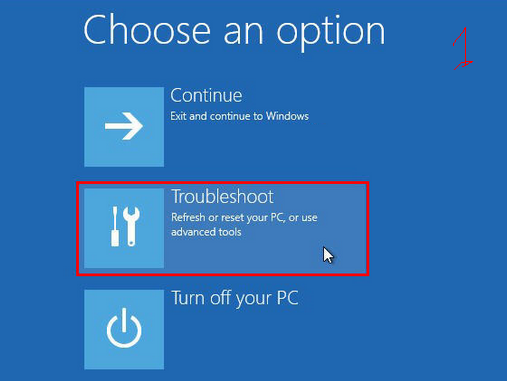
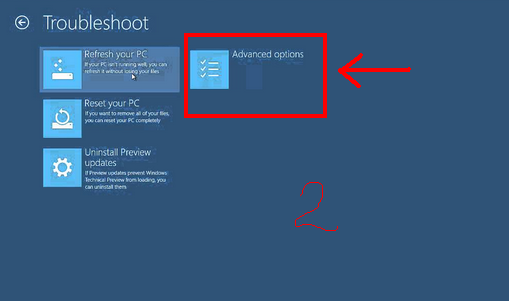
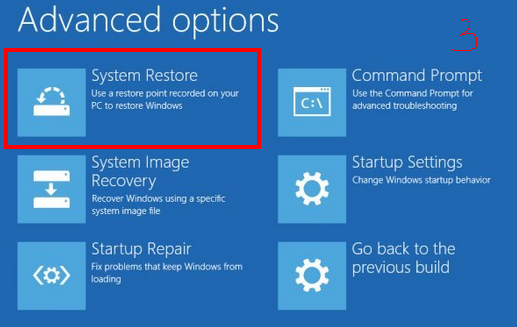
Your FEEDBACK is important. Use the interactive buttons below and let me know if the post helps ;
*** HP employee *** I express personal opinion only *** Joined the Community in 2013
*** HP employee *** I express personal opinion only *** Joined the Community in 2013
This video has been updated: https://youtu.be/14GKIpGPNRM Learn how to test your HP computer hardware using the HP PC Hardware Diagnostics UEFI. For other helpful videos go to http://hp.com/supportvideos or http://youtube.com/hpcomputingsupport. More support options for your computing device are ...
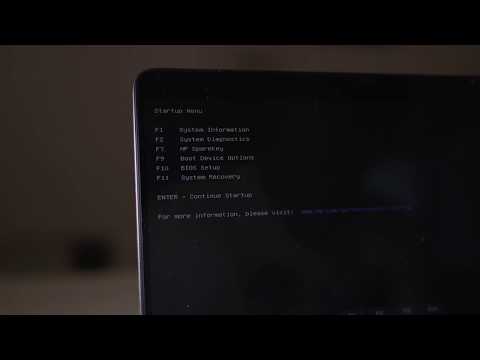
HP Laptops On Amazon BEST PRICE - https://amzn.to/3CEJDF4 HP Spectre x360 - https://amzn.to/40Z1NM4 PLEASE SUBSCRIBE IF THIS HELPS YOU - IT HELPS ME :-) Here is a very quick video on how to enter the HP Boot Menu from a HP Laptop. Step 1 - Press the power on button. Step 2 - Quickly start pressing
12-01-2019 04:11 AM
HP Recommended
Try restarting the machine by following one of the options here >> https://www.isunshare.com/windows-10/4-ways-to-restart-and-shut-down-on-windows-10.html
Let me know how it will be after that.
Your FEEDBACK is important. Use the interactive buttons below and let me know if the post helps ;
*** HP employee *** I express personal opinion only *** Joined the Community in 2013
*** HP employee *** I express personal opinion only *** Joined the Community in 2013

Be alert for scammers posting fake support phone numbers and/or email addresses on the community.
If you think you have received a fake HP Support message, please report it to us by clicking on "Flag Post".
† The opinions expressed above are the personal opinions of the authors, not of HP. By using this site, you accept the Terms of Use and Rules of Participation.


Didn't find what you were looking for?
Ask the community
† The opinions expressed above are the personal opinions of the authors, not of HP. By using this site, you accept the <a href="https://www8.hp.com/us/en/terms-of-use.html" class="udrlinesmall">Terms of Use</a> and <a href="/t5/custom/page/page-id/hp.rulespage" class="udrlinesmall"> Rules of Participation</a>.