
-
×InformationNeed Windows 11 help?Check documents on compatibility, FAQs, upgrade information and available fixes.
Windows 11 Support Center. -
-
×InformationNeed Windows 11 help?Check documents on compatibility, FAQs, upgrade information and available fixes.
Windows 11 Support Center. -
- HP Community
- Notebooks
- Notebook Video, Display and Touch
- Envy x360 amd gpu driver issue

Create an account on the HP Community to personalize your profile and ask a question
Your account also allows you to connect with HP support faster, access a personal dashboard to manage all of your devices in one place, view warranty information, case status and more.

It has been a while since anyone has replied. Simply ask a new question if you would like to start the discussion again.

04-24-2020 06:28 PM
 HP Recommended
Product: envy x360 13-ag0006nl
Operating System: Microsoft Windows 10 (64-bit)
Hi all, I'm facing some problems installing new gpu driver version from amd on my envy x360 with a ryzen 5 2500U. The gpu is an integrated vega 8, fully supported by amd on the latest drivers, but since december, with the release of adrenalin 2020 driver version 19.12.2, it is impossible to update. The installation seems to go well, but after rebooting the system and logging into windows the entire graphic interface freezes, but the computer still works. Reading on the internet this problem seems to be specific to hp computers, with some people reporting that, if using an external screen, the computer is still usable. Note that I have done a clean windows 10 installation while troubleshooting, windows itself is fully updated, bios is up to date, every other software/driver is correctly installed and updated. I'm also reporting bugs to amd directly since december.
5 REPLIES 5


04-29-2020 01:45 PM
HP Recommended
Thank you for posting on the HP Support Community.
Don't worry as I'll be glad to help, I have a few troubleshooting steps we could try to fix the issue:
Symptom tests use common issues to identify the root cause of the problem.
NOTE: Symptom tests are not available in HP PC Hardware Diagnostics for Windows.
-
Hold the power button for at least five seconds to turn off the computer.
-
Turn on the computer and immediately press Esc repeatedly, about once every second. When the menu appears, press the F2 key.
-
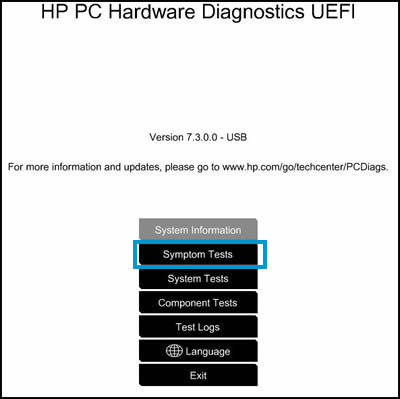
On the UEFI menu, click Symptom Tests.
-
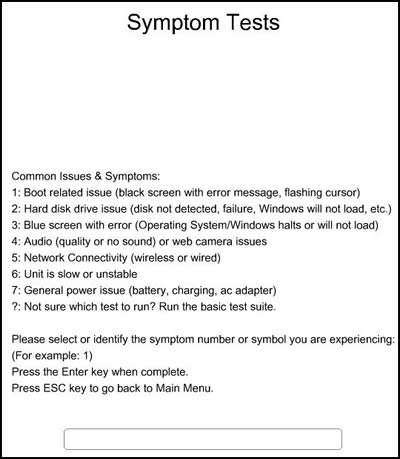
Find the symptom that best describes your computer issue in the list. Type the corresponding number into the field at the bottom of the screen, and then press Enter.
-
Wait while the tests run. Approximate time for each test displays on the Issue screen.
NOTE: You can cancel a test at any time by pressing any key.
-
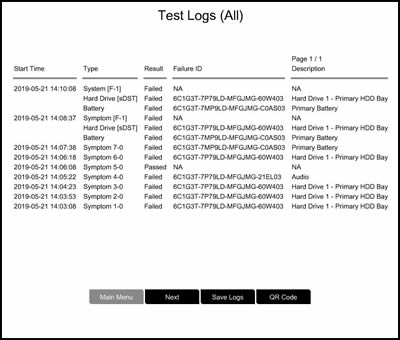
Review the results on the Test Logs screen, and then write down the test type and failure ID (24-digit code) for when you contact HP Customer Support.
NOTE: Click Save Logs, and you can view the results again by clicking Test Logs on the main menu.
Hope this helps! Keep me posted for further assistance.
Please click “Accept as Solution” if you feel my post solved your issue, it will help others find the solution.
ECHO_LAKE
I am an HP Employee
04-30-2020 06:47 PM
HP Recommended
Thank you for posting back.
I appreciate your efforts to try and resolve the issue. I would suggest performing system factory reset will put the computer back to the original factory settings in this way all corrupted and outdated software will be removed.
While doing the recovery there is an option to backup your personal files. If you have not previously done one now is a good time.
Restoring Files that were Backed Up Using HP Recovery Manager (Windows )You can also contact HP support for assistance. They can remotely access your system to help alleviate difficulties: www.hp.com/contacthp/
The HP Cloud Recovery Tool allows you to download recovery software to a USB drive. You can use the downloaded recovery image file in order to install the Windows operating system.
- Click here: https://support.hp.com/in-en/document/c04758961#AbT3to perform System Recovery (Windows 10)
- Click here: https://support.hp.com/in-en/document/c06162205 to Use the HP Cloud Recovery Tool (Windows 10)
Hope this helps! Keep me posted for further assistance.
Please click “Accept as Solution” if you feel my post solved your issue, it will help others find the solution.
ECHO_LAKE
I am an HP Employee
05-02-2020 10:58 AM
HP Recommended
Already did a windows 10 clean installation, I completely wiped the ssd and reinstalled with the latest .iso provided by microsoft. I updated every driver and software, double checked everything, still the same problem. I also tried to do a manual driver installation from the device manager, still no success.
05-02-2020 04:43 PM
HP Recommended
I would request you to reach out to our Support and our Support Engineers should be able to check the available service options in order to diagnose the computer physically. HP Support can be reached by clicking on the following link: www.hp.com/contacthp/
Please feel free to contact us here anytime you need any further assistance. Please click “Accept as Solution” if you feel my post solved your issue, it will help others find the solution.
ECHO_LAKE
I am an HP Employee

Be alert for scammers posting fake support phone numbers and/or email addresses on the community.
If you think you have received a fake HP Support message, please report it to us by clicking on "Flag Post".
† The opinions expressed above are the personal opinions of the authors, not of HP. By using this site, you accept the Terms of Use and Rules of Participation.


Didn't find what you were looking for?
Ask the community
† The opinions expressed above are the personal opinions of the authors, not of HP. By using this site, you accept the <a href="https://www8.hp.com/us/en/terms-of-use.html" class="udrlinesmall">Terms of Use</a> and <a href="/t5/custom/page/page-id/hp.rulespage" class="udrlinesmall"> Rules of Participation</a>.