-
×InformationNeed Windows 11 help?Check documents on compatibility, FAQs, upgrade information and available fixes.
Windows 11 Support Center. -

-
×InformationNeed Windows 11 help?Check documents on compatibility, FAQs, upgrade information and available fixes.
Windows 11 Support Center. -
- HP Community
- Notebooks
- Notebook Video, Display and Touch
- Re: Flashing Display

Create an account on the HP Community to personalize your profile and ask a question
05-07-2020 09:43 AM
Good morning,
I own an HP Notebook PC - 15-ay139nl, since I reinstalled the system a 20 days ago, the monitor has started to flicker while the HDMI output is working. I tried to update the drivers but nothing happened.
I tried to put the basic drivers "Microsoft basic video card" and not flicker problems. I also contacted Microsoft technicians and after several tests they said to contact the PC manufacturers.
Driver video:
AMD Radeon (Tm) R7 M340 26.20.15029.27016
Intel(R) HD Graphics 620 25.20.100.6518
I would like to know how I can do it.
05-14-2020 08:25 AM
Welcome to HP Community
I have gone through your Post and would like to help
I suggest you download and run the HP Support Assistant from this Link: https://www8.hp.com/us/en/campaigns/hpsupportassistant/hpsupport.html?jumpid=va_r602_us/en/any/psg/p...
HPSA will automatically search for all the latest drivers for your Notebook
-
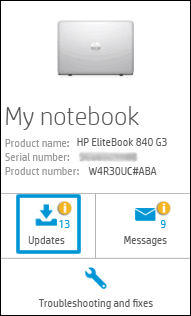
Click My devices in the top menu, and then click Updates in the My PC or My notebook pane.

-
Click Check for updates and messages to scan for new updates.

-
Review the list of updates. Updates with a yellow information icon are recommended. Updates with a blue information icon are optional.
-
Click the update name for a description, version number, and file size.
-
Select the box next to any updates you want to install, and then click Download and install.
Also ensure Windows is up to date.
Select the Start button, and then go to Settings > Update & security > Windows Update , and select Check for updates. If Windows Update says your device is up to date, you have all the updates that are currently available
Keep me posted how it goes
Thank you and have a wonderful day 😊
If the information I've provided was helpful, give us some reinforcement by clicking the "Solution Accepted" on this Post and it will also help other community members with similar issue.
KrazyToad
I Am An HP Employee