-
×InformationNeed Windows 11 help?Check documents on compatibility, FAQs, upgrade information and available fixes.
Windows 11 Support Center. -

-
×InformationNeed Windows 11 help?Check documents on compatibility, FAQs, upgrade information and available fixes.
Windows 11 Support Center. -
- HP Community
- Notebooks
- Notebook Video, Display and Touch
- HDMI1 doesn't work

Create an account on the HP Community to personalize your profile and ask a question
01-15-2019 08:56 AM
Hola. I recently installed Windows 7 64 bit on a 15-r005la laptop and except for the ethernet and wireless drivers, non work. Now I am trying to install the
ntel High-Definition (HD) Graphics Driver
1.20 Rev.A 119.8 MB Nov 21, 2014
and of course it doesn't work. I want to get the HDMI1 port to work. So what driver do I need Paul?
01-16-2019 04:06 PM
May I know how did you install the Windows 7? Was it from an HP Recovery Media?
I suggest you download and run the HP Support Assistant from this Link: https://www8.hp.com/us/en/campaigns/hpsupportassistant/hpsupport.html?jumpid=va_r602_us/en/any/psg/p...
HPSA will automatically search for all the latest drivers for your Notebook
-
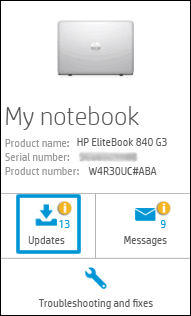
Click My devices in the top menu, and then click Updates in the My PC or My notebook pane.

-
Click Check for updates and messages to scan for new updates.

-
Review the list of updates. Updates with a yellow information icon are recommended. Updates with a blue information icon are optional.
-
Click the update name for a description, version number, and file size.
-
Select the box next to any updates you want to install, and then click Download and install.
Also ensure Windows has all the updates
Thank you and have a wonderful day 😊
If the information I've provided was helpful, give us some reinforcement by clicking the "Solution Accepted" on this Post and it will also help other community members with similar issue.
KrazyToad
I Am An HP Employee
01-17-2019 04:37 AM
I am using a Windows 7 Home Premium disk I purchased at Amazon way back in 2011. It has always served me well. I never had to look for any drivers when I installed it. As for the HP Support Assistant, I've run that every time I needed one and came up with NOTHING! No updates. No messages. No drivers available. I would run let Windows look for updates and find nothing. While I was running it this time the Windows update icon popped up and upon checking it there was a recommended update for an Intel graphics driver. I downloaded and installed it and problem solved. The video is fine. The HDMI port works. All is well. So far it was a waste of time installing the HP Support assistant. Thanks for the advice though.
01-17-2019 05:10 PM
I am responding on behalf of @KrazyToad as he is out for the day. It is great to have you back and your patience is greatly appreciated.
Perfect, I am really glad to hear that the issue is resolved.
If any other questions arise, please feel free to write back to me.
Good day! Take care 🙂
Cheers!
The_Fossette
I am an HP Employee