• ×
    Information
    Need Windows 11 help?
    Check documents on compatibility, FAQs, upgrade information and available fixes.
    Windows 11 Support Center.
  • post a message
  • ×
    Information
    Need Windows 11 help?
    Check documents on compatibility, FAQs, upgrade information and available fixes.
    Windows 11 Support Center.
  • post a message
Guidelines
Join the HP Community Solve‑a‑thon | Help Others & Share Your Solutions | Live on Zoom | 2:30 PM to 2:30 AM IST | Every Wednesday Click here to know more
HP Recommended
15-r005la
Microsoft Windows 7 (64-bit)

Hola. I recently installed Windows 7 64 bit on a 15-r005la laptop and except for the ethernet and wireless drivers, non work. Now I am trying to install the 

ntel High-Definition (HD) Graphics Driver

1.20 Rev.A 119.8 MB Nov 21, 2014

 and of course it doesn't work. I want to get the HDMI1 port to work. So what driver do I need Paul?

3 REPLIES 3
HP Recommended

@Memo66


May I know how did you install the Windows 7? Was it from an HP Recovery Media?


I suggest you download and run the HP Support Assistant from this Link: https://www8.hp.com/us/en/campaigns/hpsupportassistant/hpsupport.html?jumpid=va_r602_us/en/any/psg/p...


HPSA will automatically search for all the latest drivers for your Notebook


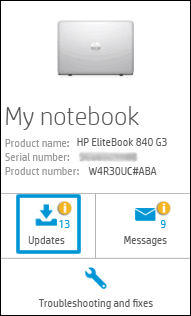
  1. Click My devices in the top menu, and then click Updates in the My PC or My notebook pane.

    Click Updates in the My notebook pane

  2. Click Check for updates and messages to scan for new updates.

     Updates list in HP Support Center

  3. Review the list of updates. Updates with a yellow information icon are recommended. Updates with a blue information icon are optional.

  4. Click the update name for a description, version number, and file size.

  5. Select the box next to any updates you want to install, and then click Download and install.

Also ensure Windows has all the updates


Thank you and have a wonderful day 😊


If the information I've provided was helpful, give us some reinforcement by clicking the "Solution Accepted" on this Post and it will also help other community members with similar issue.
 

KrazyToad
I Am An HP Employee

HP Recommended

I am using a Windows 7 Home Premium disk I purchased at Amazon way back in 2011. It has always served me well. I never had to look for any drivers when I installed it. As for the HP Support Assistant, I've run that every time I needed one and came up with NOTHING! No updates. No messages. No drivers available. I would run let Windows look for updates and find nothing. While I was running it this time the Windows update icon popped up and upon checking it there was a recommended update for an Intel graphics driver. I downloaded and installed it and problem solved. The video is fine. The HDMI port works. All is well. So far it was a waste of time installing the HP Support assistant. Thanks for the advice though.

HP Recommended

@Memo66,


I am responding on behalf of @KrazyToad as he is out for the day. It is great to have you back and your patience is greatly appreciated.


Perfect, I am really glad to hear that the issue is resolved.


If any other questions arise, please feel free to write back to me.


Good day! Take care 🙂


Cheers!


The_Fossette
I am an HP Employee

† The opinions expressed above are the personal opinions of the authors, not of HP. By using this site, you accept the <a href="https://www8.hp.com/us/en/terms-of-use.html" class="udrlinesmall">Terms of Use</a> and <a href="/t5/custom/page/page-id/hp.rulespage" class="udrlinesmall"> Rules of Participation</a>.