
-
×InformationNeed Windows 11 help?Check documents on compatibility, FAQs, upgrade information and available fixes.
Windows 11 Support Center. -
-
×InformationNeed Windows 11 help?Check documents on compatibility, FAQs, upgrade information and available fixes.
Windows 11 Support Center. -
- HP Community
- Notebooks
- Notebook Video, Display and Touch
- HP Truevision HD not working

Create an account on the HP Community to personalize your profile and ask a question
Your account also allows you to connect with HP support faster, access a personal dashboard to manage all of your devices in one place, view warranty information, case status and more.

It has been a while since anyone has replied. Simply ask a new question if you would like to start the discussion again.


08-29-2020 03:58 PM
 HP Recommended
Thank you for posting back.
As we have limited support boundaries in the support community as of now.
I would request you to reach out to our Support and our Support Engineers should be able to check the available service options in order to diagnose the computer physically. HP Support can be reached by clicking on the following link: www.hp.com/contacthp/
Hope this helps! Keep me posted for further assistance.
Please click “Accept as Solution” if you feel my post solved your issue, it will help others find the solution.
ECHO_LAKE
I am an HP Employee


08-30-2020 11:26 AM
HP Recommended
1) Click on this link - www.hp.com/contacthp/
2) Select your product type below.
3) Enter the serial of your device.
4) Select the country from the drop-down.
5) Select the chat or get phone number options based on your preferences.
6) Fill the web-form and proceed further.
KrazyToad
I Am An HP Employee
08-30-2020 07:01 PM
HP Recommended
umm...cant you just give me a link where i can get and download the webcam driver because that seems easier that what you make me want to do and also I've been in your site which provides the the correct driver for my laptop but the things is that i dont see a webcam driver there


08-31-2020 12:10 PM
HP Recommended
@Jatney Here's the only link available to the webcam driver: click here to download,
If that doesn't work and you don't feel like contacting the HP phone support using the instructions shared by the last tech, the only other option is to check with an ASP,
If you have an HP authorized service center near by, you should be able to take it to them and have it checked,
Here is a link to HP Service Centers, by Country/Region: Click here
If you wish to thank me for my efforts, you could click on "Accept as solution" on my post as the solution should help others too.
Riddle_Decipher
I am an HP Employee
Learning is a journey, not a destination.
Let's keep asking questions and growing together.
08-31-2020 01:25 PM
HP Recommended
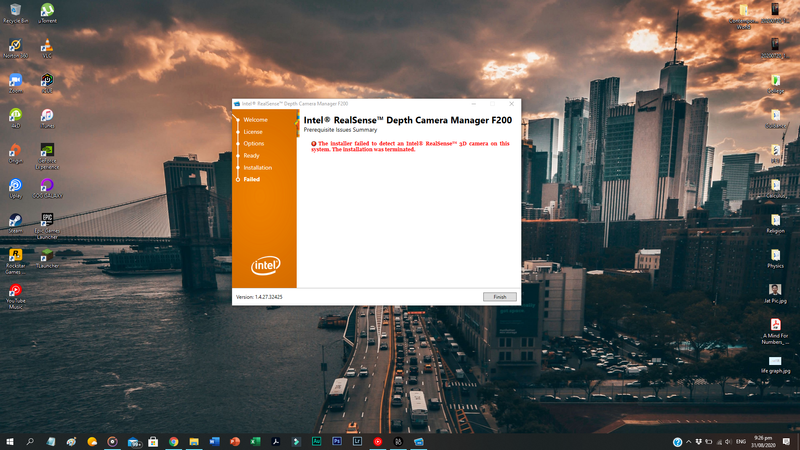
@Jatney It looks like the camera is not being detected on the device, that could only mean that there's a hardware malfunction considering everything else has already been done, I suggest you talk to HP support and discuss your options, follow the below steps to get started:
1) Click on this link - http://www.hp.com/contacthp/
2) Click on Sign-in or select the product using the below step:
3) Enter the serial of your device.
4) Select the country from the drop-down.
5) Click on "Show Options".
Fill the web-form, to populate a case number and phone number for yourself!
Also, if you are having trouble navigating through the above options, it's most likely because the device is out of warranty, if yes? please make use of the details I provided earlier to contact the ASP.
Good luck!
Riddle_Decipher
I am an HP Employee
Learning is a journey, not a destination.
Let's keep asking questions and growing together.

09-01-2020 12:17 PM
HP Recommended
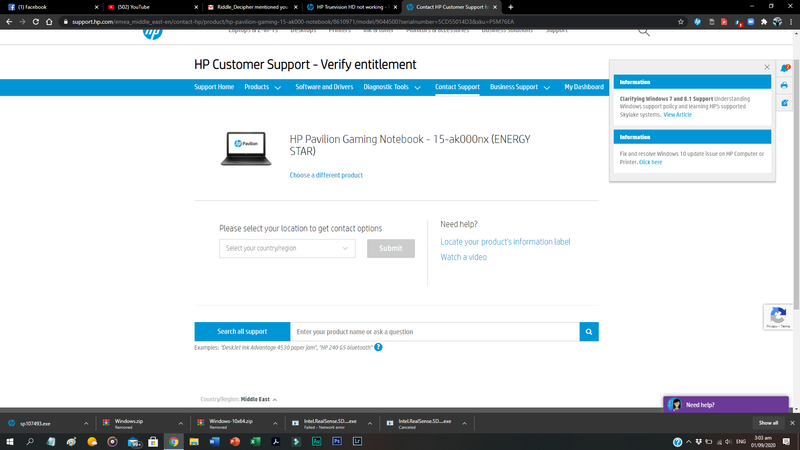
From the screenshot you have shared, I see that you have not selected your country and once you select the country you will get the available options for your computer.
I hope that helps.
Cheers!
The_Fossette
I am an HP Employee

Be alert for scammers posting fake support phone numbers and/or email addresses on the community.
If you think you have received a fake HP Support message, please report it to us by clicking on "Flag Post".
† The opinions expressed above are the personal opinions of the authors, not of HP. By using this site, you accept the Terms of Use and Rules of Participation.


Didn't find what you were looking for?
Ask the community
† The opinions expressed above are the personal opinions of the authors, not of HP. By using this site, you accept the <a href="https://www8.hp.com/us/en/terms-of-use.html" class="udrlinesmall">Terms of Use</a> and <a href="/t5/custom/page/page-id/hp.rulespage" class="udrlinesmall"> Rules of Participation</a>.