• ×
    Information
    Need Windows 11 help?
    Check documents on compatibility, FAQs, upgrade information and available fixes.
    Windows 11 Support Center.
  • post a message
  • ×
    Information
    Need Windows 11 help?
    Check documents on compatibility, FAQs, upgrade information and available fixes.
    Windows 11 Support Center.
  • post a message
Guidelines
Join the HP Community Solve‑a‑thon | Help Others & Share Your Solutions | Live on Zoom | 2:30 PM to 2:30 AM IST | Every Wednesday Click here to know more
HP Recommended
15-ay110na
Microsoft Windows 10 (64-bit)

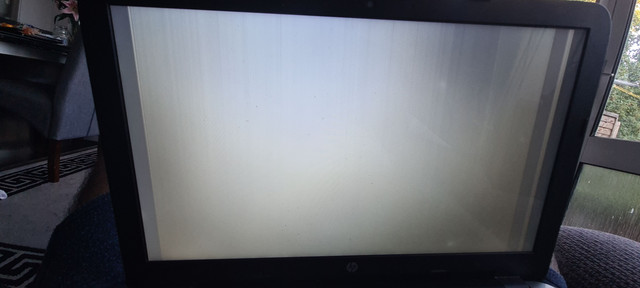
My laptop randomly displays a white screen with vertical lines when I'm using it, it usually goes when I restart but comes back frequently.i have tried updating the display driver and also uninstalling the driver to let windows install it upon restart but no luck.

I tried to upload the picture with no luck, not sure if links are allowed or not.

1 REPLY 1
HP Recommended

@Umar2020


Welcome to the HP support community.


If you haven't, please try an alternate monitor to understand if this is either a hardware or a software failure, 

If the issue does not appear on the alternate monitor, you may need to replace the display assembly on your computer, 

If you don’t have an alternate monitor, I recommend checking if the issue appears on the BIOS screen (restart the computer and tap on F10 to access BIOS) 


Let me know how it goes.

To thank me for my efforts to help you, please mark my post as an accepted solution so that it benefits several others.

Cheers.

Sandytechy20
I am an HP Employee

† The opinions expressed above are the personal opinions of the authors, not of HP. By using this site, you accept the <a href="https://www8.hp.com/us/en/terms-of-use.html" class="udrlinesmall">Terms of Use</a> and <a href="/t5/custom/page/page-id/hp.rulespage" class="udrlinesmall"> Rules of Participation</a>.