
-
×InformationNeed Windows 11 help?Check documents on compatibility, FAQs, upgrade information and available fixes.
Windows 11 Support Center. -
-
×InformationNeed Windows 11 help?Check documents on compatibility, FAQs, upgrade information and available fixes.
Windows 11 Support Center. -
- HP Community
- Notebooks
- Notebook Video, Display and Touch
- Re: My laptop does not recognize built in camera.

Create an account on the HP Community to personalize your profile and ask a question
Your account also allows you to connect with HP support faster, access a personal dashboard to manage all of your devices in one place, view warranty information, case status and more.

It has been a while since anyone has replied. Simply ask a new question if you would like to start the discussion again.

05-17-2020 04:02 PM
 HP Recommended
Product: Pavilion DV7
Operating System: Microsoft Windows 10 (64-bit)
When I bought my laptop in 2015, win7 was installed. Later on I updated to win10 and now the built in camera does not work. System can not recognize it.
What can I do?
9 REPLIES 9


05-27-2020 02:47 PM
HP Recommended
Thank you for posting on the HP Support Community.
Don't worry as I'll be glad to help, however, to provide an accurate resolution, I need a few more details:
- What is the product number of your device? Use this link to find it: http://support.hp.com/us-en/document/c03754824
Keep me posted for further assistance.
ECHO_LAKE
I am an HP Employee
05-28-2020
04:39 AM
- last edited on
05-30-2020
09:39 AM
by
 Arthur-c
HP Recommended
@Echo_Lake şunu yazdı:
HP Destek Topluluğuna gönderdiğiniz için teşekkür ederiz.
Endişelenmeyin, yardımcı olmaktan memnuniyet duyacağım, ancak doğru bir çözüm sağlamak için birkaç ayrıntıya ihtiyacım var:
- Cihazınızın ürün numarası nedir? Bulmak için bu bağlantıyı kullanın: http://support.hp.com/us-en/document/c03754824
Daha fazla yardım için beni haberdar et.
06-03-2020 07:19 PM
HP Recommended
We advise you to post your question in English to insure a quick response for the Community. This can also help other users to take advantage of your post, in the case they have the same question.
Or, if you prefer, you can visit the HP Support website, to find the support channel for your region.
If you would like to thank me for my efforts to help you, feel free to give me a virtual high-five by clicking the "Thumbs Up" icon below, followed by clicking on the "Accept as solution" button.
Have a great day!
ECHO_LAKE
I am an HP Employee
06-04-2020 05:05 PM
HP Recommended
Thank you for posting back.
Don't worry as I'll be glad to help, however, to provide an accurate resolution, I need a few more details:
- Did this happen after a recent window or software update?
- Have you made any hardware/software changes?
Use these basic steps to troubleshoot the webcam.
Step 1: Locate and toggle the webcam privacy switch or press the webcam shutter key
Select HP notebook models come with a webcam privacy switch or a webcam shutter key that turns the webcam off and on. By default, the webcam is turned on.
Webcam privacy switch
The webcam privacy switch is located on the side of your computer. To turn off your webcam, slide the webcam privacy switch toward the icon next to the switch. To turn the webcam back on, slide the switch away from the icon.
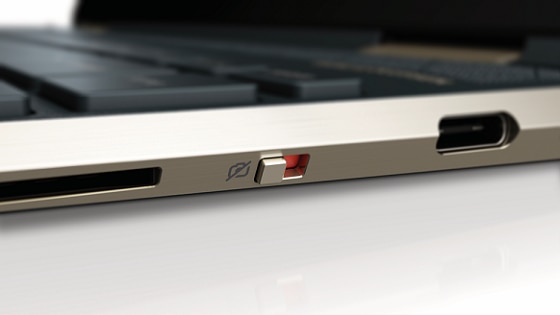
Webcam shutter key
The webcam shutter key is located on the action key row of your keyboard. To turn off your webcam, press the webcam shutter key. To turn the webcam back on, press the shutter key again.
Webcam shutter LED
Webcam status

LED on: The webcam is off.
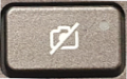
LED off: The webcam is on.
Figure : Webcam shutter key location

Step 2: Configure your antivirus software
You might need to adjust your firewall settings to include the webcam software as an allowed application. See your antivirus software documentation for more information.
Step 3: Verify that your app can use the webcam (Windows 10 only)
Use these steps to make sure your app can access your webcam.
-
From the Start menu, click Settings, Privacy, and then click Camera.
-
In the Allow apps to access your camera section of the menu, choose the setting that is most applicable for your webcam.
-
Under Choose which apps can access your camera, select your preferred individual settings to On or Off.
Hope this helps! Keep me posted for further assistance.
Please click “Accept as Solution” if you feel my post solved your issue, it will help others find the solution.
ECHO_LAKE
I am an HP Employee
06-05-2020 12:49 PM
HP Recommended
My laptop has no such a switch and button. Model year is approx.2015
This problem occured after my upgrading to win10 in 2016. (Originally win7 was loaded.)
On the other hand, I have done all the steps you mentioned. No success.
Problem still exists.
06-05-2020 02:13 PM
HP Recommended
Thank you for posting back.
System Restore returns your computer to the files and settings from the restore point. Your personal files and documents are not affected.
You can also undo a System Restore if the restore does not resolve the issue or if the issue becomes worse.
Click here: https://support.hp.com/in-en/document/c03327545
Hope this helps! Keep me posted for further assistance.
Please click “Accept as Solution” if you feel my post solved your issue, it will help others find the solution.
ECHO_LAKE
I am an HP Employee

Be alert for scammers posting fake support phone numbers and/or email addresses on the community.
If you think you have received a fake HP Support message, please report it to us by clicking on "Flag Post".
† The opinions expressed above are the personal opinions of the authors, not of HP. By using this site, you accept the Terms of Use and Rules of Participation.


Didn't find what you were looking for?
Ask the community
† The opinions expressed above are the personal opinions of the authors, not of HP. By using this site, you accept the <a href="https://www8.hp.com/us/en/terms-of-use.html" class="udrlinesmall">Terms of Use</a> and <a href="/t5/custom/page/page-id/hp.rulespage" class="udrlinesmall"> Rules of Participation</a>.