• ×
    Information
    Need Windows 11 help?
    Check documents on compatibility, FAQs, upgrade information and available fixes.
    Windows 11 Support Center.
  • post a message
  • ×
    Information
    Need Windows 11 help?
    Check documents on compatibility, FAQs, upgrade information and available fixes.
    Windows 11 Support Center.
  • post a message
Guidelines
Join the HP Community Solve‑a‑thon | Help Others & Share Your Solutions | Live on Zoom | 2:30 PM to 2:30 AM IST | Every Wednesday Click here to know more
HP Recommended
HP Marble laptop 15-db1xxx
Microsoft Windows 10 (64-bit)

My Hp 15-db1xxx DOES NOT have a tab for the Synaptics touch pad or a disable button.  I desperately need to DISABLE it.  I've gone through every feed online I can find.  Nothing works.

3 REPLIES 3
HP Recommended

Hi@lgrogers1,


Welcome to the HP Support Community!


Request you to follow the below troubleshooting steps from the document:-


Disable the Touchpad Automatically When You Connect a Mouse

Having Windows automatically disable your touchpad when you connect an external mouse is the solution most people will want to use. This makes it easy to use the touchpad when you’re on the move without having to worry about it when you connect your mouse.

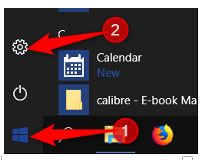
Open up Windows Settings by clicking the “Start” button, then clicking on the cogwheel. 

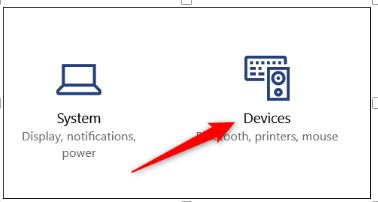
Next, click the “Devices” option.

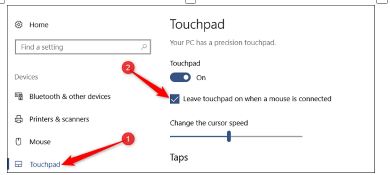
On the Devices page, switch to the “Touchpad” category on the left and then disable the “Leave Touchpad on When Mouse is Connected” option.

From now on, connecting an external mouse will automatically disable your touchpad. Disconnecting the mouse will enable the touchpad again.


Hope this helps! Keep me posted. 


Please click “Accept as Solution” if you feel my post solved your issue, it will help others find the solution.

HP Recommended

My computer DOES NOT have that option when you go to devices.  A tech at another support plan I have FINALLY found a solution:  you have to type in "touchpad" in the windows box and you finally get a screen to turn off the touchpad.

HP needs to fix this in their laptops.  It shouldn't be this huge issue to find something so simple.

HP Recommended

Hi@lgrogers1,


We have done the basic troubleshooting as per the document and the notebook needs to be checked taking remote access so that get to know it's a hardware or software issue.


I'd suggest you contact HP in your region regarding the service options for your computer or HP Chat Support Team.

† The opinions expressed above are the personal opinions of the authors, not of HP. By using this site, you accept the <a href="https://www8.hp.com/us/en/terms-of-use.html" class="udrlinesmall">Terms of Use</a> and <a href="/t5/custom/page/page-id/hp.rulespage" class="udrlinesmall"> Rules of Participation</a>.