• ×
    Information
    Need Windows 11 help?
    Check documents on compatibility, FAQs, upgrade information and available fixes.
    Windows 11 Support Center.
  • post a message
  • ×
    Information
    Need Windows 11 help?
    Check documents on compatibility, FAQs, upgrade information and available fixes.
    Windows 11 Support Center.
  • post a message
Guidelines
Join the HP Community Solve‑a‑thon | Help Others & Share Your Solutions | Live on Zoom | 2:30 PM to 2:30 AM IST | Every Wednesday Click here to know more
HP Recommended
HP 17 BY3000nc
Microsoft Windows 10 (64-bit)

Hi,


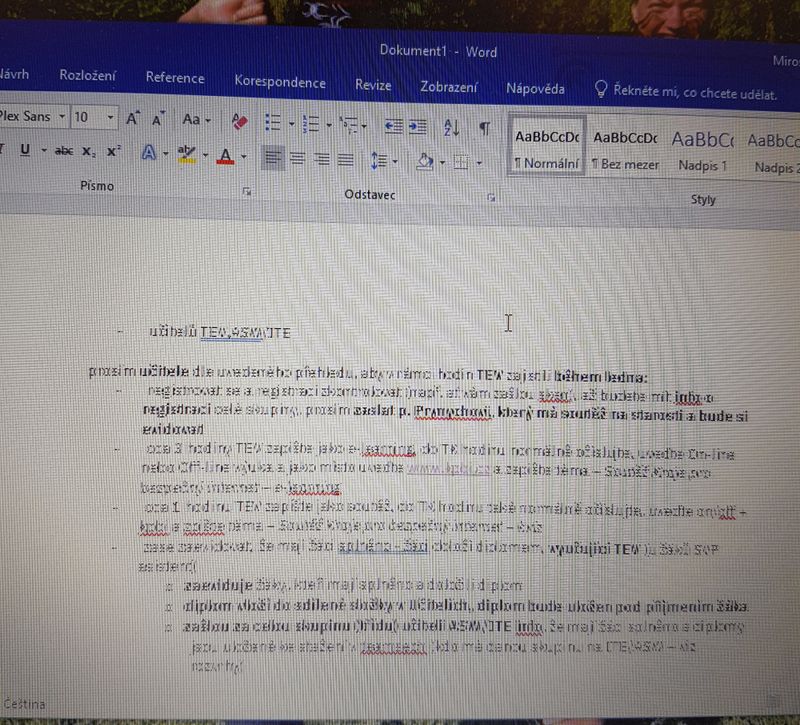
error.jpgI installed the operating system from the cloud and then compared our downloaded system (from the MS website) and drivers with that from the cloud and no differences. But even so, I did a clean installation and it just gets angry after a while. The image in the word is blurred and then the (black) screen turns off. The longer the notebook is installed, the longer the screen turns off. Interestingly, in MS Office, the image blur is only in the white window, but the menu remains. But you don't want to tell me that I can't use other software such as MS OFFICE on my laptop.

1 REPLY 1
HP Recommended

Hi@Infis, Welcome to the HP Support Community!


I understand you want to know if there is a screen calibration that can make your screen look better than the other monitor's you have,

I'll be glad to help you out, however, for an accurate solution I will need more details:


What is the product number of your product? Use this link to find it: http://support.hp.com/us-en/document/c03754824 

Have you attempted any steps on your own before posting on the HP Forums?

When was the last time it worked without these issues? Have you attempted a system restore?

About the other 3 computers, are they similar models or different ones?


In the meantime, please try the steps mentioned on this link: Click here

Please reply with the details for further assistance.


Hope this helps! Keep me posted. 


Please click “Accept as Solution” if you feel my post solved your issue, it will help others find the solution.

Click the “Kudos, Thumbs Up" on the bottom right to say “Thanks” for helping!

Have a great day! 

† The opinions expressed above are the personal opinions of the authors, not of HP. By using this site, you accept the <a href="https://www8.hp.com/us/en/terms-of-use.html" class="udrlinesmall">Terms of Use</a> and <a href="/t5/custom/page/page-id/hp.rulespage" class="udrlinesmall"> Rules of Participation</a>.