-
×InformationNeed Windows 11 help?Check documents on compatibility, FAQs, upgrade information and available fixes.
Windows 11 Support Center. -

-
×InformationNeed Windows 11 help?Check documents on compatibility, FAQs, upgrade information and available fixes.
Windows 11 Support Center. -
- HP Community
- Notebooks
- Notebook Video, Display and Touch
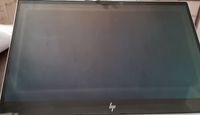
- a discoloration around the edge of the screen

Create an account on the HP Community to personalize your profile and ask a question
08-19-2022 05:59 AM
Hey @Nicklx1 🙂
Thank you for visiting the HP Support Community!
Admin and Mods are here to guide the customer to get the best experience from the Community.
To help volunteers that reply to posts in the Community, please provide more details about your issue. Here are some recommendations of information that can help volunteers to better understand and provide support to your question:
- Exact model of your printer / Desktop/ notebook (if you need help, click here for information on how to find your model number model).
- Operating system (including revisions made with service packs, 32-bit or 64-bit, etc.)
- Connection method - USB, physical LAN, or wireless?
- Error messages - on the printer display and/or computer, any patterns for flashing lights.
- Any system changes before the problem starts (Example: Operating System Update, Software installation);
Regards,
MarcusC
08-19-2022 07:42 AM
It's the HP - ENVY 15-ep0512na 15.6" Laptop - Intel® Core™ i7, 512 GB SSD, Silver.
I have exactly the same problem as the guy in the original post. See the image attached.
It's a pretty big problem for such an expensive laptop. Something that I'd like fixed.
08-28-2022 11:41 AM
@Nicklx1
I understand you trying to get your HP - ENVY 15-ep0512na Notebook PC repaired. Not to worry I will help you to get a resolution to resolve the issue.
I'm sending out a private message to assist you with the next course of action.
Please check your Private message icon on the upper right corner of your HP Community profile Next, to your profile Name, you should see a little blue envelope, please click on it or simply click on this link.
Hope this helps! Keep me posted for further assistance.
Please click “Accept as Solution” if you feel my post solved your issue, it will help others find the solution. Click the “Kudos, Thumbs Up" on the bottom right to say “Thanks” for helping!
ANAND_ANDY
I am an HP Employee