• ×
    Information
    Need Windows 11 help?
    Check documents on compatibility, FAQs, upgrade information and available fixes.
    Windows 11 Support Center.
  • post a message
  • ×
    Information
    Need Windows 11 help?
    Check documents on compatibility, FAQs, upgrade information and available fixes.
    Windows 11 Support Center.
  • post a message
Guidelines
Seize the moment! nominate yourself or a tech enthusiast you admire & join the HP Community Experts!
Archived This topic has been archived. Information and links in this thread may no longer be available or relevant. If you have a question create a new topic by clicking here and select the appropriate board.

HP Recommended

@educatedshrimp


Hi,

I see on screenshot which you posted that some kind of device haven't got installed driver. I pointed this problem on below photo by using the arrow.


969iEED2BA6E507939AB


Before we will try anything I need to know what is this. Please go to: 

Control Panel -> Device Manager

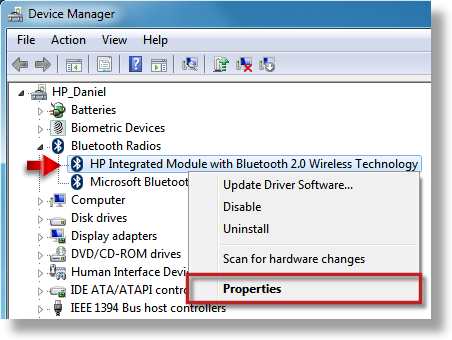
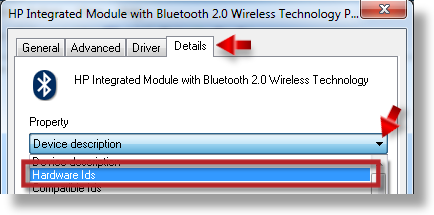
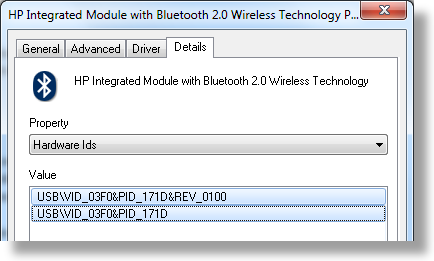
Click with right button of your mouse on ' Unkown Device ' with exclamation mark ( ) and choose properties. Then go to ' Details ' tab and paste here Hardware Ids . This way we will know what it is.

Below You've got example how to do it:

464i329EA20FEFCDC76A
466i652BE51C12165A92
467iC2AEC23384DE4519

** Say thanks by clicking the "Thumb up" icon below. **

** Make it easier for other people to find solutions, by marking my answer with "Accept as Solution" if it solves your issue. **
HP Recommended

I didnt think that this was somthing that was relevant as I found another post (i cant find it) but it was apparently to do with the HP 3D Drive Gaurd drivers having issues with windows 7. I couldnt fix it, even with the latest driver release and the hardware id is USB/UNKNOWN as you can see below.


971i876AFC8081D585FA


972iBE332A80104DFFF6


973iCA46181905B268BB

HP Recommended

There is some kind of problem with this screenshots which you posted. I do not see them.

If you want you may just give here links to them.

** Say thanks by clicking the "Thumb up" icon below. **

** Make it easier for other people to find solutions, by marking my answer with "Accept as Solution" if it solves your issue. **
HP Recommended

I think the images are still waiting for approval, ive linked to my flickr account hope that helps


http://www.flickr.com/photos/23897750@N08/4979712993/in/photostream

HP Recommended

Uninstall all fingerprint reader drivers and software from your system.


Resource:
Uninstalling Software in Windows 7

Uninstall or change a program in Windows 7


Restart your system. Check is hardware id of this device still the same.

If yes then click with right button of your mouse on this ' Unkown Device ' with exclamation mark ( ) and choose properties. Then go to ' General ' tab and show me what kind of status this device have there. Post me link to screenshot with it.

** Say thanks by clicking the "Thumb up" icon below. **

** Make it easier for other people to find solutions, by marking my answer with "Accept as Solution" if it solves your issue. **
HP Recommended

it hasnt changed frim what i can see.


http://www.flickr.com/photos/23897750@N08/4980226549/


979i815E0CFFA8467EA4

HP Recommended

Please show me two more things about this  ' Uknown Device ' on screenshots.

' Drivers ' tab and then click in the same place on ' Driver details ' button.

** Say thanks by clicking the "Thumb up" icon below. **

** Make it easier for other people to find solutions, by marking my answer with "Accept as Solution" if it solves your issue. **
HP Recommended

her you go, thanks for the help btw


http://www.flickr.com/photos/23897750@N08/4982149532/


982iF403C0B97BAE4455

HP Recommended

For now there is nothing to thank me. I have some suspicions, but before I will write anything I want to try some solutions.


Ok so we will try firstsomething like this. Download and install:

Intel Chipset Driver here


Restart your system.

Check is hardware id of this ' Unkown Device ' changed or not.

If yes then please post it.

If not then restart your system again (Please follow this procedure as is described below. It's very important.)
On boot press ' F8 ' and choose ' Safe mode '.

Go to:

Control Panel -> Devices Manager -> Universal Serial Bus controllers

and click on ' Unkown Device ' with right button of your mouse and choose from the list ' Uninstall driver '.

Restart your system again and start it normally.

Check again device manager. Is there anything changed? Name of this not working device, hardware id, etc.

** Say thanks by clicking the "Thumb up" icon below. **

** Make it easier for other people to find solutions, by marking my answer with "Accept as Solution" if it solves your issue. **
HP Recommended

ok so ive done what you said and it hasn't changed in device manager when I installed the new chipset driver and rebooted from safe mode. I did however get a speech bubble pop up when i rebooted from safe mode saying that it had found new hard ware and proceeded with installing a driver for it. once it had complete the error poped up below.


http://www.flickr.com/photos/23897750@N08/4985686793/


1027i02155B2D741E325C


so i guess were back where we started lol


Archived This topic has been archived. Information and links in this thread may no longer be available or relevant. If you have a question create a new topic by clicking here and select the appropriate board.
† The opinions expressed above are the personal opinions of the authors, not of HP. By using this site, you accept the <a href="https://www8.hp.com/us/en/terms-of-use.html" class="udrlinesmall">Terms of Use</a> and <a href="/t5/custom/page/page-id/hp.rulespage" class="udrlinesmall"> Rules of Participation</a>.