This widget could not be displayed.

  • ×
    Information
    Need Windows 11 help?
    Check documents on compatibility, FAQs, upgrade information and available fixes.
    Windows 11 Support Center.
  • post a message
  • ×
    Information
    Need Windows 11 help?
    Check documents on compatibility, FAQs, upgrade information and available fixes.
    Windows 11 Support Center.
  • post a message
This widget could not be displayed.
Guidelines
Seize the moment! nominate yourself or a tech enthusiast you admire & join the HP Community Experts!
This widget could not be displayed.
Archived This topic has been archived. Information and links in this thread may no longer be available or relevant. If you have a question create a new topic by clicking here and select the appropriate board.

HP Recommended
HP Recommended

Hello @hopelover143 and @Ram1800 


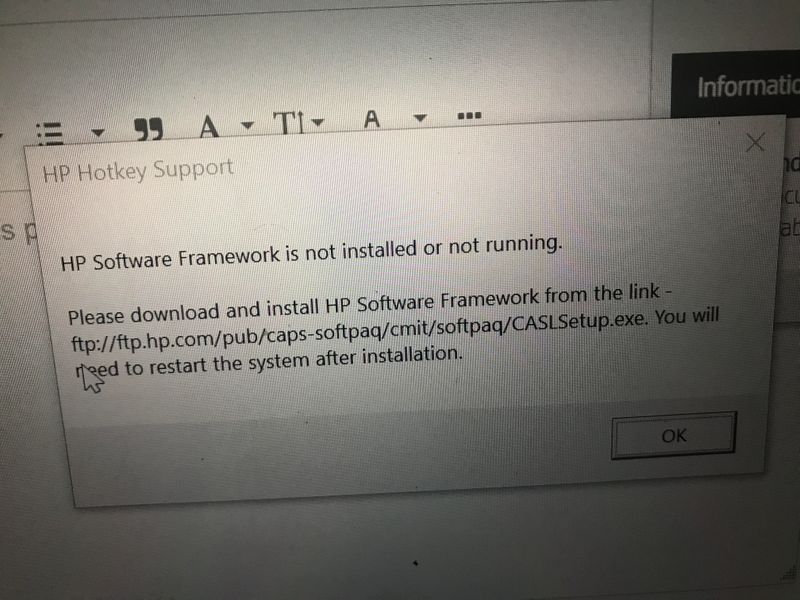
(1) Download and install CASLSetup.exe file

--->>> CASLSetup


Let me check your current system configuration.

 (2) Run    msinfo32

- Select <System Summary>:

--->>> Copy/screenshot/paste following key/value pairs:


OS Name

Version

System Model

System SKU

( equals HP product number (p/n) )

Processor

BIOS Version/Date


(3Please report your results

HP Recommended

how do I know what is what like i don't know my os something or my system name

HP Recommended

Hello @hopelover143 

I just wrote run msinfo32 ( <- Microsoft System Information )


Take time and dive into this:

How to Open & View System Information Windows 10/11 - 10 Ways [MiniTool Tips]


Kind regards

HP Recommended

Sir please My keyboard brightness doesnt show up anymore and its always tells me to download and install Framework this is what its tells me always i try opening brightness for keyboadthis is what its tells me always i try opening brightness for keyboad

HP Recommended

Hello @hopelover143 

Sorry to hear that you are having problems ... I would like to help you.


Let me check your current system configuration.


(1) Run    msinfo32

- Select <System Summary>:

--->>> Copy/screenshot/paste following key/value pairs:


OS Name

Version

System Model

System SKU

( equals HP product number (p/n) )

Processor

BIOS Version/Date


(2Please report your results

HP Recommended

Hello @McShoddy 


Download and install CASLSetup.exe file

--->>> CASLSetup


Kind regards


HP Recommended

I just downloaded its and i guess its now working sir

HP Recommended

product id: 00331-10000-00001-AA263

HP Recommended

Hello @AbdullahR 


Let me check your current system configuration.


(1) Run    msinfo32

- Select <System Summary>:

--->>> Copy/screenshot/paste following key/value pairs:


OS Name

Version

System Model

System SKU

( equals HP product number (p/n) )

Processor

BIOS Version/Date


(2Please report your results

Archived This topic has been archived. Information and links in this thread may no longer be available or relevant. If you have a question create a new topic by clicking here and select the appropriate board.
† The opinions expressed above are the personal opinions of the authors, not of HP. By using this site, you accept the <a href="https://www8.hp.com/us/en/terms-of-use.html" class="udrlinesmall">Terms of Use</a> and <a href="/t5/custom/page/page-id/hp.rulespage" class="udrlinesmall"> Rules of Participation</a>.
This widget could not be displayed.