
-
×InformationNeed Windows 11 help?Check documents on compatibility, FAQs, upgrade information and available fixes.
Windows 11 Support Center. -
-
×InformationNeed Windows 11 help?Check documents on compatibility, FAQs, upgrade information and available fixes.
Windows 11 Support Center. -
- HP Community
- Archived Topics
- Notebooks Archive
- Re: Intel RST preventing windows update May 2019

Create an account on the HP Community to personalize your profile and ask a question
Your account also allows you to connect with HP support faster, access a personal dashboard to manage all of your devices in one place, view warranty information, case status and more.
 This topic has been archived. Information and links in this thread may no longer be available or relevant. If you have a question create a new topic by clicking here and select the appropriate board.


08-12-2019 02:15 PM
 HP Recommended
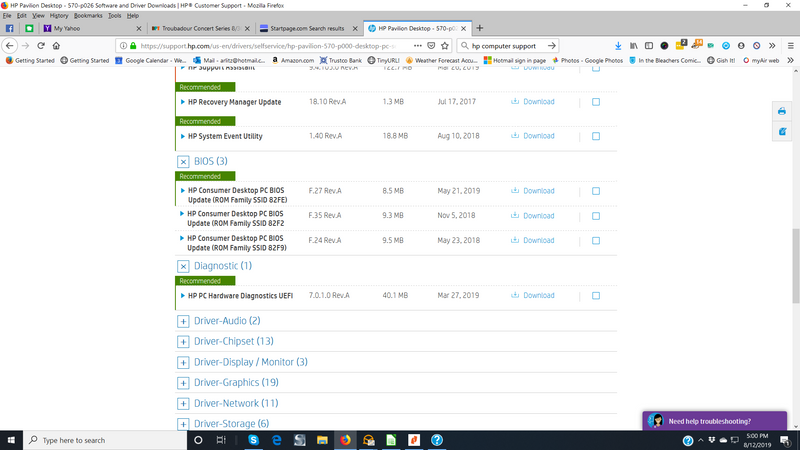
I noticed a dot (think it was green) on the Support Assistance Icon on my Windows Taskbar. When I opened the assistant i clicked on the updates link under my device (a Pavilion Desktop). Downloaded and installed the Bios update and was able to install the Windows update after that.
08-14-2019 07:32 AM
HP Recommended
Thank you for the help! I had tried several other means to get the Windows update to take but nothing worked until I did as you instructed. I renamed the file, went to HP's website and found the RST update, ran the 1903 update and then re-attempted the Windows update. IT WORKED!! Thank you!
08-19-2019 12:44 PM
HP Recommended
hello,
According to Intel it is an Intel problem
They recommend to install driver 15.9.8.1050 generic Intel driver
- « Previous
- Next »
This topic has been archived. Information and links in this thread may no longer be available or relevant. If you have a question create a new topic by clicking here and select the appropriate board.
† The opinions expressed above are the personal opinions of the authors, not of HP. By using this site, you accept the Terms of Use and Rules of Participation.


Didn't find what you were looking for?
Ask the community
† The opinions expressed above are the personal opinions of the authors, not of HP. By using this site, you accept the <a href="https://www8.hp.com/us/en/terms-of-use.html" class="udrlinesmall">Terms of Use</a> and <a href="/t5/custom/page/page-id/hp.rulespage" class="udrlinesmall"> Rules of Participation</a>.