• ×
    Information
    Need Windows 11 help?
    Check documents on compatibility, FAQs, upgrade information and available fixes.
    Windows 11 Support Center.
  • post a message
  • ×
    Information
    Need Windows 11 help?
    Check documents on compatibility, FAQs, upgrade information and available fixes.
    Windows 11 Support Center.
  • post a message
Guidelines
Join the HP Community Solve‑a‑thon | Help Others & Share Your Solutions | Live on Zoom | 2:30 PM to 2:30 AM IST | Every Wednesday Click here to know more
Archived This topic has been archived. Information and links in this thread may no longer be available or relevant. If you have a question create a new topic by clicking here and select the appropriate board.

HP Recommended
zbook 17 g3
Microsoft Windows 10 (64-bit)

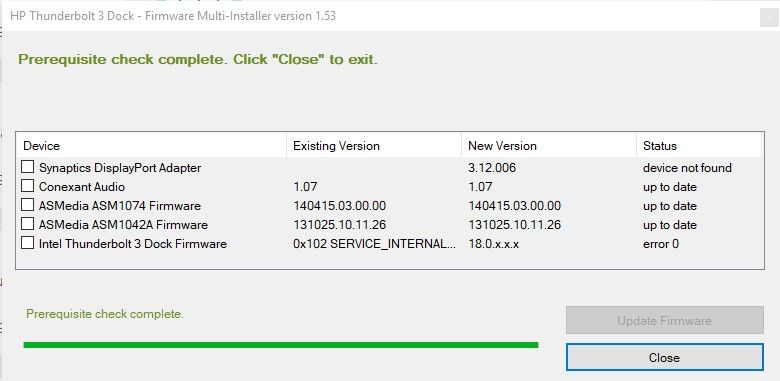
hello, ive an issue where i couldnt connect my thunderbolt dock to my monitor via display port, there was no video, then i decided to update all my drivers and i came with the dock firmware update 1.41 Rev.A , the tool  updated with no errors and the display port video started working but the performance was very slow so then i recover my windows with the cloud recovery tool and created the original media installer to try a windows fresh install. the result was the same so, i found the firmware 1.53 Rev.A and when i tried to update an then i got an error, any clues on the matter?thunderbolt error.jpg

2 REPLIES 2
HP Recommended

Hello


latest firmware availble should be this

SP96414 , 20190527, HP Thunderbolt 3 Dock - Firmware , 1.77, Dock - Firmware and Driver

link for text file: ftp://ftp.hp.com/pub/softpaq/sp96001-96500/sp96414.cva

link for exe file ftp://ftp.hp.com/pub/softpaq/sp96001-96500/sp96414.exe


as sometime softpaq download is not 100% good, it may stop without error, verify that the file size is 9183 KB or even better use filezilla the download it.


from CVA file:

[Software Dependencies]
- The system must be running one of the following operating systems with Administrator or equivalent access: Windows 7, Windows 8, Windows 8.1, or Windows 10.
- The system must be a USB-C capable HP Commercial notebook or tablet compatible with an HP ZBook or Elite Thunderbolt 3 Docking Station.
- The system must be docked to HP ZBook or Elite Thunderbolt 3 Docking Station running on A/C power.
- A DisplayPort Display must be attached and running on an HP ZBook or Elite Thunderbolt 3 Docking Station.
- Microsoft .NET Framework 4.5 must be installed.

bye

HP Recommended

also make sure you have the laptop's TB firmware updated as well - SP92196

I work for HP. However, all opinions and comments are my own.
Archived This topic has been archived. Information and links in this thread may no longer be available or relevant. If you have a question create a new topic by clicking here and select the appropriate board.
† The opinions expressed above are the personal opinions of the authors, not of HP. By using this site, you accept the <a href="https://www8.hp.com/us/en/terms-of-use.html" class="udrlinesmall">Terms of Use</a> and <a href="/t5/custom/page/page-id/hp.rulespage" class="udrlinesmall"> Rules of Participation</a>.
-->