
-
×InformationNeed Windows 11 help?Check documents on compatibility, FAQs, upgrade information and available fixes.
Windows 11 Support Center. -
-
×InformationNeed Windows 11 help?Check documents on compatibility, FAQs, upgrade information and available fixes.
Windows 11 Support Center. -
- HP Community
- Printers
- Printer Setup, Software & Drivers
- Re: Big Sur Update 11.4 now HP Officejet All-in-one 3830 not...

Create an account on the HP Community to personalize your profile and ask a question
Your account also allows you to connect with HP support faster, access a personal dashboard to manage all of your devices in one place, view warranty information, case status and more.
Check some of the most frequent questions about Instant Ink: HP INSTANT INK, HP+ PLANS: INK AND TONER.
Check out our WINDOWS 11 Support Center info about: OPTIMIZATION, KNOWN ISSUES, FAQs AND MORE.

It has been a while since anyone has replied. Simply ask a new question if you would like to start the discussion again.

05-31-2021 10:21 AM
 HP Recommended
Product: HP Officejet All-in-one 3830
Operating System: macOS 11.0 Big Sur
Just updated Mac OS to Big Sur 11.4. Now printer isn't working, although the print box says it is. I've tried several apps, pdfs, etc and the only thing that has printed was an alignment test generated by the support website via my computer.
Help!
11 REPLIES 11


06-11-2021 08:37 AM
HP Recommended
Welcome to the HP support community.
I understand that after the OS update you are unable to print, this seems to be a driver issue.
Follow these steps to fix the issue:-
Remove and add the printer using Airprint
Click the Apple menu, and then select System Preferences.
Depending on your operating system version, click Print & Fax, Print & Scan, or Printers & Scanners.
Click the name of your printer, click the Minus sign , and then delete the printer.
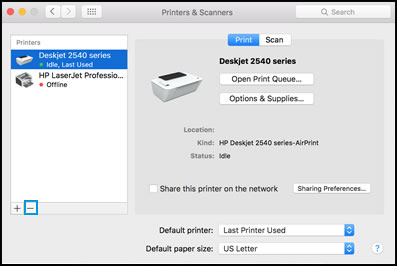
Click the Plus sign , and then click Add Printer or Scanner.
Click the Use or Print Using box, and then select AirPrint
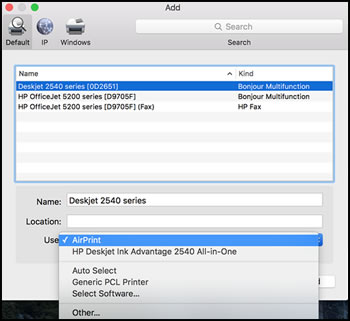
Click Add to add the printer to the list.
Try to print.
Let me know how it goes.
To thank me for my efforts to help you, please mark my post as an accepted solution so that it benefits several others.
Cheers.
Sandytechy20
I am an HP Employee
07-11-2021 08:41 AM
HP Recommended
I have the exact same issue with my HP MFP M127fn.
My iMac (running OS 11.4) recognizes the printer and acts as though it's working — if I open the print queue, I'll see "sending document" etc — but nothing happens.
I tried setting up the printer with Airprint, but in the "Use" menu, Airprint doesn't appear as an option. The only option is "Generic PCL printer". (The M127 is on the list of Airprint-capable printers.)
I tried using the HP Smart app. At the beginning of the set-up procedure, it does recognize my printer, but when I then want to add it, I get an error message saying that no printer was detected.
I really don't know what to do anymore.
07-11-2021 04:47 PM
HP Recommended
Actually, I was able to fix it thanks to a YouTube video.
Go to
https://support.apple.com/kb/dl1888
and download the v5.1 drivers for HP printers. (On that webpage, there's also a link to a list that includes all the HP printers that are supported.)
Once you've installed the drivers, you can set up your printer Using "Printers and scanner" in System Preferences.
I can print again!
So why don't these drivers upload automatically when you upgrade the OS? Or why isn't there at least a message explaining where to find them?
And why doesn't the HP website work?
07-16-2021 10:05 AM
HP Recommended
I did the solution suggested by an HP of deleting my printer and adding it again. It did not work. I think I need an update for easy scan. I am so frustrated that my scanner won't work after the updates ! Please fix this, HP.
07-16-2021 10:17 AM
HP Recommended
I tried this and once it installed a message popped up that it would destroy my computer ! I promptly moved all the folders to the trash and then emptied the trash. I am going to google drivers for HP easy scan.

Be alert for scammers posting fake support phone numbers and/or email addresses on the community.
If you think you have received a fake HP Support message, please report it to us by clicking on "Flag Post".
† The opinions expressed above are the personal opinions of the authors, not of HP. By using this site, you accept the Terms of Use and Rules of Participation.


Didn't find what you were looking for?
Ask the community
† The opinions expressed above are the personal opinions of the authors, not of HP. By using this site, you accept the <a href="https://www8.hp.com/us/en/terms-of-use.html" class="udrlinesmall">Terms of Use</a> and <a href="/t5/custom/page/page-id/hp.rulespage" class="udrlinesmall"> Rules of Participation</a>.