
-
×InformationNeed Windows 11 help?Check documents on compatibility, FAQs, upgrade information and available fixes.
Windows 11 Support Center. -
-
×InformationNeed Windows 11 help?Check documents on compatibility, FAQs, upgrade information and available fixes.
Windows 11 Support Center. -
- HP Community
- Printers
- Printer Setup, Software & Drivers
- Re: CP 1025 drivers on Catalina

Create an account on the HP Community to personalize your profile and ask a question
Your account also allows you to connect with HP support faster, access a personal dashboard to manage all of your devices in one place, view warranty information, case status and more.
Check some of the most frequent questions about Instant Ink: HP INSTANT INK, HP+ PLANS: INK AND TONER.
Check out our WINDOWS 11 Support Center info about: OPTIMIZATION, KNOWN ISSUES, FAQs AND MORE.

It has been a while since anyone has replied. Simply ask a new question if you would like to start the discussion again.

01-22-2020 08:20 AM
 HP Recommended
Product: CP 1025
Operating System: macOS 10.15 Catalina
Hello,
Since I updated to Mac OS Catalina i have this error saying 'filter failed'.
I cannot find new drivers, they seem not to be supporting Catalina.
Can i still use my printer now? It's only 5 years old and i recently bought new cartridges.
Please help me out here!
Thanks,
Auke
21 REPLIES 21

01-24-2020
11:50 AM
- last edited on
09-21-2026
10:51 AM
by
 FriendlyMod
HP Recommended
I have gone through your Post and I would like to help
Please try these steps
First ensure your Mac and Printer have the latest updates
Printer Firmware: https://support.hp.com/in-en/document/c02919168
Mac update: https://support.hp.com/us-en/drivers/hp-laserjet-pro-cp1025-color-printer-series/model/4052956
After checking all those details, Remove and Re-add the printer using Airprint. AirPrint is an Apple technology that helps you create full-quality printed output without the need to download or install drivers.
1.) Click the Apple menu, click System Preferences, and then click Print & Scan or Printers & Scanners.
2.) Check if your printer name displays in the Printers list, If your printer is listed, click the printer name, click the minus sign  to delete the printer.
3.) If you see multiple printer queues for the same printer, remove all extra printers by selecting them one at a time, and then clicking the minus button at the bottom of the list.
4.) Click the plus sign  , click Add Printer or Scanner, click the printer name.
5.) Click the Use or Print Using menu, select AirPrint or Secure AirPrint in the pop-up menu. Then click Add.
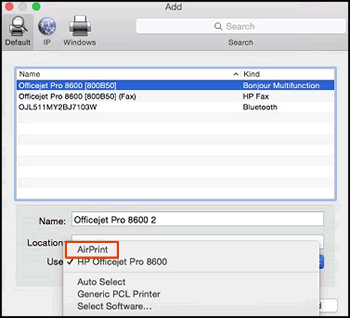
6.) Try to Print
Let me know how it goes😊
If the information I've provided was helpful, give us some reinforcement by clicking the "Solution Accepted" on this Post and it will also help other community members with similar issue.
KrazyToad
I Am An HP Employee
01-27-2020 03:02 AM
HP Recommended
Hi,
Thanks, i appreciate your repsonse, but i think that HP is not providing the right drivers for this printer for Catalina.
Could you please check if my printer can download up to date drivers? CP1025 - Catalina
Thanks,
Auke

01-27-2020 09:18 AM
HP Recommended
Have you tried the AirPrint driver as suggested previously?
Also, what type of document are you trying to print? Does this error occurs only while printing a specific document?
Let me know.
Asmita
I am an HP Employee
01-28-2020 03:30 PM
HP Recommended
Try using the HP Smart App and let me know how it goes
Link: https://support.hp.com/in-en/document/c06188214
If the information I've provided was helpful, give us some reinforcement by clicking the "Solution Accepted" on this Post and it will also help other community members with similar issue.
KrazyToad
I Am An HP Employee
02-03-2020 03:35 AM
HP Recommended
Thank you for this.
I installed the HP application on my laptop. It detects my HP printer, but it sia it is offline, allthough it is connected and turned on.
Could you please check if my printer is still supported by HP under Catalina?
Please help me out (soon!)
Thanks,
Auke

02-03-2020 09:14 AM
HP Recommended
Thanks for replying!
HP LaserJet CP1025 Color Printer is not supported with macOS 10.15 Mojave. HP LaserJet CP1025 Color Printer driver for macOS 10.15 Mojave are not available from the HP website or Apple Software Update. However, Gutenprint (formerly called Gimp-Print) provides open-source basic print drivers for many printers that would otherwise not be supported in Mac OS X. To see if your printer is supported, go to Gutenprint drivers for more information.
NOTE: Gutenprint drivers are not supported by HP or Apple.
Hope this helps! Keep me posted.
Please click “Accept as Solution” if you feel my post solved your issue, it will help others find the solution. Click the “Kudos/Thumbs Up" on the bottom right to say “Thanks” for helping!
TEJ1602
I am an HP Employee
02-03-2020
09:28 AM
- last edited on
02-03-2020
03:51 PM
by
Arthur-c
HP Recommended
Thanks.
The drivers are not available Gutenprint, i checked before.
So you are saying that i can throw away my printer, since i updated to a new operating system? The printer is 100% fine, only 6 years old, i bought recently 4 new cartridges + drum, worth at least 150,- €
Why are the drivers not updated?
And i have been emailing with HP for over 2 weeks now and finally i get this answer, while you could have answered this immediately? You guys/girls really suck at what you do...
***, this was the last time i bought HP stuff...
Thanks for nothing
Auke
02-04-2020 06:44 AM
HP Recommended
I have brought your issue to the attention of an appropriate team within HP. They will likely request information from you in order to look up your case details or product serial number. Please look for a private message from an identified HP contact. Additionally, keep in mind not to publicly post personal information (serial numbers and case details).
If you are unfamiliar with how the Forum's private message capability works, you can learn about that here.
Thank you for visiting the HP Support Community.
TEJ1602
I am an HP Employee

Be alert for scammers posting fake support phone numbers and/or email addresses on the community.
If you think you have received a fake HP Support message, please report it to us by clicking on "Flag Post".
† The opinions expressed above are the personal opinions of the authors, not of HP. By using this site, you accept the Terms of Use and Rules of Participation.


Didn't find what you were looking for?
Ask the community
† The opinions expressed above are the personal opinions of the authors, not of HP. By using this site, you accept the <a href="https://www8.hp.com/us/en/terms-of-use.html" class="udrlinesmall">Terms of Use</a> and <a href="/t5/custom/page/page-id/hp.rulespage" class="udrlinesmall"> Rules of Participation</a>.