
-
×InformationNeed Windows 11 help?Check documents on compatibility, FAQs, upgrade information and available fixes.
Windows 11 Support Center. -
-
×InformationNeed Windows 11 help?Check documents on compatibility, FAQs, upgrade information and available fixes.
Windows 11 Support Center. -
- HP Community
- Printers
- Printer Setup, Software & Drivers
- Re: Can not Install Printer ML-2160 on Mac OS BIG Sur

Create an account on the HP Community to personalize your profile and ask a question
Your account also allows you to connect with HP support faster, access a personal dashboard to manage all of your devices in one place, view warranty information, case status and more.
Check some of the most frequent questions about Instant Ink: HP INSTANT INK, HP+ PLANS: INK AND TONER.
Check out our WINDOWS 11 Support Center info about: OPTIMIZATION, KNOWN ISSUES, FAQs AND MORE.

It has been a while since anyone has replied. Simply ask a new question if you would like to start the discussion again.

05-26-2021 08:18 PM
 HP Recommended
Product: ML-2160
Operating System: macOS 11.0 Big Sur
Hi All,
I can not install my Samsung ML-2160 printer on my MAC which runs BIG Sur 11.3.1. I have tried already the option to install using the Samsung Universal Print Driver with no success.
Any help would be appreciated.
Thanks in advance
Pedro
Solved! Go to Solution.
1 ACCEPTED SOLUTION
Accepted Solutions


05-26-2021 11:19 PM
HP Recommended
Greetings Pedro,
i've heard of some drivers not available for Mac Big Sur.
I'm assuming you tried the Samsung universal drivers as mentioned by you. Here is the location i've used in the past https://driverfresh.com/en/printers/samsung/3-universal-driver.html
ideally your Mac should automatically detect which driver to use once you've installed the Universal driver package
if not then maybe try and pick the closest possible model /series "Samsung ML-2100/ 2600 Series".
hope it helps
regards
Ronnie
8 REPLIES 8
05-26-2021 11:19 PM
HP Recommended
Greetings Pedro,
i've heard of some drivers not available for Mac Big Sur.
I'm assuming you tried the Samsung universal drivers as mentioned by you. Here is the location i've used in the past https://driverfresh.com/en/printers/samsung/3-universal-driver.html
ideally your Mac should automatically detect which driver to use once you've installed the Universal driver package
if not then maybe try and pick the closest possible model /series "Samsung ML-2100/ 2600 Series".
hope it helps
regards
Ronnie
05-29-2021 06:01 AM
HP Recommended
Thanks Ronnie,
It worked!!!! The interesting point is that when installing the Samsung ML-2100 series, which would be matching with the model of my printer, it did not work. Then I tried the ML-2600 series and it worked.
thank you very much
Pedro

07-14-2021 10:54 AM - edited 07-14-2021 10:57 AM
HP Recommended
Hello Chilessj,
I have problem with my ML-2165W I downloaded driver for HP DESKJET 2600 like you, but when I opened hp easy start my printer still not showing in the hp software. Can you tell me step by step how you do this? I have all the time filter failed and I can't used my printer at home 😞
MBP 11.5


08-12-2021 02:16 AM - edited 08-12-2021 02:20 AM
HP Recommended
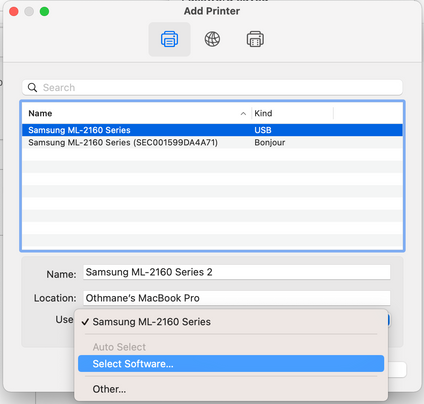
Hi Casper, don't download any specific model driver.
Download the one shared above.
Go to System Preferences, Printers & Scanners
Click the '+' button to add a printer
The tricky part is here :


08-30-2021 10:41 AM - edited 08-30-2021 01:47 PM
HP Recommended
Okay I changed from Samsung ML-2100/2600 Series to M2060 driver from universal driver
https://driverfresh.com/en/printers/samsung/3-universal-driver.html and its now working.
BTW when im used Windows 10 and install program from hp support website called "Samsung Easy Wireless Setup"
I was able connect printer by WiFi on macOS 11 Big Sur (still using M2060 driver) and now I can print via WiFi, and everything working correctly.
if you hold down the wifi button on the printer for 10 seconds, the configuration page will start printing configuration page with all data.
Thanks, @OthmaneBoum 😁

08-30-2021 03:10 PM
HP Recommended
This is for printer cable HP Printer install issues for IOS Big Sur. HP's Smart install does not work well with IOS Big Sur. You have to do it manually. Here's how...
Once you download the HP Easy Start, you will be walked through the following steps:
1. Welcome screen displaying terms of use. Click continue to agree.
2. Share usage data, Yes or No. Then continue.
3. Then the program will auto search your computer for any printers connected. You should be good at this point and it will find the printer connected to your computer via USB cable. Once found, click continue.
4. When it asks if you want HP Smart to install the driver, cancel out of that screen and do it manually. It will ask you if you want to download the software to install the drivers. This is where the problems arise. Do it manually. Easy.
Hope this helps!

Be alert for scammers posting fake support phone numbers and/or email addresses on the community.
If you think you have received a fake HP Support message, please report it to us by clicking on "Flag Post".
† The opinions expressed above are the personal opinions of the authors, not of HP. By using this site, you accept the Terms of Use and Rules of Participation.


Didn't find what you were looking for?
Ask the community
† The opinions expressed above are the personal opinions of the authors, not of HP. By using this site, you accept the <a href="https://www8.hp.com/us/en/terms-of-use.html" class="udrlinesmall">Terms of Use</a> and <a href="/t5/custom/page/page-id/hp.rulespage" class="udrlinesmall"> Rules of Participation</a>.