• ×
    Information
    Need Windows 11 help?
    Check documents on compatibility, FAQs, upgrade information and available fixes.
    Windows 11 Support Center.
  • post a message
  • ×
    Information
    Need Windows 11 help?
    Check documents on compatibility, FAQs, upgrade information and available fixes.
    Windows 11 Support Center.
  • post a message
Guidelines
Seize the moment! nominate yourself or a tech enthusiast you admire & join the HP Community Experts!
Check some of the most frequent questions about Instant Ink: HP INSTANT INK, HP+ PLANS: INK AND TONER.


Check out our WINDOWS 11 Support Center info about: OPTIMIZATION, KNOWN ISSUES, FAQs AND MORE.
HP Recommended
HP B110a
Microsoft Windows 10 in S Mode

Hey I’ve recently got a new modem, & since the power went out I can’t connect the printer back to wirelessly to the modem, it keeps telling me the WPA Passphrase is wrong, it’s defiantly the correct password. Can you help please 

1 REPLY 1
HP Recommended

Hi @LF231


Welcome to the HP Support Community. I'd be happy to assist you with the connectivity issue. 


Please try these steps to reset the printer -


1) Take out the cartridges.

2) Unplug the power cord from the printer & wall.

3) Wait for 30 seconds. 

4) Plug the power cord back into the printer and wall, ensure the printer is plugged into the wall & not to a surge protector.

5) Insert the cartridges back into the printer.


Try restoring the network settings to defaults - 


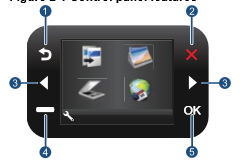
1.) From the printer's control panel, touch Setup. Option#4 in the below picture is setup - 


2.) Touch Wireless. 

3.) Touch Wireless Settings

4.) Touch Restore Network Defaults


To connect the printer, run the wireless setup wizard - 


1.) From the printer's control panel, touch Setup.

2.) Touch Wireless. 

3.) Touch Wireless Setup Wizard.

4.) Connect to wireless network.

5.) Select your network from the list of detected networks.

6.) Follow prompts. 


You may also try these steps - HP Printers - Changing from a USB to a Wireless Connection


Hope this helps! Keep me posted. 


Please click “Accept as Solution” if you feel my post solved your issue, it will help others find the solution.

Click the “Kudos, Thumbs Up" on the bottom right to say “Thanks” for helping!


Have a great day! 

Asmita
I am an HP Employee

† The opinions expressed above are the personal opinions of the authors, not of HP. By using this site, you accept the <a href="https://www8.hp.com/us/en/terms-of-use.html" class="udrlinesmall">Terms of Use</a> and <a href="/t5/custom/page/page-id/hp.rulespage" class="udrlinesmall"> Rules of Participation</a>.