
-
×InformationNeed Windows 11 help?Check documents on compatibility, FAQs, upgrade information and available fixes.
Windows 11 Support Center. -
-
×InformationNeed Windows 11 help?Check documents on compatibility, FAQs, upgrade information and available fixes.
Windows 11 Support Center. -
- HP Community
- Printers
- Printer Setup, Software & Drivers
- Re: Cannot get wireless light to come on and no connection y...

Create an account on the HP Community to personalize your profile and ask a question
Your account also allows you to connect with HP support faster, access a personal dashboard to manage all of your devices in one place, view warranty information, case status and more.
Check some of the most frequent questions about Instant Ink: HP INSTANT INK, HP+ PLANS: INK AND TONER.
Check out our WINDOWS 11 Support Center info about: OPTIMIZATION, KNOWN ISSUES, FAQs AND MORE.

It has been a while since anyone has replied. Simply ask a new question if you would like to start the discussion again.

07-02-2018 01:52 PM
 HP Recommended
I went to setting under printer utility and tried to deactivate scan from there. Remember I’m on a Mac. It said that my printer was not secure and wouldn’t let me enable scan. My printer is on a google network with a password in my condo. So I don’t get it but I cannot get it to scan. I did have to set up a new network address but it’s printing from all devices but scan is not set up, I guess. How do I do that? Do I really need to go buy a new printer???! Is there anyone at Hp I can get to. I’ll pay for help if necessary since my service agreement has expired.


07-02-2018 04:45 PM - edited 07-02-2018 04:46 PM
HP Recommended
Thanks for reaching out to us.
HP Support Forums is a free service and you do not have to pay to seek assistance. 🙂
As I understand that the HP Photosmart 5520 e-All-in-One Printer can print but cannot scan over the network.
Is the printer able to make a photocopy successfully? If yes then it indicates that the printer's hardware is working fine.
Meanwhile, please try to scan using the Airprint by following the below steps:
Start scans from the Print & Scan or Printers and Scanners window or from Image Capture when using AirPrint.
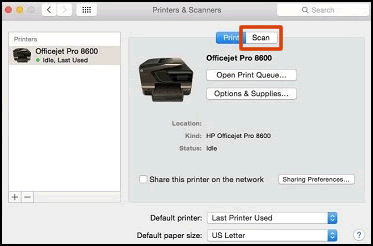
Click the Apple menu, click System Preferences, and then click Print & Scan or Printers & Scanners.
Click Scan, and then click Open Scanner. If the Scan button is not available, open Image Capture from the list of Applications, which also supports scanning.
Figure : Click Scan in the Printers & Scanners window
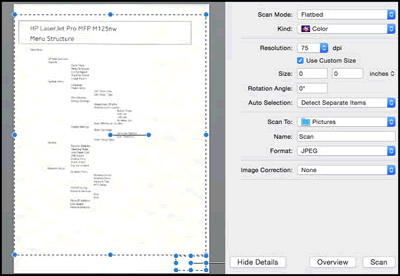
In the Scanner window, click Show Details.
After the overview scan completes, change any settings, and then click Scan.
Figure : Scanner window with Show Details setting on
If the printer is still unable to scan then please perform the following steps from this HP document:
- Step 3: Remove multiple printers from the printer list.
- Step 4: Delete the existing print queue and add the printer.
- Step 5: Reset the printing system.
Hope this information helps. All the best! 🙂
07-02-2018 07:30 PM
HP Recommended
On the 1st sentence above I write “deactivate the scanner.” It was supposed to say activate the scanner. I read your suggestions and there is a major problem. The scanner is not showing up in the “printer and scanner” window. It just shows the print side. When I went into utilities, security, admin settings, enable for webcsan, and hit apply— it told me it did not have an appropriate certificate and could be vulnerable so I didn’t continue. I can’t do your steps as I don’t get those choices.
07-02-2018 07:47 PM
HP Recommended
The only choice I have is “open print queue.” No scan choices. I went to image capture & it says no camera or scanner connected. Somehow when I went to the new network when I installed my google Wi-Fi, the network isn’t finding the scanner — just like it didn’t originally find the printer until you had me reset the network and then it found it. On the printer and scanner page, it shows the icon for the printer but does not title it Photosmart 5520. It just shows the numbers of the new network IP address. Wish I could send you a screen shot. I know the forums are free but I need a way to get to someone specifically even if I have to pay.
07-04-2018 04:42 PM
HP Recommended
Hi,
the private message is absolutely safe and secure. It is a a genuine message from HP, so I'm not sure how these warning have occurred.
However, I'll send you one more private message and you may check it.
You could also use another web browser and see if that helps.
Cheers! 🙂

- « Previous
-
- 1
- 2
- Next »

Be alert for scammers posting fake support phone numbers and/or email addresses on the community.
If you think you have received a fake HP Support message, please report it to us by clicking on "Flag Post".
† The opinions expressed above are the personal opinions of the authors, not of HP. By using this site, you accept the Terms of Use and Rules of Participation.


Didn't find what you were looking for?
Ask the community
† The opinions expressed above are the personal opinions of the authors, not of HP. By using this site, you accept the <a href="https://www8.hp.com/us/en/terms-of-use.html" class="udrlinesmall">Terms of Use</a> and <a href="/t5/custom/page/page-id/hp.rulespage" class="udrlinesmall"> Rules of Participation</a>.