
-
×InformationNeed Windows 11 help?Check documents on compatibility, FAQs, upgrade information and available fixes.
Windows 11 Support Center. -
-
×InformationNeed Windows 11 help?Check documents on compatibility, FAQs, upgrade information and available fixes.
Windows 11 Support Center. -
- HP Community
- Printers
- Printer Setup, Software & Drivers
- Driver Not Found

Create an account on the HP Community to personalize your profile and ask a question
Your account also allows you to connect with HP support faster, access a personal dashboard to manage all of your devices in one place, view warranty information, case status and more.
Check some of the most frequent questions about Instant Ink: HP INSTANT INK, HP+ PLANS: INK AND TONER.
Check out our WINDOWS 11 Support Center info about: OPTIMIZATION, KNOWN ISSUES, FAQs AND MORE.

It has been a while since anyone has replied. Simply ask a new question if you would like to start the discussion again.

01-01-2020 07:55 AM
 HP Recommended
Product: HP Laptop 15-da0xxx
Operating System: Microsoft Windows 10 (64-bit)
Hello,
I have recently updated my laptop to the latest windows 10 version 1909. After the update, I am unable to connect my phone to the laptop. It displays the error of driver not available. So I went to the HP's driver downloads page and searched for an appropriate driver. But no such drivers are available for the windows 10 version 1909. My question is when will the driver be made available by HP? Or is there any other way to transfer large media files from my android phone to the PC.
7 REPLIES 7


01-03-2020 12:04 PM
HP Recommended
Welcome to the HP Support Community!
I reviewed your post and I understand that you are facing issues connecting your phone to the computer after a recent Windows update.
Don’t worry, I assure you I will try my best to get this sorted.
Have you tested with a different data cable?
Meanwhile, you can transfer files from your phone to the computer using the media transfer option on your phone.
I would also like to inform you that there are no special drivers for the phones from HP and they use the USB drivers. However, you can check on the phone manufacturer website and usually, there will be drivers available for your phone.
I hope that answers your question and you have a great day!
If you wish to show appreciation for my efforts, mark my post as Accept as Solution. Your feedback counts!
Cheers!
The_Fossette
I am an HP Employee
01-04-2020 06:37 AM
HP Recommended
I have not tried with other data cables but I know that it is not the problem with cable as it is the one which was bundled with the phone.
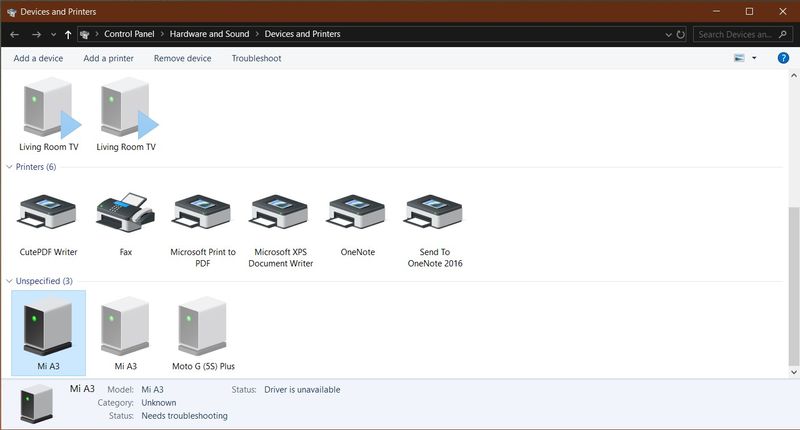
I am hereby attaching the screenshot which shows the problem.
Also I an unable to understand about which USB drivers and the Media Transfer Option you are talking about. So can you elaborate about the same. Or can you provide the detailed steps to do so.
Here is the screenshot which says Driver Unavailable for the phone connected to it. I have connected this phone few months ago and it worked well. But after the feature update for windows 1909 it stated this problem.

01-04-2020 04:25 PM
HP Recommended
I suggest you download and run the HP Support Assistant from this Link: https://www8.hp.com/us/en/campaigns/hpsupportassistant/hpsupport.html?jumpid=va_r602_us/en/any/psg/p...
HPSA will automatically search for all the latest drivers for your Notebook
-
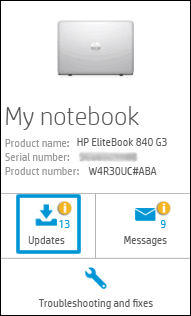
Click My devices in the top menu, and then click Updates in the My PC or My notebook pane.
-
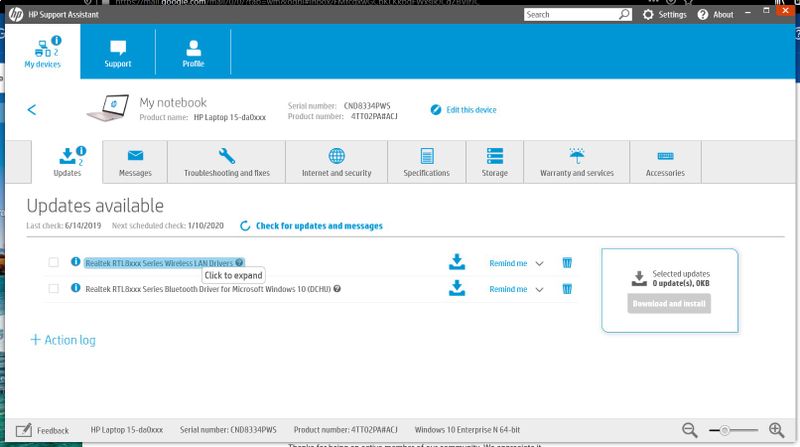
Click Check for updates and messages to scan for new updates.

-
Review the list of updates. Updates with a yellow information icon are recommended. Updates with a blue information icon are optional.
-
Click the update name for a description, version number, and file size.
-
Select the box next to any updates you want to install, and then click Download and install.
Also ensure Windows is up to date.
Select the Start button, and then go to Settings > Update & security > Windows Update , and select Check for updates. If Windows Update says your device is up to date, you have all the updates that are currently available
Keep me posted how it goes
Thank you and have a wonderful day 😊
If the information I've provided was helpful, give us some reinforcement by clicking the "Solution Accepted" on this Post and it will also help other community members with similar issue.
KrazyToad
I Am An HP Employee
01-06-2020 11:09 AM
HP Recommended
I recommend you check on the phone manufacturer website and usually, there will be drivers available for your phone.
If you wish to show appreciation for my efforts, mark my post as Accept as Solution. Your feedback counts!
Cheers!
The_Fossette
I am an HP Employee


01-08-2020 01:18 PM
HP Recommended
@Mihir3 The drivers for your smartphone can only be provided by the manufacturers of the smart phone, hence I suggest you take into consideration the suggestion of the last tech, and contact them (speak to them) on the same, to obtain a solution.
I hope that helps, good luck.
Riddle_Decipher
I am an HP Employee
Learning is a journey, not a destination.
Let's keep asking questions and growing together.

Be alert for scammers posting fake support phone numbers and/or email addresses on the community.
If you think you have received a fake HP Support message, please report it to us by clicking on "Flag Post".
† The opinions expressed above are the personal opinions of the authors, not of HP. By using this site, you accept the Terms of Use and Rules of Participation.


Didn't find what you were looking for?
Ask the community
† The opinions expressed above are the personal opinions of the authors, not of HP. By using this site, you accept the <a href="https://www8.hp.com/us/en/terms-of-use.html" class="udrlinesmall">Terms of Use</a> and <a href="/t5/custom/page/page-id/hp.rulespage" class="udrlinesmall"> Rules of Participation</a>.