
-
×InformationNeed Windows 11 help?Check documents on compatibility, FAQs, upgrade information and available fixes.
Windows 11 Support Center. -
-
×InformationNeed Windows 11 help?Check documents on compatibility, FAQs, upgrade information and available fixes.
Windows 11 Support Center. -
- HP Community
- Printers
- Printer Setup, Software & Drivers
- Fatal error installing HP software

Create an account on the HP Community to personalize your profile and ask a question
Your account also allows you to connect with HP support faster, access a personal dashboard to manage all of your devices in one place, view warranty information, case status and more.
Check some of the most frequent questions about Instant Ink: HP INSTANT INK, HP+ PLANS: INK AND TONER.
Check out our WINDOWS 11 Support Center info about: OPTIMIZATION, KNOWN ISSUES, FAQs AND MORE.

It has been a while since anyone has replied. Simply ask a new question if you would like to start the discussion again.

06-28-2017 06:36 AM - edited 06-29-2017 01:01 PM
 HP Recommended
Product: Laserjet Pro MFP M277dw
Operating System: Microsoft Windows 10 (64-bit)
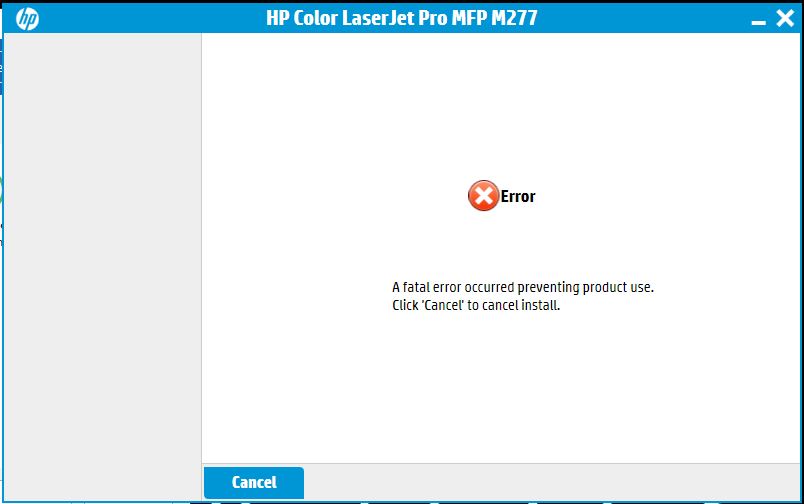
Every time I try to install the driver and software package I get the same fatal error message below
7 REPLIES 7

06-29-2017
02:25 PM
- last edited on
08-22-2025
02:09 PM
by
 Raj_05
HP Recommended
Hello, @gsister - Hope you are well 🙂
Thank you for becoming an HP Forum member. It is a great location to get help from the community, get suggestions and find what has worked for others!
I understand you are having issues while installing your LaserJet printer. Let’s start be performing a clean install. Try the steps below:
- First, unplug the USB cable from the printer if present.
- Go to Control panel – Programs and feature – Select all the HP LaserJet printer entries and uninstall them.
- Now go to Control panel – Devices and printer – Select all the printer entries and remove the device.
- Restart your computer.
- Click the bottom-left Start button on desktop, type device manager in the search box and tap Device Manager on the menu.
- Once in device manager, click on the view tab in the top & choose “Show hidden devices”.
- Then from the device manager list, check the entries under “Printer” – If there are any entries, please right click and choose “uninstall” – In the confirm device un-install pop-up, make sure you select the box which says “Delete the driver software for this device".
- Also, check the entries under "printer queue" and "imaging devices" and repeat the same exercise. Delete any printer entry or any entry which says “Unknown device”.
- Once done, close device-manger. Then press the "windows key" + "r" to get the "Run" window open - Type "printui.exe /s" (there is a space between .exe & /) and press enter.
- Under print server properties, go to drivers - remove any entry there as well.
- Again, go to run window, type – “c:/programdata” – Go to Hewlett Packard folder, remove any printer related folders & files.
- Open run again, type “%temp%” and press enter to get the temporary files. Delete all the files here. Skip the items which cannot be deleted.
- Now restart your computer again.
- Open the Run window again, type “services.msc” and press ok to get services window.
- Scroll down to “Remote Procedure Call (RPC)” – right-click and go to properties. Make sure the service is started and startup type is “Automatic”.
- Now scroll up and go to “Function Discovery Provider Host” – right-click and select properties – Change the startup type to “manual” and start the service.
- Repeat the same exercise on “Function Discovery Resource Publication” as well.
- Click on http://ftp.hp.com/pub/softlib/software13/LES/M277/HP_Color_LJ_Pro_MFP_M277-full-solution-15343.exe and install the software.
- Connect the USB cable if prompted and follow the onscreen instructions to complete the installation.
Please let me know if this resolves the issue, or if you require further assistance!
Good luck 🙂
Please click "Accepted Solution" on the post that solves your issue to help others find the solution. To show appreciation for my help, please click the "Thumbs Up Icon" below!
Please click "Accepted as Solution" on the post that solves your issue to help others find the solution. To show appreciation for my help, please click the "Thumbs Up Icon" below!
DVortex
I am not an HP Employee
DVortex
I am not an HP Employee
06-29-2017 03:11 PM - edited 06-29-2017 03:12 PM
HP Recommended
Thank you, but I did NOT work.
There are 5 steps for installing (Prepare, Connect, Install, Configure and Complete) and I am still stuck at the second.
As soon as I select my printer and click on next I get the same error message.
06-30-2017 09:19 AM
HP Recommended
Hello, @gsister
Is there any error code with the fatal error? If there is an option to see the details, select that and see if you are getting a specific error code.
Also, try these steps to try and resolve the issue:
When you are prompted to connect the USB cable during software installation, use the Device Manager to manually select the printer driver. Follow these steps to open the Device Manager and select the printer driver to complete the software installation.
-
On the Windows taskbar, click the Windows icon (
 ), and then click Control Panel. The Windows Control Panel opens.
 -
Click System and Maintenance, and then click Device Manager. The Device Manager window opens.
-
Click View, and then select Show hidden devices on the drop-down menu. A list displays in the Device Manager window.
-
Click the plus sign (
 ) next to Printers to expand the listing. From the listing, right-click HP Universal printing PCL_5 (or PCL_6 depending on the version), and then click Update Driver Software. The Update Driver Software screen displays.
 -
From the Update Driver Software screen, click Browse my computer for driver software, and then click Let me pick from a list of drivers on my computer. The Add Printer Wizard screen displays.
-
From the Add Printer Wizard screen, select your printer driver from the list, and then click Next. The driver installation process begins.
NOTE:
Do not select the Universal Printer driver on the Add Printer Wizard screen. Make sure to select the printer that you are trying to install.
-
When the driver software installation is complete, click Close to close the Update Driver Software window. The original software installer window displays, and the software installation continues automatically.
-
When your software installation is complete, click Finish.
Let me know if that helps!
Cheers 🙂
Please click "Accepted Solution" on the post that solves your issue to help others find the solution. To show appreciation for my help, please click the "Thumbs Up Icon" below!
Please click "Accepted as Solution" on the post that solves your issue to help others find the solution. To show appreciation for my help, please click the "Thumbs Up Icon" below!
DVortex
I am not an HP Employee
DVortex
I am not an HP Employee
06-30-2017 02:28 PM
HP Recommended
There are not any error codes with the fatal error. The print screen shows exaclty the message I get everytime I click on "next" for the second step which is "Connection".
I also tried your new instructions and I did not work.
I was finally able to get the printer to work through "add a printer" on control panel, but still not able to install the software to manage it properly.
07-03-2017
02:30 PM
- last edited on
08-22-2025
02:10 PM
by
Raj_05
HP Recommended
Hello, @gsister
I found a promising document that could help you fix this issue 🙂
Go to http://hp.care/2tjDSov
Start with step 7. If the issue persists, then try the steps from Step 1 - Step 6.
Please let me know if this resolves the issue, or if you require further assistance!
Good luck 🙂
Please click "Accepted Solution" on the post that solves your issue to help others find the solution. To show appreciation for my help, please click the "Thumbs Up Icon" below!
Please click "Accepted as Solution" on the post that solves your issue to help others find the solution. To show appreciation for my help, please click the "Thumbs Up Icon" below!
DVortex
I am not an HP Employee
DVortex
I am not an HP Employee

Be alert for scammers posting fake support phone numbers and/or email addresses on the community.
If you think you have received a fake HP Support message, please report it to us by clicking on "Flag Post".
† The opinions expressed above are the personal opinions of the authors, not of HP. By using this site, you accept the Terms of Use and Rules of Participation.


Didn't find what you were looking for?
Ask the community
† The opinions expressed above are the personal opinions of the authors, not of HP. By using this site, you accept the <a href="https://www8.hp.com/us/en/terms-of-use.html" class="udrlinesmall">Terms of Use</a> and <a href="/t5/custom/page/page-id/hp.rulespage" class="udrlinesmall"> Rules of Participation</a>.