• ×
    Information
    Need Windows 11 help?
    Check documents on compatibility, FAQs, upgrade information and available fixes.
    Windows 11 Support Center.
  • post a message
  • ×
    Information
    Need Windows 11 help?
    Check documents on compatibility, FAQs, upgrade information and available fixes.
    Windows 11 Support Center.
  • post a message
Guidelines
Join the HP Community Solve‑a‑thon | Help Others & Share Your Solutions | Live on Zoom | 2:30 PM to 2:30 AM IST | Every Wednesday Click here to know more
Check some of the most frequent questions about Instant Ink: HP INSTANT INK, HP+ PLANS: INK AND TONER.


Check out our WINDOWS 11 Support Center info about: OPTIMIZATION, KNOWN ISSUES, FAQs AND MORE.
HP Recommended
Office jet 6600
iOS

Since the last update from Apple my office jet 6600 printer now only prints in blue ink in the upper left quadrant of the paper .....this happens with my mobile devices iPhone XR and iPad (6th generation)......it works fine with my Mac book pro. This started after 9/20/2020.

Apple says they are no longer supporting this printer 😩

3 REPLIES 3
HP Recommended

@Beachlady102, Welcome to the HP Support Community!


If you are able to print fine from the MAC, it means the printer hardware is working fine.

Have you tried printing different files to check if the issue persists?


This printer is AirPrint compatible. Check for any pending software updates on the iOS devices

Go to Settings > general > Update the software


Update the printer firmware

Click here to know different methods of updating printer firmware.

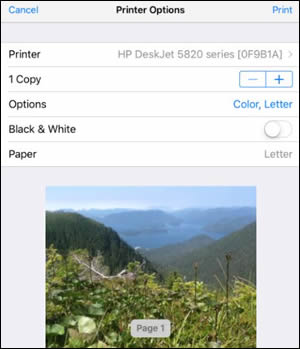
  1. Open the item you want to print, and then tap the Share icon  or  .

  2. Tap Print or the Print icon  to open Printer Options.

  3. Tap Select Printer to select your printer.

  4. Change any of the following print job settings. Available settings vary depending on the app you are printing from, the print job type, and your printer.

    • Paper: Make any paper size changes on the printer. AirPrint automatically detects the paper size loaded in the printer or the size selected on the printer control panel. If the detected size is different than the paper in the tray, an error might display asking to confirm the size.

    • Number of copies: Select how many copies you want to print.

    • Black & White: Select to print in grayscale. This option only displays for color printers.

    • Double-sided printing: Print on both sides of the paper for certain file types.

    • Page range: Select specific pages within a document or webpage to print.

    Printer Options screen

For more info on resolving print quality issues, refer to - Fixing Poor Print Quality Problems


Hope this helps! Keep me posted. 


Please click “Accept as Solution” if you feel my post solved your issue, it will help others find the solution.

Click the “Kudos, Thumbs Up" on the bottom right to say “Thanks” for helping!

Have a great day! 

KUMAR0307
I am an HP Employee

HP Recommended

It seems that the issue is when I try to print photos from my iPad and iPhone........I just went to print directly from a web page and that worked! All software is up to date....on both the printer and the Apple devices.....Apple states they are not longer supporting this printer...ughh.

HP Recommended

@Beachlady102


As mentioned before, this printer is AirPrint compatible. It means that the printer is compatible with iOS and MAC.

Are you using HP Photo papers?

Have you tried printing the same picture on regular paper to check the result?


Keep me posted.

KUMAR0307
I am an HP Employee

† The opinions expressed above are the personal opinions of the authors, not of HP. By using this site, you accept the <a href="https://www8.hp.com/us/en/terms-of-use.html" class="udrlinesmall">Terms of Use</a> and <a href="/t5/custom/page/page-id/hp.rulespage" class="udrlinesmall"> Rules of Participation</a>.