• ×
    Information
    Need Windows 11 help?
    Check documents on compatibility, FAQs, upgrade information and available fixes.
    Windows 11 Support Center.
  • post a message
  • ×
    Information
    Need Windows 11 help?
    Check documents on compatibility, FAQs, upgrade information and available fixes.
    Windows 11 Support Center.
  • post a message
Guidelines
Seize the moment! nominate yourself or a tech enthusiast you admire & join the HP Community Experts!
Check some of the most frequent questions about Instant Ink: HP INSTANT INK, HP+ PLANS: INK AND TONER.


Check out our WINDOWS 11 Support Center info about: OPTIMIZATION, KNOWN ISSUES, FAQs AND MORE.
HP Recommended
HP 7740
Microsoft Windows 10 (64-bit)

Trying to print a booklet from a pdf file but can't find a booklet option in the dialogue.  There is a duplex option but that does not print a booklet.  When printing directly from a Microsoft Publisher file I do get the booklet option and it works fine.  Confused.

1 REPLY 1
HP Recommended

@Randy71 


Edits - Add Reader DC how-to print as image to section Adobe Reader DC – Install Whether You Use It or Not


Welcome to the HP User Community.


If you have not done so,


  • Install the Full Feature Software / full driver printer software
  • Print from document source (for example, Word) OR Export document to PDF and print using Adobe Reader DC PDF software.


Options...

Word

  • If the document is in Word format - there is a booklet setup in Properties > Shortcut > Select shortcut "Everyday Printing" > Next, adjust options, including tab Advanced where the booklet option is switch on / off.  Save the changes in Properties > return to the main Word print menu > select printer and Print

Example > Printing Preferences - Shortcut "Everyday Printing"

9025_Printing_Preferences_Everyday_39025_Printing_Preferences_Everyday_3


OR


Export the document into PDF format.


Next,


====================================================================

Printer Software


Installation package:

HP OfficeJet Pro 7740 Wide Format All-in-One Print and Scan Driver and Accessories 


===========================================================

>>> Check / Install the Full Feature Software / full driver printer software


The full driver provides the foundation on which other programs and printing software depend.


Preparation - Install Full Driver Printer Software


If you have not done so,

In addition to the HP Smart application,

Install the Full Feature Software / full driver printer software for the printer.

HP Smart and other print software / applications benefit from having the full driver installed.

Make sure your VPN is switched Off when installing software.


Printer Software Check - Is the printer software installed?


Notes

When the full driver printer software is installed,

Find the printer software listed in Control Panel > icon view > Programs and Features.


The installation of the full printer software adds two shortcut icons to the Desktop.

The Printer Assistant is named for the printer and provides access to Print , Scan , and Tools

HP Scan is named for itself and provides a direct call to the HP Scan software.

Programs_and_Features_Printer_Desktop_Icons_5Programs_and_Features_Printer_Desktop_Icons_5


Next...

Printer software installed and  listed >> Software is out of date or not working?


NOTE:  If the printer software shows installed but is not working as expected,


NOTE:  Windows 11

Windows Start > Search for Control Panel and open


Uninstall the printer software from Control Panel > icon view > Programs and Features

Restart the computer and log in


What if?

If software will not uninstall, appears to be removed and is “still hanging around” after you uninstall / Restart...

Microsoft:  Fix problems that block programs from being installed or removed

OR

Revo Uninstaller (Free version)

then

Restart the computer and log in


Reminder:  If using USB, disconnect the USB printer cable between the printer and the computer before installing software.  (Re)Connect the USB cable when instructed to do so near the end of the installation procedure.


===============================================================


Next,

Install a fresh copy of the Full Feature Software / Full Driver printer software

Restart the computer and log in


Basic Instructions - Install the Full Feature Software / Full Driver printer software


  • If using VPN, shut it off to install software
  • Download and Save the Full Feature Software installation package or the Easy Start Software
  • Open File Explorer
  • Navigate to the folder in which you saved the installation file  (likely Downloads)
  • Reminder:  If using USB cable between printer and computer, disconnect the cable before installing software.
  • Right-Click on the installation package and “Run as Administrator
  • If using Easy Start > When asked, opt for "Full Driver" (exact wording might vary).
  • If using Easy Start > Skip any extra software / offers you do not want (wording varies).
  • After the software is installed, Restart the computer and log in


NOTES

- - - - - - - - - - - - - - - - - - - - - - - - - - - - - - - - - - - - - - - - - - - - - - - - - - - - - - - - - -

Preparation > Check / enable the printer as the “Default Printer”


Settings > Devices > Printers and scanners

UNCHECK (clear box) Let Windows manage my default printer

Select (Left-Click) your printer from the list of printers > Manage > Set as Default


=================================================

Adobe Reader DC – Install Whether You Use It or Not

If you have not done so,

Reinstall / Update your PDF Reader (Adobe Reader DC /Optional  Foxit Reader)

HINT:  Watch out for and UNCHECK unwanted extra software


NOTE:  Adobe Reader DC software can be installed even if you do not normally open / view / print PDF files directly from the Adobe Reader DC software.


If the file will not print due to unusual content (odd fonts, color schemes, tables, other oddities), print the file as an Image.  Image printing does not require the printer software to translate file content.


  1. Open the offending document in Adobe Reader DC
  1. Click Print icon > Set other options on the menu > Click Advanced button
  1. Set the printer select the colors (Optional)
  2. Select Print the PDF file as an image


Reference

Adobe Acrobat Reader Learn & Support

Acrobat Reader DC Help


=================================================

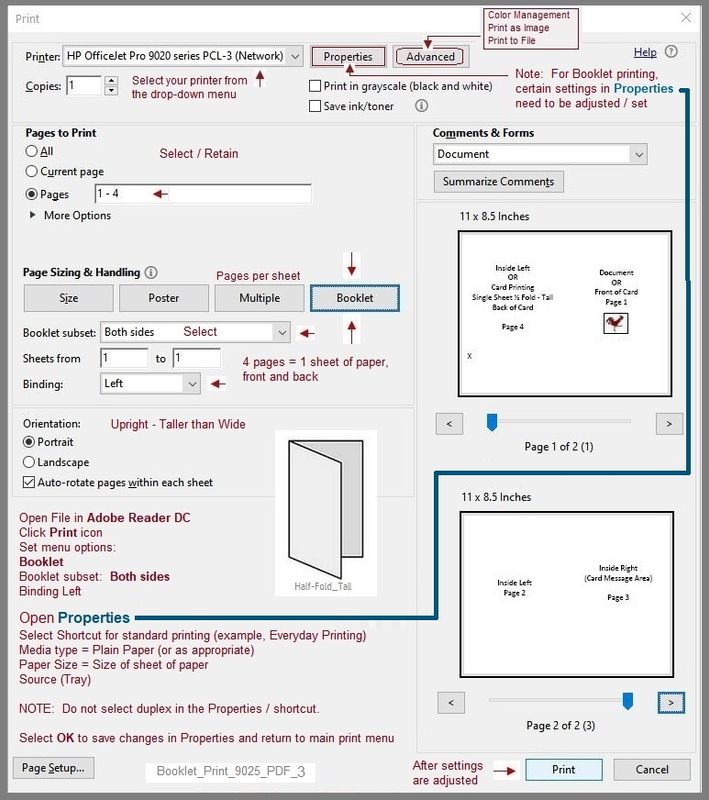
Example - Adobe Reader DC > PDF print > Booklet

NOTE:  Example includes Page Range setup to print a limited number of pages from the original document.

Booklet_Print_9025_PDF_3Booklet_Print_9025_PDF_3


+++++++++++++++++++++++++++++++++++++++++++++++++++++++++++++++


HP Printer Support Home Page - References and Resources – Learn about your Printer  - Solve Problems

 “Things that are your printer”

NOTE:  Content depends on device type and Operating System

Categories:  Alerts, Access to the Print and Scan Doctor (Windows), Warranty Check, HP Drivers / Software / Firmware Updates, How-to Videos, Bulletins/Notices, Lots of How-to Documents, Troubleshooting, Manuals > User Guides, Product Information (Specifications), more

When the website support page opens, Select (as available) a Category > Topic > Subtopic

HP OfficeJet Pro 7740 Wide Format All-in-One Printer series 


Thank you for participating in the HP Community.

Our Community is comprised of volunteers - people who own and use HP devices.

Click Helpful = Yes to say Thanks!

Question / Concern Answered, Click "Accept as Solution"


Dragon-Fur

† The opinions expressed above are the personal opinions of the authors, not of HP. By using this site, you accept the <a href="https://www8.hp.com/us/en/terms-of-use.html" class="udrlinesmall">Terms of Use</a> and <a href="/t5/custom/page/page-id/hp.rulespage" class="udrlinesmall"> Rules of Participation</a>.