
-
×InformationNeed Windows 11 help?Check documents on compatibility, FAQs, upgrade information and available fixes.
Windows 11 Support Center. -
-
×InformationNeed Windows 11 help?Check documents on compatibility, FAQs, upgrade information and available fixes.
Windows 11 Support Center. -
- HP Community
- Printers
- Printer Setup, Software & Drivers
- HP LaserJet P1102 not working with new MacOS

Create an account on the HP Community to personalize your profile and ask a question
Your account also allows you to connect with HP support faster, access a personal dashboard to manage all of your devices in one place, view warranty information, case status and more.
Check some of the most frequent questions about Instant Ink: HP INSTANT INK, HP+ PLANS: INK AND TONER.
Check out our WINDOWS 11 Support Center info about: OPTIMIZATION, KNOWN ISSUES, FAQs AND MORE.

It has been a while since anyone has replied. Simply ask a new question if you would like to start the discussion again.

11-14-2024 01:45 PM
 HP Recommended
Product: HP LaserJet Pro P1102 Printer
Operating System: Other
Hello, so I own a HP LaserJet P1102, recently bought a new MacBook Pro M2, it is currently on MacOS 15. Is there any way I can find a driver that might work with it? The Mac does recognise it the problem is that I am guessing due to lack of a driver it will not print. I do know it can be considered as an ancient product but it to this day it still works fine and I don't want to change my printer just because of the driver incompatibility. Does anyone know of a workaround to make it work? Any help is appreciated, thank you all in advance.
Solved! Go to Solution.
1 ACCEPTED SOLUTION
Accepted Solutions
03-10-2025 12:30 PM
HP Recommended
This fixed it! Finally!
Follow these steps carefully:
Step 1: Download the Official HP Mac Printer Driver
1.Go to HP’s official website and download the HP Mac Printer Driver for your HP LaserJet P1102 printer.
2.The downloaded file should be in .dmg format (e.g., HewlettPackardPrinterDrivers.dmg).
Step 2: Extract the .pkg File
1.Open the .dmg file by double-clicking it.
2.Inside the mounted volume, find the .pkg file (e.g., HewlettPackardPrinterDrivers.pkg).
3.Copy this .pkg file to a folder on your desktop (or any easy-to-access location).
Step 3: Expand the Package
1.Open Terminal (Command + Space → search for “Terminal” → Press Enter).
2.Navigate to the folder where you saved the .pkg file. For example, if it’s on your desktop:
cd ~/Desktop
3.Run the following command to expand the package into a folder:
pkgutil --expand HewlettPackardPrinterDrivers.pkg drivers
This will create a new folder called drivers.
Step 4: Modify the Compatibility Check
1.Open the drivers folder.
2.Find the file named Distribution (it has no file extension).
3.Open this file using TextEdit or Visual Studio Code (or any text editor).
4.Locate the following fragment:
system.version.ProductVersion, '15.0'
5.Change 15.0 to 16.0 so that it looks like this:
system.version.ProductVersion, '16.0'
6.Save the file.
Step 5: Repack the Installer
1.Back in Terminal, run the following command:
pkgutil --flatten drivers HewlettPackardPrinterDrivers-sequoia.pkg
This will generate a new modified package file called HewlettPackardPrinterDrivers-sequoia.pkg.
2.You can now delete the drivers folder, the original .dmg file, and the original .pkg file:
rm -rf drivers
rm HewlettPackardPrinterDrivers.pkg
rm HewlettPackardPrinterDrivers.dmg
Step 6: Install the Modified Package
1.Double-click HewlettPackardPrinterDrivers-sequoia.pkg to start the installation.
2.Follow the installation steps as usual.
3.Restart your Mac after installation is complete.
Step 7: Add Your Printer
1. Open System Settings → Printers & Scanners.
2.Click Add Printer (+ button).
3.Select your HP LaserJet P1102 from the list.
4.Choose the correct driver (it should now be available).
5.Click Add.
Your HP LaserJet P1102 should now work as expected on macOS Sequoia 15.3.1!
Let me know if you run into any issues. 🚀
19 REPLIES 19


11-14-2024 03:39 PM - edited 11-14-2024 03:40 PM
HP Recommended
Try the arm64 universal driver.
https://support.hp.com/us-en/help/smartupd
https://support.hp.com/us-en/drivers/supd/model/33835514
Let me know what you find out as I have no experience with the 1102 or the M2 cpu
Thank you for using HP products and posting to the community.
I am a community volunteer and do not work for HP. If you find
this post useful click the Yes button. If I helped solve your
problem please mark this as a solution so others can find it


11-14-2024 03:43 PM
HP Recommended
Is there an HP universal driver for my Mac which is running OAS 15.1?
My HP printer is considered expired although it works perfectly. I am ok with no warranty but hate the idea of not being able to print because of a technicality.

11-14-2024 03:50 PM
HP Recommended
Hi @Brigitta444
Try to install the next HP driver for your printer:
>> https://ftp.hp.com/pub/softlib/software12/HP_Quick_Start/osx/Applications/HP_Easy_Admin.app.zip
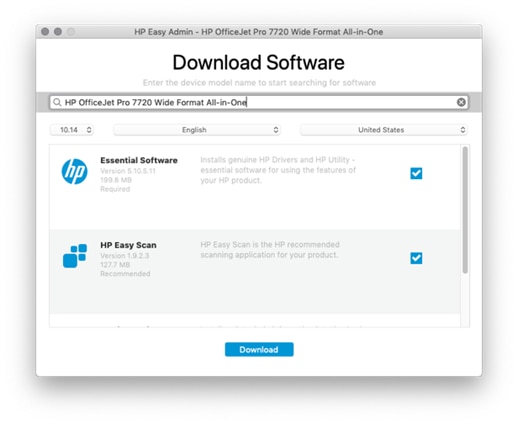
* Click YES to say thank you,
* Click Accepted Solution when question is answered.
Best regards,
ferRX.

@ferRX / I am a volunteer posting answers.
11-16-2024 04:42 AM
HP Recommended
Hallo, I have the same problem.
Unfortunately I can't install any drivers because they are not detected by this program. All available drivers are for macos 10.xx and every time I get an error when installing.
11-16-2024 07:33 AM
HP Recommended
This thread is about the 1102 printer and the ARM 64bit CPU (Apples's M2 CPU)
If you have a different printer or a CPU based on Intel or AMD then you should start a different post to get a better answer to your problems.
=====General help for old printers and MacOS=====
MacOS please read this article.
This list of HP printers can be used with MacOS 11 or under.
Download this software for those printers
https://support.apple.com/en-us/106385
If your printer is not on that list then it must be used with MacOS 12 or later.
If you have a recent HP printer it may work on older MacOS 11 or under but you need to use either USB or the AirPrint Apple setup app. HP Smart is unlikely to run on older MacOS as it is a 32-bit OS.
Thank you for using HP products and posting to the community.
I am a community volunteer and do not work for HP. If you find
this post useful click the Yes button. If I helped solve your
problem please mark this as a solution so others can find it

11-17-2024 02:05 PM
HP Recommended
This may or may not be helpful but I gave up and put my 1102W on Facebook Marketplace and bought ab HP MFP 4301fdw. Print quality is beautiful and it did cost me a lot out of pocket but I need to be able to print, but so occasionally that inkjet won't work due to drying out and this is working for me on Mac OS 15.1. The scan software is working as expected, as well as printing. I'm unhappy I had to give up on my trusty printer but I'm satisfied with what I replaced it with.

Be alert for scammers posting fake support phone numbers and/or email addresses on the community.
If you think you have received a fake HP Support message, please report it to us by clicking on "Flag Post".
† The opinions expressed above are the personal opinions of the authors, not of HP. By using this site, you accept the Terms of Use and Rules of Participation.


Didn't find what you were looking for?
Ask the community
† The opinions expressed above are the personal opinions of the authors, not of HP. By using this site, you accept the <a href="https://www8.hp.com/us/en/terms-of-use.html" class="udrlinesmall">Terms of Use</a> and <a href="/t5/custom/page/page-id/hp.rulespage" class="udrlinesmall"> Rules of Participation</a>.