• ×
    Information
    Need Windows 11 help?
    Check documents on compatibility, FAQs, upgrade information and available fixes.
    Windows 11 Support Center.
  • post a message
  • ×
    Information
    Need Windows 11 help?
    Check documents on compatibility, FAQs, upgrade information and available fixes.
    Windows 11 Support Center.
  • post a message
Guidelines
Seize the moment! nominate yourself or a tech enthusiast you admire & join the HP Community Experts!
Check some of the most frequent questions about Instant Ink: HP INSTANT INK, HP+ PLANS: INK AND TONER.


Check out our WINDOWS 11 Support Center info about: OPTIMIZATION, KNOWN ISSUES, FAQs AND MORE.
HP Recommended
HP OfficdeJet Pro 8710 Series All-In-One Printer
Microsoft Windows 10 (64-bit)

After sending a FAX on the above mentioned (HP OfficdeJet Pro 8710 Series All-In-One Printer) the printed "FAX Log" sheet shows a "Time" that is between eleven and 13 hour different that my local time. It appears that the time many be GMT, a UTC or something else. Where does the FAX History printing app get it's time from?

1 REPLY 1
HP Recommended

@yBob 


The following might be relevant.


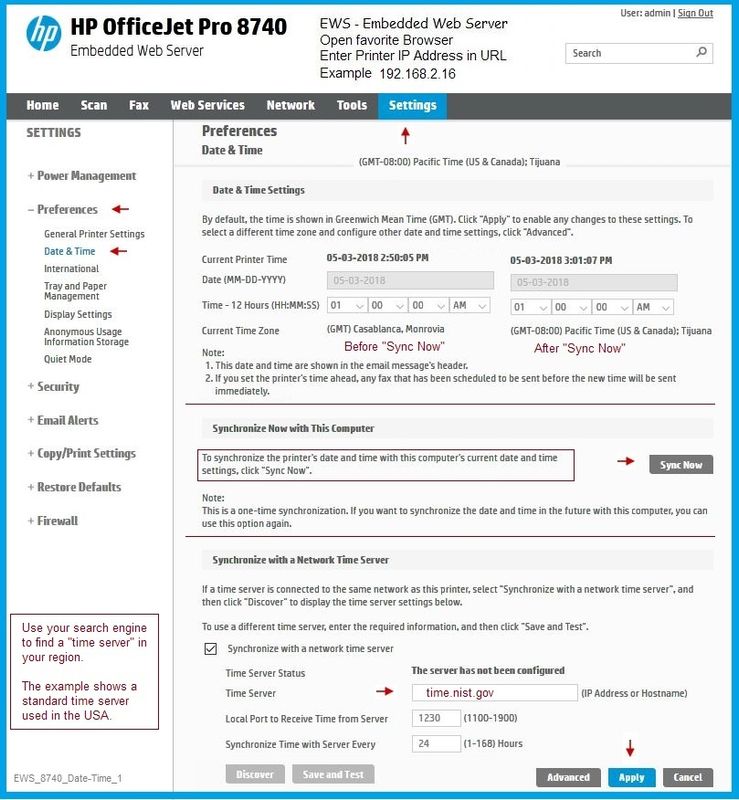
If the printer is on the network, set the Date / Time using the Embedded Web Server (EWS)


NOTE:  Setting the Date / Time on the printer may - or may not - affect the Fax; run a test fax to check.

Test Fax Setup with the HP Fax Test Service


Open your favorite browser > type / enter Printer IP address into URL / Address bar

Tab Settings > Preferences > Date & Time


Examples

EWS_8630_Settings_Date-Time_1EWS_8630_Settings_Date-Time_1


and

EWS_8740_Date-Time_1EWS_8740_Date-Time_1


Reference and Resources – Places to find (more) help and learn about your Printer

Printer Homepage – “Things that are your printer”

Drivers / Software / Firmware Updates, Videos, Bulletins/Notices, How-to, Troubleshooting, User Guides, Product Information, more

HP OfficeJet Pro 8710 All-in-One Printer series


Thank you for participating in the HP Community Forum.

We are a world community of HP enthusiasts dedicated to supporting HP technology.

Click Thumbs Up on a post to say Thank You!

Answered? Click post "Accept as Solution" to help others find it.


Dragon-Fur

† The opinions expressed above are the personal opinions of the authors, not of HP. By using this site, you accept the <a href="https://www8.hp.com/us/en/terms-of-use.html" class="udrlinesmall">Terms of Use</a> and <a href="/t5/custom/page/page-id/hp.rulespage" class="udrlinesmall"> Rules of Participation</a>.