-
×InformationNeed Windows 11 help?Check documents on compatibility, FAQs, upgrade information and available fixes.
Windows 11 Support Center. -

-
×InformationNeed Windows 11 help?Check documents on compatibility, FAQs, upgrade information and available fixes.
Windows 11 Support Center. -
- HP Community
- Printers
- Printer Setup, Software & Drivers
- HP Solution center and flash player

Create an account on the HP Community to personalize your profile and ask a question
01-12-2021 12:43 PM
Trying to find an answer to my problem online and can't. Since Flash Player is no longer available how can I get the HP Solution Center to work without it? Or do I need to just purchase a new printer?
01-12-2021 12:53 PM - edited 01-12-2021 12:55 PM
@jt112 wrote:Trying to find an answer to my problem online and can't. Since Flash Player is no longer available how can I get the HP Solution Center to work without it? Or do I need to just purchase a new printer?
==============================================================
Welcome to the HP Community.
Reminder to those reading:
Do NOT respond to vermin who post phone numbers or email addresses.
HP does not post phone numbers or email in Community messages.
==============================================================
Flash Player is permanently disabled as of 12-Jan-2021.
The HP Solution center software is based on Flash:
https://www.adobe.com/products/flashplayer/end-of-life.html
A couple of scanning solutions:
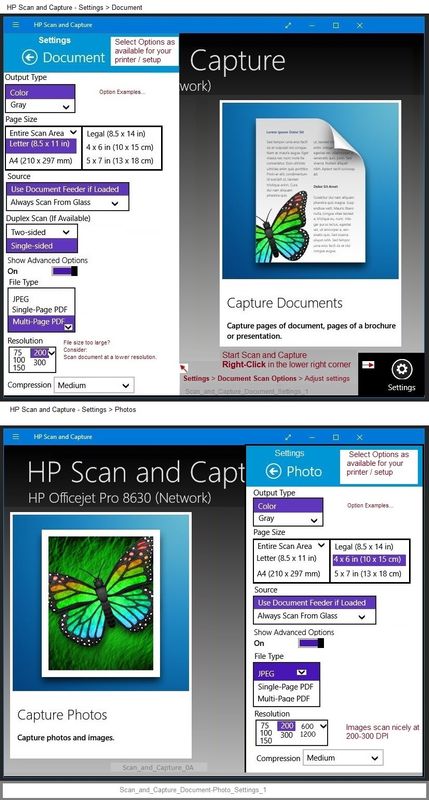
HP Scan and Capture - Microsoft Store (formally Windows Store) - Requires Windows 8 or higher
- Download-Save-Install HP Scan and Capture
Example
Scan_and_Capture_Document-Photo_Settings_1
and
What else?
@ShlomiL has recommended that HP Scan Extended apparently still works for scanning.
Caveat: HPSE is perhaps dependent on the Full Feature Software (previously "HP Solution Center") - if you uninstall the solution center after uninstalling Flash, you might not be able to reinstall it (since the old Solution Center depends on Flash). ??
HP Scan Extended
- Download-Save-Install > HP Scan Extended
- HPSE is a subset an older Full Feature Software suite.
- HPSE features are very similar to the HP Scan Software released after 2015.
- Although HPSE appears to be a separate software, HPSE is dependent on the infrastructure provided by the Full Feature Software. The Full Feature Software for your printer should be installed before installing and using HPSE.
- OPTIONAL: Add HP Scan Extended shortcut to Taskbar / Send to Desktop / Pin to Start
- Open File Explorer > Navigate to C:\Program Files (x86)\HP\HP Scan Extended\bin
- Right-Click HPScan.exe > Select Pin to Taskbar
- Right-Click HPScan.exe > Select Send to Desktop (Create a Shortcut)
- Right-Click HPScan.exe > Select Pin to Start
- HP Scan Extended features include (and are not limited to): Single, Multiple scans, Image and PDF scans, Email as PDF / JPEG, Source selection, Page Size choices include Auto-Detect (extracts image / document boundary). Might include OCR (Save as Editable Text).
Thank you for participating in the HP Community.
The Community is a separate wing of the HP website - We are not a business group of HP..
Our Community is comprised of volunteers - people who own and use HP devices.
Click Thumbs Up to say Thank You.
Question Resolved / Answered, Click "Accept as Solution" .
01-13-2021 01:04 AM
I found the solution! - https://h30434.www3.hp.com/t5/Printer-Setup-Software-Drivers/HP-Digital-Imaging-Monitor-doesn-t-work...
Hope this helps you! All the best!