• ×
    Information
    Need Windows 11 help?
    Check documents on compatibility, FAQs, upgrade information and available fixes.
    Windows 11 Support Center.
  • post a message
  • ×
    Information
    Need Windows 11 help?
    Check documents on compatibility, FAQs, upgrade information and available fixes.
    Windows 11 Support Center.
  • post a message
Guidelines
Join the HP Community Solve‑a‑thon | Help Others & Share Your Solutions | Live on Zoom | 2:30 PM to 2:30 AM IST | Every Wednesday Click here to know more
Check some of the most frequent questions about Instant Ink: HP INSTANT INK, HP+ PLANS: INK AND TONER.


Check out our WINDOWS 11 Support Center info about: OPTIMIZATION, KNOWN ISSUES, FAQs AND MORE.
HP Recommended
Apple iMac
Mac OS X 10.9 Mavericks

Wirelessly connected, however when I run Easy Start, the three elements , run, and seem to download, and then as Product Help fnishes, I get an error message, ;cannot instal software try later'. I tried opening the firewall and that did not work. Bought this printer earlier today and I am not happy 😞 

Dermot C.

1 REPLY 1
HP Recommended

@Seomra


A warm welcome to HP Support Community!

HP ENVY 4527 printer is AirPrint compatible. The following steps should help you remove the existing printer driver and setup the printer with Apple AirPrint.

Please ensure that the printer is up to date with its firmware and Mac is up to date with it's software. If you are unsure you may use the links below to update the printer firmware and Mac software:

Update printer firmware

Update software on Mac 


1.) Click the Apple menu, click System Preferences, and then click Print & Scan or Printers & Scanners.
2.) Check if your printer name displays in the Printers list, If your printer is listed, click the printer name, click the minus sign to delete the printer.

3.) If you see multiple printer queues for the same printer, remove all extra printers by selecting them one at a time, and then clicking the minus button  at the bottom of the list.

4.) Click the plus sign , click Add Printer or Scanner, click the printer name.
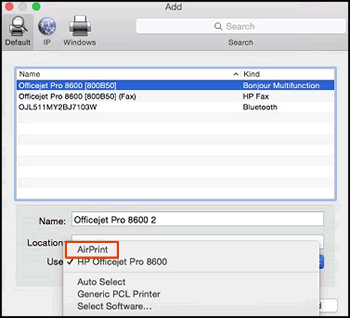
5.) Click the Use or Print Using menu, select AirPrint or secure AirPrint in the pop-up menu. Then click Add.

Select AirPrint from the Use menu


6.) Try to print.


HP Easy start also installs the printer essential software like HP Easy Scan and HP Utility. If you would like to use them, you may download and install HP Easy Scan and HP Utility from the links below:

HP Easy Scan

HP Printer Utility for Mac OS X


If the information I've provided was helpful, give us some reinforcement by clicking the Accepted Solution and Kudos buttons, that'll help us and others see that we've got the answers!
Have a great day!

Senan6806


I am an HP Employee

† The opinions expressed above are the personal opinions of the authors, not of HP. By using this site, you accept the <a href="https://www8.hp.com/us/en/terms-of-use.html" class="udrlinesmall">Terms of Use</a> and <a href="/t5/custom/page/page-id/hp.rulespage" class="udrlinesmall"> Rules of Participation</a>.