• ×
    Information
    Need Windows 11 help?
    Check documents on compatibility, FAQs, upgrade information and available fixes.
    Windows 11 Support Center.
  • post a message
  • ×
    Information
    Need Windows 11 help?
    Check documents on compatibility, FAQs, upgrade information and available fixes.
    Windows 11 Support Center.
  • post a message
Guidelines
Seize the moment! nominate yourself or a tech enthusiast you admire & join the HP Community Experts!
Check some of the most frequent questions about Instant Ink: HP INSTANT INK, HP+ PLANS: INK AND TONER.


Check out our WINDOWS 11 Support Center info about: OPTIMIZATION, KNOWN ISSUES, FAQs AND MORE.
HP Recommended
HP OfficeJet 7110 Wide Format ePrinter - H812a
Microsoft Windows 10 (64-bit)

Hello,


I am having problems printing A3 size paper in the architectural program Autocad.
The horizontal lines are hatched and are not solid
I don't have this problem with printing A4 paper.
Previously, A3 printing always went well. on the HP Officjet 7110 (Windows 10 64 bit)


See the image:

IMG-20231105-WA0000.jpg


What I've done:
- Reinstalled several drivers: the extended version 29.2.1009 - 54.7 MB and the basic version 29.2.1009 - 20.3 MB.
- I removed the printer software via programs and feature.
- Via the run command with the "Windows Key + R" key combo, I ran printui.exe /s and uninstalled HP Printer driver. After this, reinstalled the printer driver, both USB and WIFI.
- I also uninstall the printer software from the root level on your PC and install the full feature printer software: via device manager delete the printer. And also use printui.exe /s and c:/programdata. Then I used “services.msc”, and the two looked at “Remote Procedure Call (RPC)” and “Function Discovery Provider Host” and “Function Discovery Resource Publication”.
- I have used various AutoCAD programs for printing.
- I printed an A3 PDF page from Acrobat reader
- Latest Firmware installed
- Windows update run
- The printer is connected to another computer and the correct printer drivers are installed: only A4 paper is currently printed out


Can you help me further?


Sometimes I won't respond until later because I am very busy. Apologies for this

6 REPLIES 6
HP Recommended

@Bisschop56 


Welcome to the HP Community --


Review for those reading - Full Feature Printer Software

It is important for A3 printing that two criteria are met:

  • The Full Feature Software should be installed for the supported version of Windows


Next,

If not done...

Try / Consider

  • Printer Properties > Advanced > Driver must be set to the HP Driver and not the Windows IPP / Class driver


Details / Examples


=========================================

Printer - Printer Software


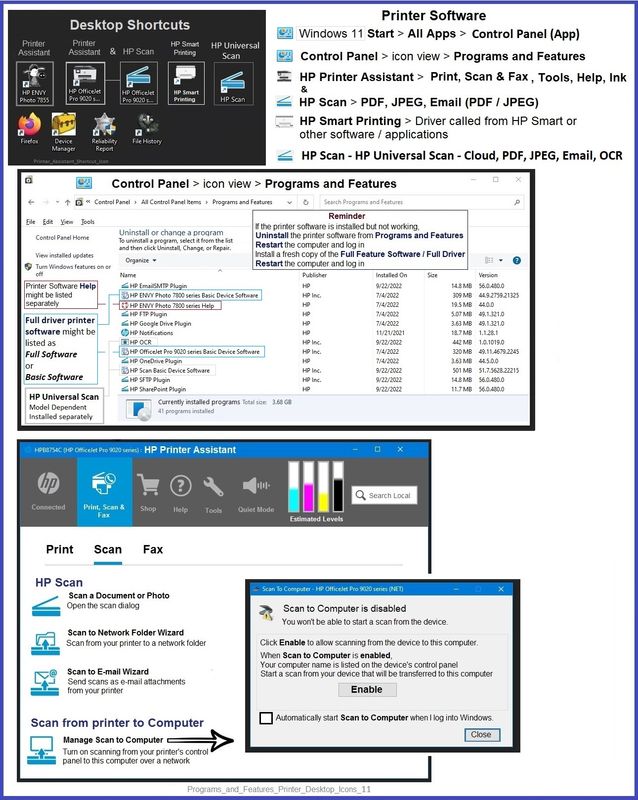
HP Full Feature Software / Full Driver printer software - supports printing and scanning from the web, printing in in other software and programs (for example, Word), and provides access to the full range of Printing Preferences / Shortcuts.  The full driver adds at least two shortcuts to the Desktop: Printer Assistant and HP Scan. If the printer model includes built-in Fax hardware, the software supports the setup and use of the Fax driver. No Sign-in required.


Details Page - Driver - For your Printer

>>> Full Feature Software - Web Pack Installation Package - Information - Download / Save / Install <<<

HP Officejet 7110 series Full Feature Software and Drivers 

After the software is installed, Restart the computer and sign in.


====================================

The installation of the full driver adds at least two shortcuts to the Desktop:  

Printer Assistant 

HP Scan


>>> Open the Printer Assistant > tab Scan Manage Scan to Computer Enable


Example - Windows - Full Feature Software - Installed in Programs and Features

Programs_and_Features_Printer_Desktop_Icons_11Programs_and_Features_Printer_Desktop_Icons_11


=========================================

Printer - Printer Properties


Printer Properties > Advanced > Driver = the HP driver (not the Microsoft / IPP class driver)


Example - Windows - Printer Properties

9025_Printer_Properties_Advanced_Driver_List_119025_Printer_Properties_Advanced_Driver_List_11


=+=+=+=+=+=+=+=+=+=+=+=+=+=

References / Resources


HP Printer Home Page - References and Resources

Learn about your Printer - Solve Problems

“Things that are your printer”

When the website support page opens, Select (as available) a Category > Topic > Subtopic

NOTE: Content depends on device type and Operating System

Categories: Alerts, Troubleshooting, Ink & Paper, HP Software / Drivers / Firmware Updates , Setup & User Guides, Product Specifications, Account & Registration, Warranty & Repair

Open

HP OfficeJet 7110 Wide Format ePrinter series - H812  


Thank you for participating in the HP Community --

People who own, use, and support HP devices.

Click Yes to say Thank You

Question / Concern Answered, Click my Post "Accept as Solution"


Dragon-Fur

HP Recommended

Thanks for your quick response.
Sorry for my late response.

I have checked extra, regarding the software and drivers:
The full printer software was installed.
I downloaded the software, via the link you provided and re-installed it.

I only have the 'HP Printer Assistant' icon:

Bisschop56_0-1699791901360.png

I do not have HP Scan, because the 7110 HP Officjet does not have a scanner either.
HP 7110 series Help I do have.
Also see:

Bisschop56_1-1699792183062.png


Furthermore, under Properties and drivers, the HP printer is selected:

Bisschop56_2-1699792478825.png

Under Device Settings it also says A3 (the settings are standard on A4):

Bisschop56_3-1699792564705.png

In another HP Officjet 7110 Properties Menu you can perhaps adjust other settings?

See also:

Bisschop56_4-1699792903809.png


Other options I haven't tried yet:
- Try to connect the printer via UTP connection
- When installing the full driver and software of HP 7110, it was asked to allow the diagnostic data, and to synchronize some data to HP. I clicked no.
- I use an English version of Windows 10 64 bit Pro. 3 months ago I could just print A3 correctly. Perhaps a Windows 10 update has ensured that only A4 can be printed properly?


Bisschop56_5-1699793214119.png


Can you help me further?

Would you like to see other menus from the 7110 printer?

HP Recommended

@Bisschop56 


You are welcome.


Ah!  I will have to update my notes about the full driver adding HP Scan along with the other bits of the software.

Will do that...


Disclaimer

I don't know (really much of anything) about this particular model -- it's older than the newer wide body (7740) but does seem to have some of the same mechanicals.


I'm not sure it will prove anything -

Check the pixel density of the original drawing file -- it's not likely changed but might be worth a look.

Perhaps try printing a Poster section of the CAD drawing in Adobe Acrobat.

Select A4 paper -- Depending on the size of the original, the section might be printed large enough to check the detail.


True - Windows Updates can impact printer software -- generally, though, the steps you already completed (removing and reloading the software) corrects driver issues.


Dirt, wear and tear, and service life impact the printer's ability to do its best.   


I think we should ask someone who perhaps knows the product line better than I.

@Repairatrooper  - Can you provide Words of Wisdom?  Thanks in advance!


Thank you for participating in the HP Community --

People who own, use, and support HP devices.

Click Yes to say Thank You

Question / Concern Answered, Click my Post "Accept as Solution"


Dragon-Fur

HP Recommended

@Dragon-Fur


And thanks again for your feedback.

I looked at the pixel density. That should go well.
I also exported A4 and A1 to PDF in Autocad and opened both format files in Adobe Acrobat.
Then printed the files in A3 format.
Unfortunately, the lines are not printed straight.

Do you or anyone else have any suggestions?
Possibly someone from HP is in contact with Microsoft, referring to the drivers that may have been adjusted in recent months with regard to printing in A3 format?

HP Recommended

@Bisschop56 


You are welcome.


The printer supports Ethernet, Wireless, and USB -- Unshielded twisted pair (UTP), is not one of these.  Perhaps UTP is a standard in your region and I am misunderstanding the definition,


Printer Specifications for HP Officejet 7110 Wide Format ePrinter Series

Connectivity

Model
Wireless
Ethernet
USB
HP Officejet 7110 Wide Format ePrinter - H812A
Yes
Yes
Yes


Ethernet and a decent, updated router generally provides the most stable connection (in my experience).


I do not see where you might have reinstalled the printer software.

Windows Updates are certainly a potential source of changes in the printer driver behavior.

If you have not done so, consider uninstalling / installing the Full Feature Software.


No changes have been made to the drivers - more recent release was in 2021.


========================================

Printer - Printer Software - Windows


HP Full Feature Software / Full Driver printer software - supports printing and scanning from the web, printing in in other software and programs (for example, Word), and provides access to the full range of Printing Preferences / Shortcuts.  The full driver adds at least two shortcuts to the Desktop: Printer Assistant and HP Scan. If the printer model includes built-in Fax hardware, the software supports the setup and use of the Fax driver. No Sign-in required.


Basics - Printer Software


Note: Skip part(s) that are not relevant to your situation.


Uninstall the full driver printer software from Programs and Features

Restart computer and Sign in

Install a new copy of the Full Feature Software

Restart computer and Sign in


Full Feature Software / Full Driver printer software

Details Page - Driver - For your Printer

>>> Full Feature Software - Web Pack Installation Package - Information - Download / Save / Install <<<

HP Officejet 7110 series Full Feature Software and Drivers 


=== --- === --- === --- === --- ===

Printer Assistant - Manage Scan to Computer


The installation of the full driver generally adds at least two shortcuts to the Desktop.

NOTE > HP Scan is not installed if the printer does not support Scan.


Printer Assistant 

HP Scan


When needed / wanted, enable "Scan to Computer" using the Printer Assistant


Open the Printer Assistant > Tab Scan > Manage Scan to Computer > Enable


Example - Full Feature Software - Installed - Programs and Features

Programs_and_Features_Printer_Desktop_Icons_11Programs_and_Features_Printer_Desktop_Icons_11


Thank you for participating in the HP Community --

People who own, use, and support HP devices.

Click Yes to say Thank You

Question / Concern Answered, Click my Post "Accept as Solution"


Dragon-Fur

HP Recommended

Hello,
Recently I installed a new Windows update. And guess what, the horizontal lines are now better!
Unfortunately, the lines still shift a little bit.


Furthermore, I reinstalled the printer driver and connected the printer via UTP cable. Unfortunately, the effect remains the same.


I hope that a next Windows update will make the horizontal lines completely straight.

I'll keep you informed.

† The opinions expressed above are the personal opinions of the authors, not of HP. By using this site, you accept the <a href="https://www8.hp.com/us/en/terms-of-use.html" class="udrlinesmall">Terms of Use</a> and <a href="/t5/custom/page/page-id/hp.rulespage" class="udrlinesmall"> Rules of Participation</a>.