• ×
    Information
    Need Windows 11 help?
    Check documents on compatibility, FAQs, upgrade information and available fixes.
    Windows 11 Support Center.
  • post a message
  • ×
    Information
    Need Windows 11 help?
    Check documents on compatibility, FAQs, upgrade information and available fixes.
    Windows 11 Support Center.
  • post a message
Guidelines
Seize the moment! nominate yourself or a tech enthusiast you admire & join the HP Community Experts!
Check some of the most frequent questions about Instant Ink: HP INSTANT INK, HP+ PLANS: INK AND TONER.


Check out our WINDOWS 11 Support Center info about: OPTIMIZATION, KNOWN ISSUES, FAQs AND MORE.
HP Recommended

Bought laptop in June.  It automatically updated to windows 11  Everything seemed to work fine.  Had an older hp 6940 printer that printed fine and was recognized by the laptop and windows 11.  About a month or so later windows 11 updated itself.  I lost all ability to print from any program or app.  I thought it might be the printer, it being older and no longer supported.  I purchased a new printer, hp 4255e, and connected it via usb port on laptop.  Windows recognized and install the printer immediately.  I am able to scan but still unable to print.  I downloaded the HP Smart app to connect to the printer and manage its features.  The app installed but shows nothing but a blank interface. Uninstalled and reinstalled the app and the printer numerous times to no avail.  Stop and started the print spooler numerous times to no avail.   Been nearly three months and have tried every solution offered on various websites including this one.  I could really use some expert advice to resolve this issue.


One other thing.  Hp support says my warranty has expired.  I bought this laptop in June 2025 .  How can my warranty be expired already? 


Somebody please help.

1 REPLY 1
HP Recommended

Hi @GFFrontera 

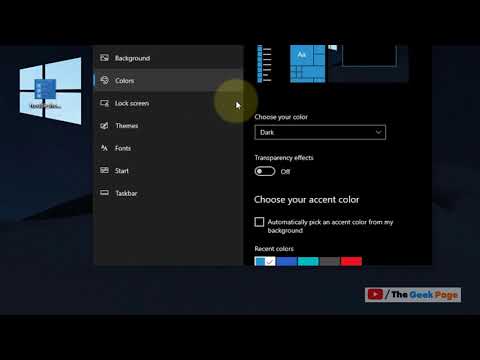
1.  Change your windows screen mode to Light Mode, follow steps from the next video:

Windows > Settings > Personalization > Colors > Choose your Color > Light


>> https://www.youtube.com/watch?v=x5a5PLbLbnY&ab_channel=TheG


2.  Then try again to open your HP Smart app.


* Click YES   to say thank you, 

* Click Accepted as Solution when question is answered.

Best regards,

ferRX.

dodecaedroh.gif,.,.,.


@ferRX / I am a volunteer posting answers on my own time.
† The opinions expressed above are the personal opinions of the authors, not of HP. By using this site, you accept the <a href="https://www8.hp.com/us/en/terms-of-use.html" class="udrlinesmall">Terms of Use</a> and <a href="/t5/custom/page/page-id/hp.rulespage" class="udrlinesmall"> Rules of Participation</a>.