• ×
    Information
    Need Windows 11 help?
    Check documents on compatibility, FAQs, upgrade information and available fixes.
    Windows 11 Support Center.
  • post a message
  • ×
    Information
    Need Windows 11 help?
    Check documents on compatibility, FAQs, upgrade information and available fixes.
    Windows 11 Support Center.
  • post a message
Guidelines
Join the HP Community Solve‑a‑thon | Help Others & Share Your Solutions | Live on Zoom | 2:30 PM to 2:30 AM IST | Every Wednesday Click here to know more
Check some of the most frequent questions about Instant Ink: HP INSTANT INK, HP+ PLANS: INK AND TONER.


Check out our WINDOWS 11 Support Center info about: OPTIMIZATION, KNOWN ISSUES, FAQs AND MORE.
HP Recommended

I forgot the admin name and password I set on my printer back when I first got it in 2018. It's a DeskJet 2640 and the serial number isn't registering on the website for some reason. I can't find a way to reset the printer back to 100% factory defaults to allow me to setup a new admin name and password. This is preventing me from adding my printer to my home WiFi network, making printing a tedious task. Is there any way for me to remedy this issue?

3 REPLIES 3
HP Recommended

Hi @BLittleton 

Please follow steps from the next video:

>> https://www.youtube.com/watch?v=z7-7KuV31Tw&ab_channel=CopyPrintScan

* Click YES   to say thank you, 

* Click Accepted Solution when question is answered.

Best regards,

ferRX.

dodecaedroh.gif


@ferRX / I am a volunteer posting answers on my own time.
HP Recommended

This does not work, I tried this before posting here as I have googled the issue and every solution I've found with google does not work either. 

HP Recommended

Hi @BLittleton 


Ok, then try with the next steps:


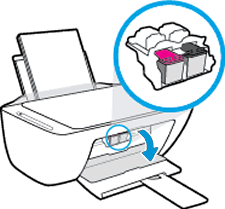
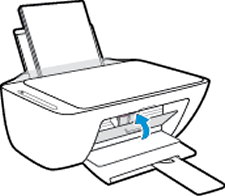
1.  Turn on your printer and open the cartridge door.


2.  Press and hold Power button and Wireless button during 3 seconds.

  • ferRX_0-1734419053745.png


  • ferRX_0-1734418612761.png


3.  Wait 20 seconds and then close the cartridge door,

  •  

4.  Then try again to install your printer.


* Click YES   to say thank you, 

* Click Accepted Solution when question is answered.

Best regards,

ferRX.

dodecaedroh.gif


@ferRX / I am a volunteer posting answers on my own time.
† The opinions expressed above are the personal opinions of the authors, not of HP. By using this site, you accept the <a href="https://www8.hp.com/us/en/terms-of-use.html" class="udrlinesmall">Terms of Use</a> and <a href="/t5/custom/page/page-id/hp.rulespage" class="udrlinesmall"> Rules of Participation</a>.