• ×
    Information
    Need Windows 11 help?
    Check documents on compatibility, FAQs, upgrade information and available fixes.
    Windows 11 Support Center.
  • post a message
  • ×
    Information
    Need Windows 11 help?
    Check documents on compatibility, FAQs, upgrade information and available fixes.
    Windows 11 Support Center.
  • post a message
Guidelines
Here is the solution for the error: "Encryption Credentials have expired" when attempting to print or scan from Mac OS or iOS devices: Click here to view the troubleshooting steps!
Check some of the most frequent questions about Instant Ink: HP INSTANT INK, HP+ PLANS: INK AND TONER.


Check out our WINDOWS 11 Support Center info about: OPTIMIZATION, KNOWN ISSUES, FAQs AND MORE.
HP Recommended
Microsoft Windows 10 (64-bit)

englishenglishchinesechinese


Which one is correct?

3 REPLIES 3
HP Recommended

@john_green 


If you are in the USA, then neither one is correct if you expect the information to be USA / English.


If you are elsewhere, then I'd guess you would still only want / need a single entry.


What if?

IF the second entry is actually displayed in the language selected in the first "Information" list, perhaps it is simply duplicated for your convenience.  Disclaimer:  I don't read Chinese - I cannot judge whether this statement is silly.


If you cannot correct the entry by changing the information,

If it all seems wrong / out-of-place and if the application is not working as expected,

Try / Consider

Scroll down to Manage > Forget this Printer

Close the application

Restart your printer

Open HP Smart Windows

Add your printer using the information that is correct for your region and preferred language.


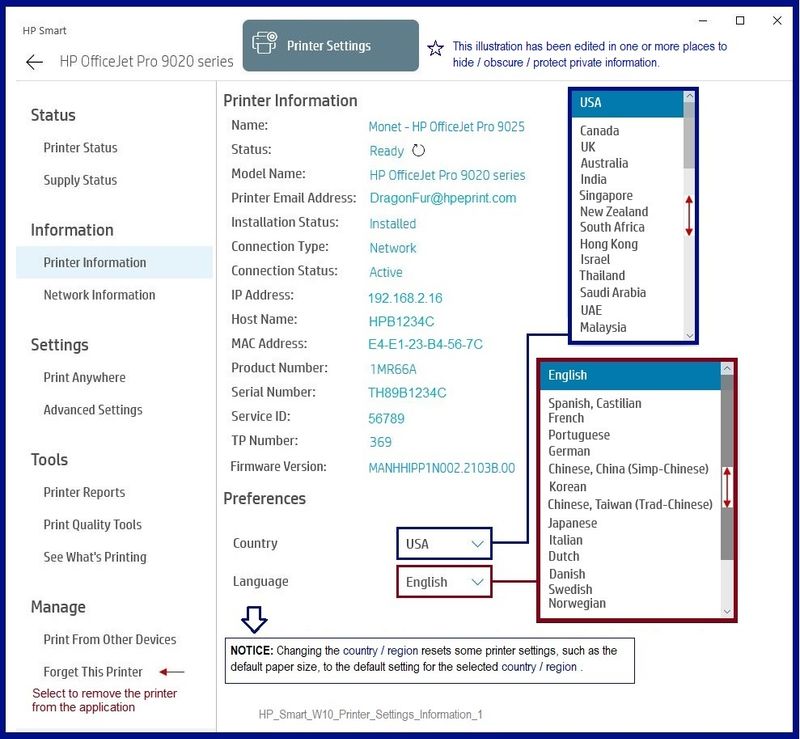
Example - HP Smart W10 - Settings > Printer Information

HP_Smart_W10_Printer_Settings_Information_1.jpg


HP Printer Home Page - References and Resources – Learn about your Printer  - Solve Problems

 “Things that are your printer”

NOTE:  Content depends on device type and Operating System

Categories:  Alerts, Access to the Print and Scan Doctor (Windows), Warranty Check, HP Drivers / Software / Firmware Updates, How-to Videos, Bulletins/Notices, Lots of How-to Documents, Troubleshooting, Manuals > User Guides, Product Information (Specifications), more

When the website support page opens, Select (as available) a Category > Topic > Subtopic

Product Home

Enter the type and name of your HP device


Thank you for participating in the HP Community.

The Community is a separate wing of the HP website - We are not an HP business group.

Our Community is comprised of volunteers - people who own and use HP devices.

Click Thumbs Up to say Thank You.

Question / Concern Answered, Click "Accept as Solution"

Dragon-Fur

HP Recommended

Hey,

From reviewing your screenshot and using Google Translate, could you please clarify what the problem is?


I can see your printer is set to Chinese  (Language) and Taiwan (Location) in both screenshots, the only difference is the app language which is affected by the computer.


Here is a screenshot of a translation from your Chinese language PC's screen, which is identical for the printer as listed in the other PC:

TEST.jpg


I would say that both are correct, both says Taiwan...


If you refer to the app language itself,. the HP Smart is displayed as your OS language / Non-Unicode setting, to change the app language you would need to change your computer OS settings, if you refer to the printer setting, simply change it from any of the PCs to the required value.


Shlomi


Click the Yes button to reply that the response was helpful or to say thanks.
If my post resolve your problem please mark it as an Accepted Solution 🙂
HP Recommended

hi @Dragon-Fur and @ShlomiL,


Sorry it wasn't clear enough in the message.


In Chinese (simplified and traditional), the label is "Country/Region", and the list items are "Taiwan, China" and "Hong Kong, China", while in other languages, the label is "Country" and the items are "Taiwan" and "Hong Kong".

This is very sensitive in these regions. Please be sure that HP considers Taiwan and Hong Kong to be Countries or a part of China.

† The opinions expressed above are the personal opinions of the authors, not of HP. By using this site, you accept the <a href="https://www8.hp.com/us/en/terms-of-use.html" class="udrlinesmall">Terms of Use</a> and <a href="/t5/custom/page/page-id/hp.rulespage" class="udrlinesmall"> Rules of Participation</a>.