• ×
    Information
    Need Windows 11 help?
    Check documents on compatibility, FAQs, upgrade information and available fixes.
    Windows 11 Support Center.
  • post a message
  • ×
    Information
    Need Windows 11 help?
    Check documents on compatibility, FAQs, upgrade information and available fixes.
    Windows 11 Support Center.
  • post a message
Guidelines
Seize the moment! nominate yourself or a tech enthusiast you admire & join the HP Community Experts!
Check some of the most frequent questions about Instant Ink: HP INSTANT INK, HP+ PLANS: INK AND TONER.


Check out our WINDOWS 11 Support Center info about: OPTIMIZATION, KNOWN ISSUES, FAQs AND MORE.
HP Recommended
HP Envy 4500
macOS 10.13 High Sierra

Hello,

I lost the recto-verso printing function after upgrading my printer driver on my HP Envy 4500 model A9T80

I am running a MacBookPro, high Sierra.

It was working fine before the update, now I don't see any reference to recto verso printing in all the different dialog boxes


The actual(updated) driver is: HP Inkjet 1 Driver 3.6.1, I took it on HP web site

HP Easy Start  2.9.0.180  9.1 MB  Sep 24, 2018

HP ENVY 4500 e-All-in-One Printer series Firmware Update1828A  7.8 MB  Aug 29, 2018


Is there any way to go back to the old driver???how can I do that???

Your help would be much appreciated


------------------------------------------------------------------------------

HP ENVY 4500 series : 

  État : Inactif

  Serveur d’impression : Local

  Version du gestionnaire : 3.6.1

  Par défaut : Oui

  Partage d’imprimantes système : Non

  Partagé : Non

  URI : dnssd://HP%20ENVY%204500%20series%20%5BD3E5AB%5D._ipp._tcp.local./?uuid=1c852a4d-b800-1f08-abcd-fc15b4d3e5ab

  PPD : HP ENVY 4500 e-All-in-One

  Version du fichier PPD : 3.6.1

  Version PostScript : (3011.104) 0

  Version CUPS : 2.2.5 (cups-462.2.4)

  Assistance numérisation : Oui

  Application de numérisation : /Library/Image Capture/Devices/HP Scanner 3.app

  Application de numérisation (chemin bundleID) : -

  Version de l’application de numérisation : 4.22.5

  UUID scanner : 1C852A4D-B800-1F08-ABCD-FC15B4D3E5AB

  Commandes de l’imprimante : ReportLevels 

  Ajouté : mardi 20 October 2018 at 1:15:02 PM GMT-04:00

  Filtres CUPS :

Inkjet1 :

  Chemin : /Library/Printers/hp/cups/Inkjet1.driver/Contents/MacOS/Inkjet1

  Autorisations : r-xr-xr-x

  Version : 3.6.1

commandtohp :

  Chemin : /Library/Printers/hp/cups/filters/commandtohp.filter/Contents/MacOS/commandtohp

  Autorisations : r-xr-xr-x

  Version : 2.4.1

  Assistance fax : Non

  Utilitaire de l’imprimante : /Library/Printers/hp/Utilities/HP Utility.app

  Version de l’utilitaire de l’imprimante : 5.42.1

  PDE :

PDE.plugin :

  Conforme à Sandbox : Oui

1 ACCEPTED SOLUTION

Accepted Solutions
HP Recommended

Things have changed in the latest driver.

Yes.....  I got it to print recto verso finally.

there is a sub-menu that I missed completely (Page Layout) as I saw the same sub-menu in 2 different places. They are both called exactly the same but have different functionnality!!!

You have to chose the third tab down under File,Print it is where you can access recto verso parameter.

View solution in original post

3 REPLIES 3
HP Recommended

@Lepapehermann


Welcome to HP Forums. This is a great place to get support, find answers and tips to your technical queries.

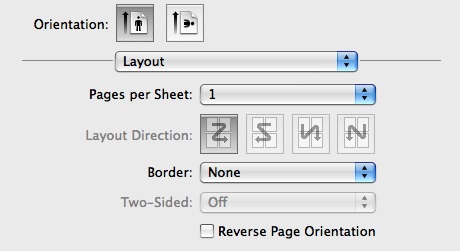
Changing the page orientation in the print dialogue box should allow us to control which direction a document prints, let's try these steps:

1.) In the application you would like to print from, choose Print from the File menu.

2.) Click the icon next to Orientation, representing the page orientation you would like to use: Portrait (vertical) or Landscape (horizontal).

3.) If you would like to reverse the page orientation (rotate 180 degrees), choose Layout from the pop-up menu in the Print window, then check (enable) "Reverse Page Orientation". For example, if you want the top of your document to print on the left edge of the paper, you would select Landscape orientation and enable Reverse Page Orientation.


You may also refer to this document.

Let me know how it goes!


If the information I've provided was helpful, give us some reinforcement by clicking the Accepted Solution and Kudos buttons, that'll help us and others see that we've got the answers!
Have a great day!

Senan6806


I am an HP Employee

HP Recommended

Things have changed in the latest driver.

Yes.....  I got it to print recto verso finally.

there is a sub-menu that I missed completely (Page Layout) as I saw the same sub-menu in 2 different places. They are both called exactly the same but have different functionnality!!!

You have to chose the third tab down under File,Print it is where you can access recto verso parameter.

HP Recommended

@Lepapehermann


Glad to hear that the issue is resolved.

If you need any help, feel free to reach out to us. Have a great day!

Senan6806


I am an HP Employee

† The opinions expressed above are the personal opinions of the authors, not of HP. By using this site, you accept the <a href="https://www8.hp.com/us/en/terms-of-use.html" class="udrlinesmall">Terms of Use</a> and <a href="/t5/custom/page/page-id/hp.rulespage" class="udrlinesmall"> Rules of Participation</a>.