-
×InformationNeed Windows 11 help?Check documents on compatibility, FAQs, upgrade information and available fixes.
Windows 11 Support Center. -

-
×InformationNeed Windows 11 help?Check documents on compatibility, FAQs, upgrade information and available fixes.
Windows 11 Support Center. -
- HP Community
- Printers
- Printer Setup, Software & Drivers
- Re: Mac OS 11.2.2 hp6700 unable to print

Create an account on the HP Community to personalize your profile and ask a question
03-03-2021 06:48 AM
Hi,
Anyone else having problems with printing on a 6700 after upgrading to Mac OS 11.2.2? I think I have tried everything suggested uninstall/install/remove printers/reinstalling software and still no luck. Scanning seems to work but unable to print. Printer still works fine for windows hosts.
Solved! Go to Solution.
Accepted Solutions
03-07-2021 11:47 AM - edited 03-07-2021 11:48 AM
@ShiraneK, Welcome to HP Support Community!
Follow the steps below, try to add the printer using AirPrint drivers-
Ensure that the printer is up to date with its firmware and Mac is up to date with its software. If you are unsure you may use the links below to update the printer firmware and Mac software:
Remove and add the printer
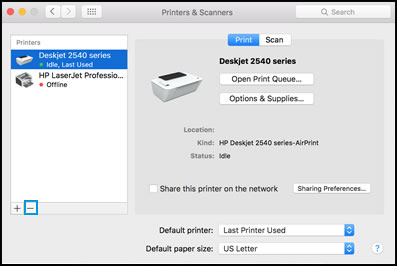
Click the Apple menu, and then select System Preferences.
Depending on your operating system version, click Print & Fax, Print & Scan, or Printers & Scanners.
Click the name of your printer, click the Minus sign
, and then delete the printer.

Click the Plus sign
, and then click Add Printer or Scanner.
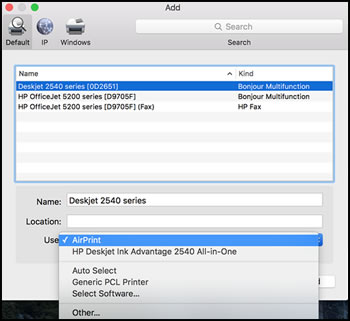
Click the Use or Print Using box, and then select AirPrint

Click Add to add the printer to the list.
Try to print.
Keep me posted for further assistance.
Please click “Accepted Solution” if you feel my post solved your issue, it will help others find the solution. Click the “Kudos/Thumbs Up" on the bottom right to say “Thanks” for helping!
TEJ1602
I am an HP Employee
03-07-2021 11:47 AM - edited 03-07-2021 11:48 AM
@ShiraneK, Welcome to HP Support Community!
Follow the steps below, try to add the printer using AirPrint drivers-
Ensure that the printer is up to date with its firmware and Mac is up to date with its software. If you are unsure you may use the links below to update the printer firmware and Mac software:
Remove and add the printer
Click the Apple menu, and then select System Preferences.
Depending on your operating system version, click Print & Fax, Print & Scan, or Printers & Scanners.
Click the name of your printer, click the Minus sign
, and then delete the printer.

Click the Plus sign
, and then click Add Printer or Scanner.
Click the Use or Print Using box, and then select AirPrint

Click Add to add the printer to the list.
Try to print.
Keep me posted for further assistance.
Please click “Accepted Solution” if you feel my post solved your issue, it will help others find the solution. Click the “Kudos/Thumbs Up" on the bottom right to say “Thanks” for helping!
TEJ1602
I am an HP Employee