• ×
    Information
    Need Windows 11 help?
    Check documents on compatibility, FAQs, upgrade information and available fixes.
    Windows 11 Support Center.
  • post a message
  • ×
    Information
    Need Windows 11 help?
    Check documents on compatibility, FAQs, upgrade information and available fixes.
    Windows 11 Support Center.
  • post a message
Guidelines
Join the HP Community Solve‑a‑thon | Help Others & Share Your Solutions | Live on Zoom | 2:30 PM to 2:30 AM IST | Every Wednesday Click here to know more
Check some of the most frequent questions about Instant Ink: HP INSTANT INK, HP+ PLANS: INK AND TONER.


Check out our WINDOWS 11 Support Center info about: OPTIMIZATION, KNOWN ISSUES, FAQs AND MORE.
HP Recommended
OfficeJetPro HP 7730
macOS 10.13 High Sierra

I cannot get printer to print from drawer 2.  I did find a similar question, and I looked in the manual.  I do not have "source" when I go into "file-print."  The ONLY way I have been successful is if I open drawer 1 - hit print - then it bumps to drawer 2 because 1 is not available.  Obviously there has to be a better way.


Thanks.

1 REPLY 1
HP Recommended

@AmyS96


A warm welcome to HP Community!

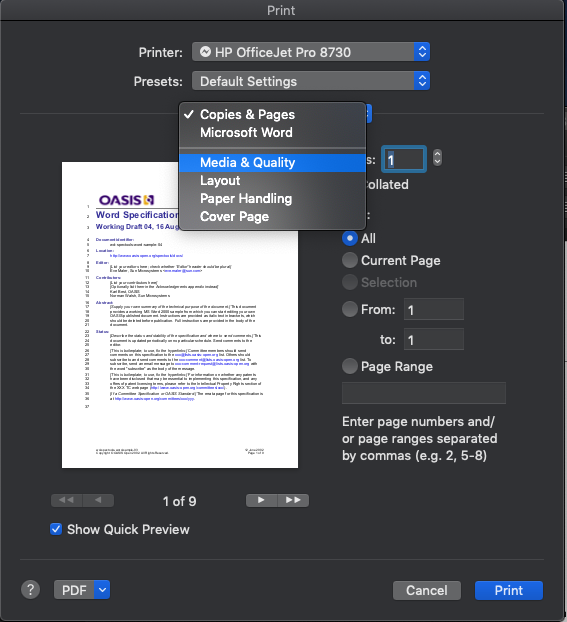
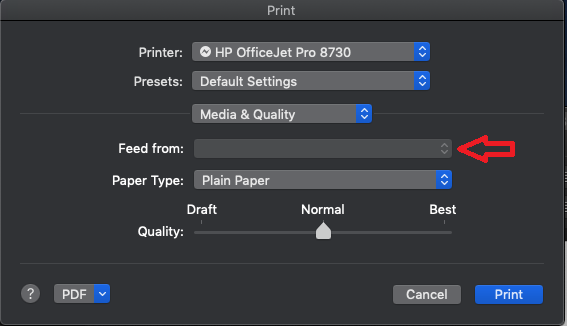
I believe the Feed from setting is available under the Media & Quality option. Here is how to adjust the Feed from option:

1.) Open a document, click File, and then click Print to open the print dialog.

2.) If a Show Details button displays at the bottom of the dialog, click it to reveal all available menu options. 

3.) Click the unnamed print options menu and select Media & Quality, Select tray 2 in feed from option.


4.) Click Print.

Once the print job is complete, these settings will be set as default for future print jobs until you select a new preset or change settings.

You can also save your settings for future print jobs, click the Presets menu, and then select Save Current Settings as Preset.


Let me know how it goes!


If the information I've provided was helpful, give us some reinforcement by clicking the Accepted Solution and Kudos buttons, that'll help us and others see that we've got the answers!
Have a great day!

Senan6806


I am an HP Employee

† The opinions expressed above are the personal opinions of the authors, not of HP. By using this site, you accept the <a href="https://www8.hp.com/us/en/terms-of-use.html" class="udrlinesmall">Terms of Use</a> and <a href="/t5/custom/page/page-id/hp.rulespage" class="udrlinesmall"> Rules of Participation</a>.