• ×
    Information
    Need Windows 11 help?
    Check documents on compatibility, FAQs, upgrade information and available fixes.
    Windows 11 Support Center.
  • post a message
  • ×
    Information
    Need Windows 11 help?
    Check documents on compatibility, FAQs, upgrade information and available fixes.
    Windows 11 Support Center.
  • post a message
Guidelines
Here is the solution for the error: "Encryption Credentials have expired" when attempting to print or scan from Mac OS or iOS devices: Click here to view the troubleshooting steps!
Check some of the most frequent questions about Instant Ink: HP INSTANT INK, HP+ PLANS: INK AND TONER.


Check out our WINDOWS 11 Support Center info about: OPTIMIZATION, KNOWN ISSUES, FAQs AND MORE.
HP Recommended
OfficeJet Pro 8630
iOS

HP OfficeJet 8630 needs to be able to pick which tray to print from automatically based on the default paper size and type we have selected. Currently, I have Tray 1 filled with 4x6 Photo paper and Tray 2 as Plain Letter. When I print from macOS, it’s fine as I can dictate which tray (jic), but when I select a photo in iOS and print using AirPrint, it appears it sees and is going to print 4x6 size on 4x6 photo paper. It does not. It prints the photo full blown on my letter paper. It appears AirPrint is only allowed to print to the default tray setting on the printer. Normal folks would have my setup for this printer (it would seem): Tray 2 as default as it’s US Letter 8.5x11 Plain Paper (locked) and Tray 1 as 4x6 Photo paper.

1 REPLY 1
HP Recommended

@Dan_Batson


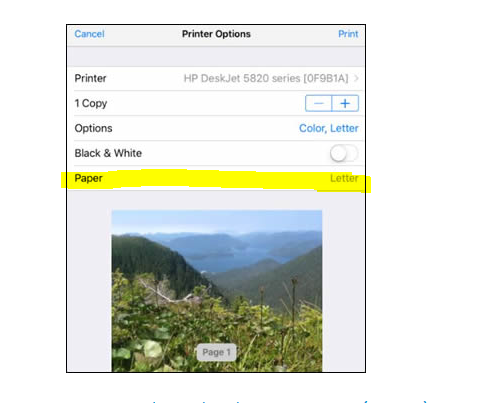
If you are printing from Aiprint you need to change the Paper Type, from Letter to Photo


Make any paper size changes on the printer. AirPrint automatically detects the paper size loaded in the printer or the size selected on the printer control panel.


Link: https://support.hp.com/in-en/document/c02623193 


Also ensure your Printer has the latest Firmware. Link: https://support.hp.com/in-en/document/c02919168


You can also try printing using HP Smart App. Link: https://support.hp.com/in-en/document/c06097800


Keep me posted


If the information I've provided was helpful, give us some reinforcement by clicking the "Solution Accepted" on this Post and it will also help other community members with similar issue.


KrazyToad
I Am An HP Employee

† The opinions expressed above are the personal opinions of the authors, not of HP. By using this site, you accept the <a href="https://www8.hp.com/us/en/terms-of-use.html" class="udrlinesmall">Terms of Use</a> and <a href="/t5/custom/page/page-id/hp.rulespage" class="udrlinesmall"> Rules of Participation</a>.