-
×InformationNeed Windows 11 help?Check documents on compatibility, FAQs, upgrade information and available fixes.
Windows 11 Support Center. -

-
×InformationNeed Windows 11 help?Check documents on compatibility, FAQs, upgrade information and available fixes.
Windows 11 Support Center. -
- HP Community
- Printers
- Printer Setup, Software & Drivers
- Officejet 8720 and Mojave

Create an account on the HP Community to personalize your profile and ask a question
10-25-2018 09:11 AM - edited 10-25-2018 09:17 AM
I apologize if this has been asked...I have searched without any luck. After downloading Mojave on my older MacBook Pro (2016), my printer will not work. Am I out of luck?
Solved! Go to Solution.
Accepted Solutions
10-27-2018 12:50 PM
Welcome to HP Forums. This is a great place to get support, find answers and tips.
I have gone through your Post and I would like to help
Let's start by checking for any latest printer Firmware updates
Select the Setup or Settings menu, select Preferences, Printer Maintenance or Tools and then select Web Services and Printer Update. ( The Menu Options vary from printer to printer )
Restart your Router, printer and Mac in the same sequence
Next download and run the HP Easy Start from this Link: https://support.hp.com/in-en/drivers/selfservice/hp-officejet-pro-8720-all-in-one-printer-series/790... and add the printer to the Mac Printing Queue using Airprint
-
If you need to change the operating system, click Change, select your version, and then click Change.
-
Click Download next to HP Easy Start or next to the full feature driver, depending on the option that displays.
-
Open the Downloads folder, and then open the HP Easy Start file or the full feature driver .dmg file to begin the installation.
-
Follow the on-screen instructions to set up the printer connection and install the software.
-
If you are prompted to add the printer to the printer queue, click the name of your printer, click the Use or Print Using menu, select the name of your printer in the pop-up menu, and then click Add.
-
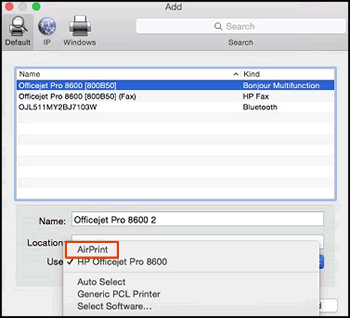
Confirm AirPrint or Secure AirPrint displays in the Use or Print Using menu, and then click Add.
Figure : AirPrint displays in the Use menu

-
Open a document or photo, click File, and then click Print.
Keep me posted how it goes
Thank you and have a wonderful weekend 😊
If the information I've provided was helpful, give us some reinforcement by clicking the "Solution Accepted" on this Post and it will also help other community members with similar issue.
KrazyToad
I Am An HP Employee
10-27-2018 12:50 PM
Welcome to HP Forums. This is a great place to get support, find answers and tips.
I have gone through your Post and I would like to help
Let's start by checking for any latest printer Firmware updates
Select the Setup or Settings menu, select Preferences, Printer Maintenance or Tools and then select Web Services and Printer Update. ( The Menu Options vary from printer to printer )
Restart your Router, printer and Mac in the same sequence
Next download and run the HP Easy Start from this Link: https://support.hp.com/in-en/drivers/selfservice/hp-officejet-pro-8720-all-in-one-printer-series/790... and add the printer to the Mac Printing Queue using Airprint
-
If you need to change the operating system, click Change, select your version, and then click Change.
-
Click Download next to HP Easy Start or next to the full feature driver, depending on the option that displays.
-
Open the Downloads folder, and then open the HP Easy Start file or the full feature driver .dmg file to begin the installation.
-
Follow the on-screen instructions to set up the printer connection and install the software.
-
If you are prompted to add the printer to the printer queue, click the name of your printer, click the Use or Print Using menu, select the name of your printer in the pop-up menu, and then click Add.
-
Confirm AirPrint or Secure AirPrint displays in the Use or Print Using menu, and then click Add.
Figure : AirPrint displays in the Use menu

-
Open a document or photo, click File, and then click Print.
Keep me posted how it goes
Thank you and have a wonderful weekend 😊
If the information I've provided was helpful, give us some reinforcement by clicking the "Solution Accepted" on this Post and it will also help other community members with similar issue.
KrazyToad
I Am An HP Employee