• ×
    Information
    Need Windows 11 help?
    Check documents on compatibility, FAQs, upgrade information and available fixes.
    Windows 11 Support Center.
  • post a message
  • ×
    Information
    Need Windows 11 help?
    Check documents on compatibility, FAQs, upgrade information and available fixes.
    Windows 11 Support Center.
  • post a message
Guidelines
Join the HP Community Solve‑a‑thon | Help Others & Share Your Solutions | Live on Zoom | 2:30 PM to 2:30 AM IST | Every Wednesday Click here to know more
Check some of the most frequent questions about Instant Ink: HP INSTANT INK, HP+ PLANS: INK AND TONER.


Check out our WINDOWS 11 Support Center info about: OPTIMIZATION, KNOWN ISSUES, FAQs AND MORE.
HP Recommended
HP DeskJet 2725 All-in-One Printer

HP Deskjet 2725 all in one printer does not sense Letter size paper. it only sense A5 as paper size even though letter size paper is loaded in paper tray

Tried to reset printer to factory default, tried all option available in HP website for paper size mismatch error, tried to clean all paper path, still issue not resolved

this issue started after we tried to print from iPad. Is there any known issue with printing from Ipad and how to resolve this issue

3 REPLIES 3
HP Recommended

@tks67 


Welcome to the HP Community Forum.


Update - Found specs sheet


@tks67 wrote:

HP Deskjet 2725 all in one printer does not sense Letter size paper.

it only sense A5 as paper size even though letter size paper is loaded in paper tray

Tried to reset printer to factory default,

tried all option available in HP website for paper size mismatch error,

tried to clean all paper path, still issue not resolved

this issue started after we tried to print from iPad.

Is there any known issue with printing from Ipad and how to resolve this issue


No, at this writing, there is no known issue printing from iPad -- should an problem of that type surface, we will be hearing about it from many, many customers and very soon, too.  Stay tuned, I guess...


You did say you essentially tried everything -- so, the following is likely redundant.


That said, it is one of the few places that paper size and type are impacted by printing from HP Smart Mobile.

What?  HP Smart Mobile requires that paper size / type be checked / adjusted before opening the content to be printed.


So - you "tried to print from ipad" but were not able to complete that task either. 

Might not be relevant but I am curious about the A5 paper size...

When I can find a Specifications document, I'll check whether A5 is a supported size.


I did not find A5 listed as a supported size, though it does seem that you could print on A5 as a "Custom size" on plain paper.


Example

Product Specifications for the HP DeskJet 2720 All-in-One Printer (3XV18B)

Paper handling

Input capacity
Up to 60 sheets
Standard input capacity (cards)
Up to 20 cards
Output capacity
Up to 25 sheets
Media sizes supported (metric)
A4; B5; A6; DL envelope
Media sizes, custom (metric)
89 x 127 to 215 x 279 mm
Media types
Plain paper, Photo paper, Brochure paper
Media weight supported (metric)
A4: 60 to 90 g/m²; HP envelopes: 75 to 90 g/m²; HP cards: up to 200 g/m²; HP 10 x 15 cm photo paper: up to 300 g/m²
Borderless printing
No


and (from another source for this model)

Media Size (facet)A4; Letter; B5; Legal
Media Sizes Custom (imperial)3 x 5 to 8.5 x 14 in
Media Sizes Custom (metric)89 x 127 to 215 x 279 mm
Media TypesPlain paper, Photo paper, Brochure paper
Media Weight Recommended (imperial)20 lb
Media Weight Recommended (metric)75 g/m²
Media Weights Supported, By Paper Path (Imperial)Letter: 16 to 32 lb; HP envelopes: 20 to 24 lb; HP cards: up to 110 lb; HP 4 x 6 inch photo paper: up to 145 lb
Media Weights Supported, By Paper Path (metric)A4: 60 to 90 g/m²; HP envelopes: 75 to 90 g/m²; HP cards: up to 200 g/m²; HP 10 x 15 cm photo paper: up to 300 g/m²+


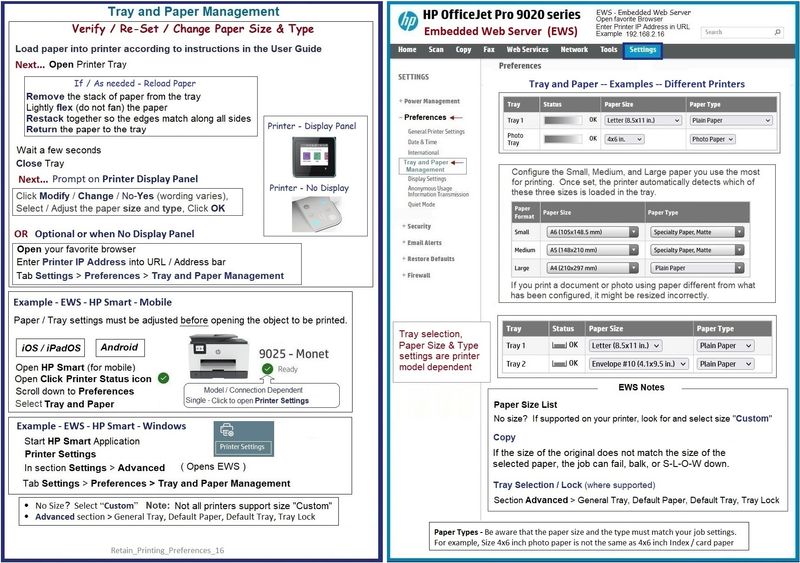
Remove the A4 paper from the tray - Flex (do not fan) paper - place back into the input tray


Immediately open the Embedded Web Server (EWS) and adjust the paper size / type, perhaps for each entry (small, medium, and large).  Certainly edit each section so each entry is correct -- the point is to see if the data can be updated so the printer software can access (detect) the right size of paper. 


Apply changes and check for any differences in your job setup.

 HP DeskJet 2700e All-in-One series - User Guide >> Page 16

OR

HP DeskJet 2700 All-in-One series - User Guide >> Page 16


Example

Retain_Printing_Preferences_16Retain_Printing_Preferences_16


=+=+=+=+=+=+=+=+=+=+=+=+=+=+=+=+=+=+=+=+=+=+=+=+=+=+=+=+=+=+=+=+=+=+=+=+

HP Printer Home Page - References and Resources – Learn about your Printer  - Solve Problems

“Things that are your printer”

When the website support page opens, Select (as available) a Category > Topic Subtopic

NOTE:  Content depends on device type and Operating System

Categories:  Alerts, Access to the Print and Scan Doctor (Windows), Warranty Check, HP Drivers / Software / Firmware Updates, How-to Videos, Bulletins/Notices, Lots of How-to Documents, Troubleshooting, Manuals > User Guides, Product Information (Specifications), Supplies, and more

Open

HP DeskJet 2725 All-in-One Printer 

Series

HP DeskJet 2700 All-in-One Printer series 


Thank you for participating in the HP Community.

Our Community is comprised of volunteers - people who own and use HP devices.

Click Helpful = Yes to say Thank You

Question / Concern Answered, Click "Accept as Solution"


Dragon-Fur

HP Recommended

Thanks for your reply. It turns out to be sensor board issue, as I do not find any part number to get replacement (not sure if it is available), for time being I removed the cable from paper sensor board and using the printer 

HP Recommended

@tks67 


OK - thanks for getting back to us.

True -- if the setup and the software are not the source of the problem, it is time to look elsewhere.

Try one of the online Printer parts merchants - some that I've checked on occasion include 800 numbers (free calling) and display photos of the parts they have available for particular models.  Might be worth checking...


Thank you for participating in the HP Community.

Our Community is comprised of volunteers - people who own and use HP devices.

Click Yes to say Thank You

Question / Concern Answered, Click "Accept as Solution"


Dragon-Fur

† The opinions expressed above are the personal opinions of the authors, not of HP. By using this site, you accept the <a href="https://www8.hp.com/us/en/terms-of-use.html" class="udrlinesmall">Terms of Use</a> and <a href="/t5/custom/page/page-id/hp.rulespage" class="udrlinesmall"> Rules of Participation</a>.