-
×InformationNeed Windows 11 help?Check documents on compatibility, FAQs, upgrade information and available fixes.
Windows 11 Support Center. -

-
×InformationNeed Windows 11 help?Check documents on compatibility, FAQs, upgrade information and available fixes.
Windows 11 Support Center. -
- HP Community
- Printers
- Printer Setup, Software & Drivers
- Poor quality when printing through HP Smart Printing web ser...

Create an account on the HP Community to personalize your profile and ask a question
08-15-2022 07:08 AM
I have a HP M130nw... when I print directly to the printer the quality is fine. However, when I use the "HP Smart Printing" option which routes the print job through the HP server and back to my printer using web services, the quality is awful. I've compared the same document using the two different methods and it is a significant difference. How do I fix this issue?
08-15-2022 12:19 PM
Not sure what Web Services is doing to your printed document.
I do not believe Print content is "sent" anywhere unless you are using "Share" or saving the content to your cloud account.
Share >> In this case, the scanned / added content is attached to the email and sent to the recipient.
HP Smart Shortcuts, for example, can be set to save scanned / opened output to a Cloud account.
Web Services connects the printer to the Internet and facilitates access to your HP Account, Cloud, and Internet services.
I believe what you say -- Right now, I don't know the HP Smart Printing job setup menu is influencing the printed output.
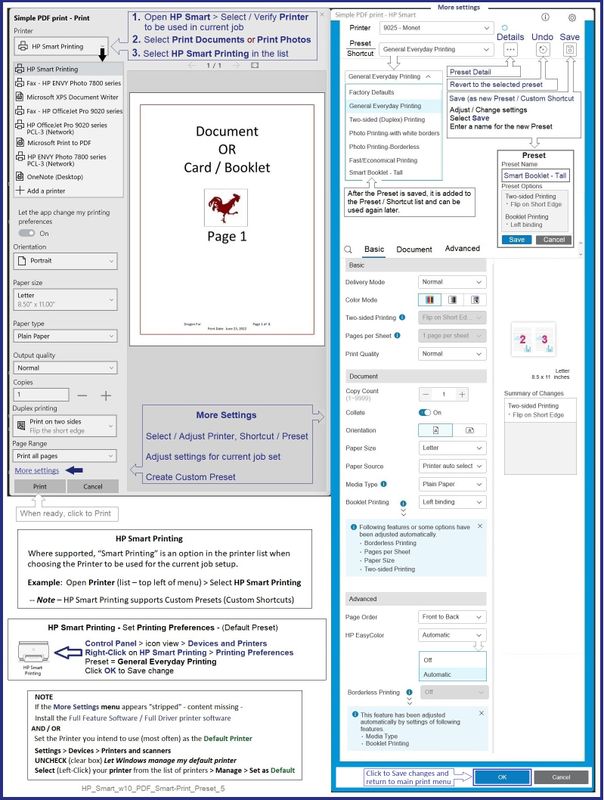
Smart Printing Menu
Quality -- Section Basic > Print Quality > Draft / Normal / Best
Color handling -- Section Advanced > HP EasyColor = OFF or Automatic
For the moment,
I suggest that you do not use HP Smart Printing - forego the option and print as you have done in the past.
Perhaps another Expert has a better idea - and can provide an explanation for your experience.
==================================================================================
For those reading
What is Smart Printing?
Install HP Smart.
HP Smart Printing -- where supported -- is an option that provides a "modern" GUI to help streamline print job setup.
For example, where supported and when the full driver printer software is installed,
HP Smart Printing is available in Word > File > Print and / or in HP Smart printing, too.
HP Smart Printing shows up as a selection in the Printer list.
Nice feature >> HP Smart Printing provides access to Presets / Custom Shortcuts.
Example - HP Smart - Simple PDF Print - HP Smart Printing - Create / Use Custom Preset
HP_Smart_w10_PDF_Smart-Print_Preset_5
Example - Word - Document Print - HP Smart Printing
NOTE: Full Feature Software / full driver printer software installed
HP_Smart_w10_Word_Smart-Print_Sample_2
HP Printer Home Page - References and Resources – Learn about your Printer - Solve Problems
“Things that are your printer”
When the website support page opens, Select (as available) a Category > Topic > Subtopic
NOTE: Content depends on device type and Operating System
Categories: Alerts, Access to the Print and Scan Doctor (Windows), Warranty Check, HP Drivers / Software / Firmware Updates, How-to Videos, Bulletins/Notices, Lots of How-to Documents, Troubleshooting, Manuals > User Guides, Product Information (Specifications), Supplies, and more
Open
Thank you for participating in the HP Community.
Our Community is comprised of volunteers - people who own and use HP devices.
Click Helpful = Yes to say Thank You
Question / Concern Answered, Click "Accept as Solution"
08-15-2022 02:43 PM
Makes sense though.
Magic.
Happy Printing.
Thank you for participating in the HP Community.
Our Community is comprised of volunteers - people who own and use HP devices.
Click Helpful = Yes to say Thank You
Question / Concern Answered, Click "Accept as Solution"