• ×
    Information
    Need Windows 11 help?
    Check documents on compatibility, FAQs, upgrade information and available fixes.
    Windows 11 Support Center.
  • post a message
  • ×
    Information
    Need Windows 11 help?
    Check documents on compatibility, FAQs, upgrade information and available fixes.
    Windows 11 Support Center.
  • post a message
Guidelines
Seize the moment! nominate yourself or a tech enthusiast you admire & join the HP Community Experts!
Check some of the most frequent questions about Instant Ink: HP INSTANT INK, HP+ PLANS: INK AND TONER.


Check out our WINDOWS 11 Support Center info about: OPTIMIZATION, KNOWN ISSUES, FAQs AND MORE.
HP Recommended
Microsoft Windows 10 (64-bit)

I have a HP M130nw... when I print directly to the printer the quality is fine. However, when I use the "HP Smart Printing" option which routes the print job through the HP server and back to my printer using web services, the quality is awful. I've compared the same document using the two different methods and it is a significant difference. How do I fix this issue?

3 REPLIES 3
HP Recommended

@Plymouth123 


Not sure what Web Services is doing to your printed document.


I do not believe Print content is "sent" anywhere unless you are using "Share" or saving the content to your cloud account.

Share >>  In this case, the scanned / added content is attached to the email and sent to the recipient.

HP Smart Shortcuts, for example, can be set to save scanned / opened output to a Cloud account.

Web Services connects the printer to the Internet and facilitates access to your HP Account, Cloud, and Internet services.


I believe what you say -- Right now, I don't know the HP Smart Printing job setup menu is influencing the printed output. 


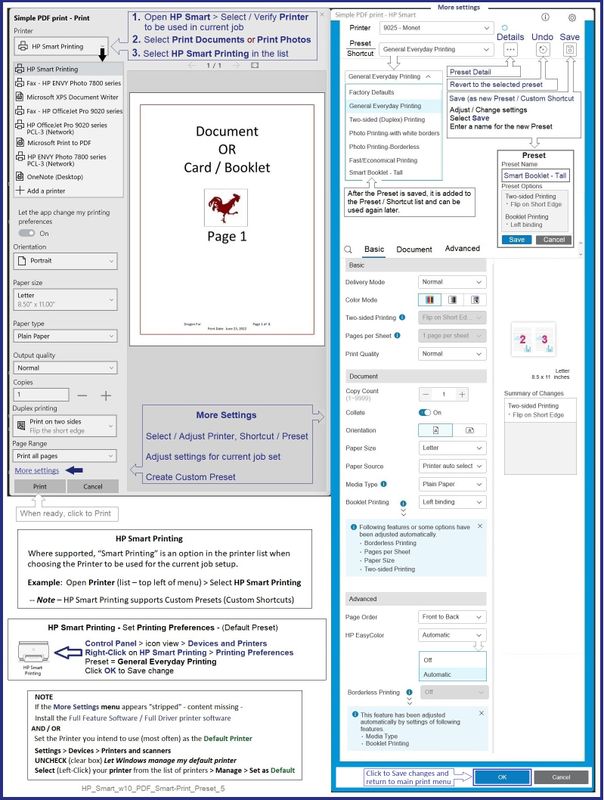
Smart Printing Menu

Quality -- Section Basic > Print Quality > Draft / Normal / Best

Color handling -- Section Advanced > HP EasyColor = OFF or Automatic


For the moment,

I suggest that you do not use HP Smart Printing - forego the option and print as you have done in the past.


Perhaps another Expert has a better idea - and can provide an explanation for your experience.


==================================================================================


For those reading

What is Smart Printing?


Install HP Smart.


HP Smart Printing -- where supported -- is an option that provides a "modern" GUI to help streamline print job setup.


For example, where supported and when the full driver printer software is installed,

HP Smart Printing is available in Word > File > Print and / or in HP Smart printing, too.


HP Smart Printing shows up as a selection in the Printer list.


Nice feature >> HP Smart Printing provides access to Presets / Custom Shortcuts.


Example - HP Smart - Simple PDF Print - HP Smart Printing - Create / Use Custom Preset

HP_Smart_w10_PDF_Smart-Print_Preset_5HP_Smart_w10_PDF_Smart-Print_Preset_5


Example - Word - Document Print - HP Smart Printing

NOTE:  Full Feature Software / full driver printer software installed

HP_Smart_w10_Word_Smart-Print_Sample_2HP_Smart_w10_Word_Smart-Print_Sample_2


HP Printer Home Page - References and Resources – Learn about your Printer  - Solve Problems

 “Things that are your printer”

When the website support page opens, Select (as available) a Category > Topic > Subtopic

NOTE:  Content depends on device type and Operating System

Categories:  Alerts, Access to the Print and Scan Doctor (Windows), Warranty Check, HP Drivers / Software / Firmware Updates, How-to Videos, Bulletins/Notices, Lots of How-to Documents, Troubleshooting, Manuals > User Guides, Product Information (Specifications), Supplies, and more

Open

HP LaserJet Pro MFP M130nw 


Thank you for participating in the HP Community.

Our Community is comprised of volunteers - people who own and use HP devices.

Click Helpful = Yes to say Thank You

Question / Concern Answered, Click "Accept as Solution"


Dragon-Fur

HP Recommended

Since I last posted the print quality of the HP Smart Printing option has now improved to work as well as local printing. I didn't change anything on my side. Strange....

HP Recommended

@Plymouth123 


Makes sense though.

Magic.


Happy Printing.


Thank you for participating in the HP Community.

Our Community is comprised of volunteers - people who own and use HP devices.

Click Helpful = Yes to say Thank You

Question / Concern Answered, Click "Accept as Solution"


Dragon-Fur

† The opinions expressed above are the personal opinions of the authors, not of HP. By using this site, you accept the <a href="https://www8.hp.com/us/en/terms-of-use.html" class="udrlinesmall">Terms of Use</a> and <a href="/t5/custom/page/page-id/hp.rulespage" class="udrlinesmall"> Rules of Participation</a>.