
-
×InformationNeed Windows 11 help?Check documents on compatibility, FAQs, upgrade information and available fixes.
Windows 11 Support Center. -
-
×InformationNeed Windows 11 help?Check documents on compatibility, FAQs, upgrade information and available fixes.
Windows 11 Support Center. -
- HP Community
- Printers
- Printer Setup, Software & Drivers
- Re: Printer - BigSur MacOS not printing and not re-installin...

Create an account on the HP Community to personalize your profile and ask a question
Your account also allows you to connect with HP support faster, access a personal dashboard to manage all of your devices in one place, view warranty information, case status and more.
Check some of the most frequent questions about Instant Ink: HP INSTANT INK, HP+ PLANS: INK AND TONER.
Check out our WINDOWS 11 Support Center info about: OPTIMIZATION, KNOWN ISSUES, FAQs AND MORE.

It has been a while since anyone has replied. Simply ask a new question if you would like to start the discussion again.

12-07-2020
10:13 AM
- last edited on
01-16-2026
11:24 AM
by
 FriendlyMod
 HP Recommended
Product: M29W
Hello,
I have a Laserjet Pro M29W printer, I couldn't print anything today and kept receiving several errors such as 'raster2pclm will damage your computer' as well as many other similar files..
I searched online and almost every post is pointing to uninstall and reinstall. well I uninstalled and from system preferences, printers & scanners, I reset the printer.
I downloaded "HP App" from the App Store. However it is not recognizing the printer. If I choose 'wireless' it sill prompts me to connect with a USB, and it cannot find the printer....
So I disconnected the printer's power, waited > 60 seconds, reconnected. Tried set up again, same problem...
I tried two different USB cables with different working computer ports, also and same problem recur.
Wondering if there's a way to hard reset the printer again to set up can work, or if there's another solution. My guess is the BigSur update was not compatible with HP drivers.
Spent the past two hours working on this to no solution.
Please help need to fix today. Thank you.
Solved! Go to Solution.
1 ACCEPTED SOLUTION
Accepted Solutions


12-09-2020 10:22 AM
HP Recommended
Hi,
Download the latest HP Easy Start below:
https://ftp.hp.com/pub/softlib/software12/HP_Quick_Start/osx/Applications/HP_Easy_Start.app.zip
After the software downloads, open HP Easy Start.
Click HP Easy Start from the top menu, and then select Uninstall HP Software
Read any warnings that display, and then click Continue.
When prompted, type your administrator user name and password.
HP Uninstaller removes all HP printer software previously installed.
Click Set Up New Device, and then follow the instructions to install the printer with HP Easy Start.
Shlomi


Click the Yes button to reply that the response was helpful or to say thanks.
If my post resolve your problem please mark it as an Accepted Solution 🙂
6 REPLIES 6
12-07-2020 10:24 AM
HP Recommended
quick update: I managed to connect to the printer's own local wifi and get to a configuration page. However, I am still unable to print anything beyond a test page (just letters/numbers...etc.) .
keep getting same errors :
“hpPostScriptPDE.plugin” will damage your computer. and others similar.
12-07-2020 01:58 PM
HP Recommended
https://support.apple.com/kb/DL1888?locale=en_US some other websites suggested getting those drivers (seem old anyway 2017), it doesn't work, I get a 'this volume does not meet the requirement for this update".
12-09-2020 09:07 AM
HP Recommended
well looks like it's been a couple of days and no body sent any reply.
My best guess is this issue has to deal with macOS Big Sur compatibility with HP and we have to wait until some drivers are available. until then I have to find a way to print from the phone to the printer or from a different computer that does not have Big Sur OS.
12-09-2020 10:22 AM
HP Recommended
Hi,
Download the latest HP Easy Start below:
https://ftp.hp.com/pub/softlib/software12/HP_Quick_Start/osx/Applications/HP_Easy_Start.app.zip
After the software downloads, open HP Easy Start.
Click HP Easy Start from the top menu, and then select Uninstall HP Software
Read any warnings that display, and then click Continue.
When prompted, type your administrator user name and password.
HP Uninstaller removes all HP printer software previously installed.
Click Set Up New Device, and then follow the instructions to install the printer with HP Easy Start.
Shlomi
Click the Yes button to reply that the response was helpful or to say thanks.
If my post resolve your problem please mark it as an Accepted Solution 🙂


12-13-2020 05:50 PM
HP Recommended
I recommend you follow the below steps and check if it helps.
First ensure your macOS is up to date with the latest software download. Then uninstall HP Easy Start.
To ensure your macOS is up to date
- Click the Apple Icon
- Click About this Mac
- Click Software Update.
- Click Advanced…
- Put a check in the box for the following items:
- Check for Updates
- Download new updates when available
- install system data files and security updates.

To uninstall HP Easy Start
-
Open HP Easy Start.
-
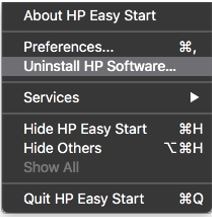
Click File, and then select Uninstall HP Software… from the menu.
Select Uninstall HP Software…
-
Read any warnings that display, and then click Continue.
-
When prompted, type your administrator user name and password.
-
HP Uninstaller removes all HP printer software previously installed.
After uninstalling HP Easy Start reinstall the printer and try to print again.
To reinstall the printer:
- Go to 123.hp.com
- Enter your printer model
- Download HP Easy Start
- Follow the instructions on screen to complete the installation
Let me know how it goes.
Cheers!
The_Fossette
I am an HP Employee

Be alert for scammers posting fake support phone numbers and/or email addresses on the community.
If you think you have received a fake HP Support message, please report it to us by clicking on "Flag Post".
† The opinions expressed above are the personal opinions of the authors, not of HP. By using this site, you accept the Terms of Use and Rules of Participation.


Didn't find what you were looking for?
Ask the community
† The opinions expressed above are the personal opinions of the authors, not of HP. By using this site, you accept the <a href="https://www8.hp.com/us/en/terms-of-use.html" class="udrlinesmall">Terms of Use</a> and <a href="/t5/custom/page/page-id/hp.rulespage" class="udrlinesmall"> Rules of Participation</a>.