
-
×InformationNeed Windows 11 help?Check documents on compatibility, FAQs, upgrade information and available fixes.
Windows 11 Support Center. -
-
×InformationNeed Windows 11 help?Check documents on compatibility, FAQs, upgrade information and available fixes.
Windows 11 Support Center. -
- HP Community
- Printers
- Printer Setup, Software & Drivers
- Re: Printer not functioning with MacOS Mojave

Create an account on the HP Community to personalize your profile and ask a question
Your account also allows you to connect with HP support faster, access a personal dashboard to manage all of your devices in one place, view warranty information, case status and more.
Check some of the most frequent questions about Instant Ink: HP INSTANT INK, HP+ PLANS: INK AND TONER.
Check out our WINDOWS 11 Support Center info about: OPTIMIZATION, KNOWN ISSUES, FAQs AND MORE.

It has been a while since anyone has replied. Simply ask a new question if you would like to start the discussion again.

09-26-2018 09:14 PM - edited 10-22-2018 01:36 AM
 HP Recommended
Product: deskjet ink adv 2135
Operating System: Other
UPDATE// the printer now works. After about a week, HP installer app identified my printer and the drivers were installed. no other method worked.
Dear,
after updating to MacOS Mojave, i have tried using HP installer to install the drivers but i keep getting this message
" Can't automatically find any driver option for this product.."
and everytime i try to print nothing happens. could you please inform me what i may do ?
Thank you.
Solved! Go to Solution.
1 ACCEPTED SOLUTION
Accepted Solutions

11-30-2018 07:48 PM
HP Recommended
Installing HP Printer Drivers v5.1 for OS X worked for me!
I had the same problem with my old HP Deskjet F300 All-in-one (2006 I believe) and a brand new Macbook Pro. After installing the driver and software that I have saved for years for this printer I was unable to print files either from the web, preview or Photoshop but I was able to print the test page from the printer utilities for some reason. Then downloaded the HP Printer Drivers v5.1 for OS X and after installing them ( installation took longer than expected btw ) the printer was once again recognized and was able to print normally. The latter install also replaced/erased the software/utilities from the first drivers I installed.
Hope this helps!
25 REPLIES 25


09-27-2018 02:54 PM - edited 09-27-2018 02:54 PM
HP Recommended
Thank you for being a part of HP Forums. This is a great place to get support, find answers and tips to your technical queries.
I believe we can add the print driver using Apple Software Update. Here is how to do it:
1.) Click the Apple menu, and then click System Preferences.
2.) Click Printers & Scanners, Print & Scan, or Print & Fax.
3.) If your printer is listed, click the name of your printer, then click the minus sign  to delete the printer.
4.) Click the plus sign  , click Add Printer or Scanner, click the name of your printer.
5.) Click the Use or Print Using menu, then select the name of your printer.
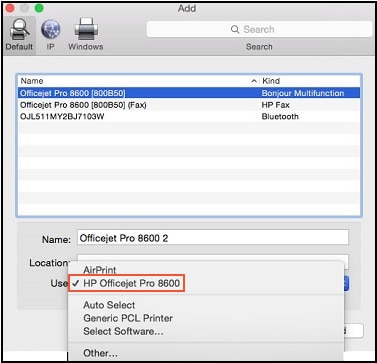
6.) Click Add to add the printer to the list.
Let me know how it goes!
If the information I've provided was helpful, give us some reinforcement by clicking the Accepted Solution and Kudos buttons, that'll help us and others see that we've got the answers!
Have a great day!
Senan6806
I am an HP Employee


09-27-2018 03:06 PM - edited 09-28-2018 07:24 AM
HP Recommended
There was an issue with HP Easy Start not locating the software on macOS Mojave. This was resolved last night (9/26/18).
HP Easy Start should now locate the appropriate software for download.
HP Easy Start version 2.9 is the latest supported version for Mojave.
While I may work for HP Inc, the views and opinions expressed here are my own.
09-27-2018 09:24 PM - edited 09-27-2018 09:27 PM
HP Recommended
@Senan6806
I have tried your steps but unfortuantely it still not printing. i tried the HP easy start again and now i get a different message than previously saying.
"Cannot obtain software information."
Thank you for your help i hope there is a sulotion.


09-28-2018 09:19 AM - edited 09-28-2018 09:20 AM
HP Recommended
That's unfortunate, not to worry, let's try adding an alternate print driver using Apple Software Update. Let's try these steps:
1.) Connect the printer to PC using a USB cable.
2.) Download and install HP Printer Drivers v5.1 for OS X from here.
3.) Click the Apple menu, then click System Preferences.
4.) Depending on your operating system version, click Print & Fax, Print & Scan, or Printers & Scanners.
5.) If your printer is listed, click the printer name, click the minus sign to delete the printer.
6.) Click the plus sign , click Add Printer or Scanner.
7.) Select the listed Deskjet printer.
8.) Click the drop-down menu next to Use or Print Using and click on Select Printer Software.
9.) Select the HP Deskjet 3050A series.
10.) Click OK to confirm your selection and add the printer, then try printing using the configured print queue.
Keep me posted!
Senan6806
I am an HP Employee

10-23-2018 07:52 AM - edited 10-23-2018 07:52 AM
HP Recommended
I'd like to help!
Are you using a Deskjet 2135 printer?
Have you tried installing the HP Printer Drivers v5.1 for OS X?
Have you tried using HP Easy start?
How is the printer connected, USB or Wireless?
Let me know!
Senan6806
I am an HP Employee
10-23-2018 10:19 AM
HP Recommended
Thank you
No, I'm using a Laserjet CP1025nw.
I tried the 5.1 drivers to no avail
I tried HP Easy start unnecessarily
USB
"Filter failed" error
Apple advised me to remove Mojave and return to Sierra, I think I will

Be alert for scammers posting fake support phone numbers and/or email addresses on the community.
If you think you have received a fake HP Support message, please report it to us by clicking on "Flag Post".
† The opinions expressed above are the personal opinions of the authors, not of HP. By using this site, you accept the Terms of Use and Rules of Participation.


Didn't find what you were looking for?
Ask the community
† The opinions expressed above are the personal opinions of the authors, not of HP. By using this site, you accept the <a href="https://www8.hp.com/us/en/terms-of-use.html" class="udrlinesmall">Terms of Use</a> and <a href="/t5/custom/page/page-id/hp.rulespage" class="udrlinesmall"> Rules of Participation</a>.