• ×
    Information
    Need Windows 11 help?
    Check documents on compatibility, FAQs, upgrade information and available fixes.
    Windows 11 Support Center.
  • post a message
  • ×
    Information
    Need Windows 11 help?
    Check documents on compatibility, FAQs, upgrade information and available fixes.
    Windows 11 Support Center.
  • post a message
Guidelines
Seize the moment! nominate yourself or a tech enthusiast you admire & join the HP Community Experts!
Check some of the most frequent questions about Instant Ink: HP INSTANT INK, HP+ PLANS: INK AND TONER.


Check out our WINDOWS 11 Support Center info about: OPTIMIZATION, KNOWN ISSUES, FAQs AND MORE.
HP Recommended
Envy 4520
Microsoft Windows 10 (64-bit)

Since windows upgrade printer will not duplex print. I have checked Device   and Duplex unit instsalled. I have uninstalled printer,. Removed all drivers and temp folders then reinstalled still will not print duplex. Help  please 

1 ACCEPTED SOLUTION

Accepted Solutions
HP Recommended

Thank you for your help. I do not have the software to convert files to pdf, but i can use my HP 15-bs158 laptop to print duplex. It is only my HP 23-d210 all-in-one that print both sides

View solution in original post

3 REPLIES 3
HP Recommended

@ivan37


Welcome to HP forums.


If duplex printing no longer works after a Windows 10 upgrade, use the HP Smart app to print the document.

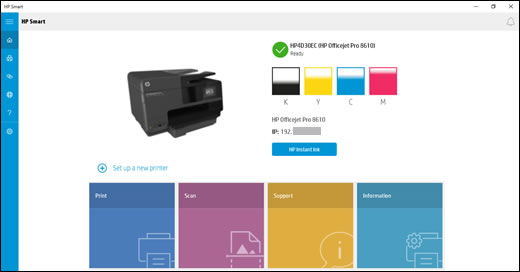
Home screen of the HP Smart app on Windows 10

  1. Search the Windows Store for HP Smart to locate and install the app.

  2. On the app home screen, click Print, and then click Print Document to find the document you want to print.

    NOTE: 

    HP Smart currently prints PDF files only. If you want to print a Word or WordPad document, save it as a PDF file, and then repeat the previous step.

  3. Select your printer, click More settings, and then select an option from the Duplex printing menu.

  4. Click OK, and then click Print.

You can refer to this HP document for more assistance:-  Click here


Let me know how it goes.

To thank me for my efforts to help you, please mark my post as an accepted solution so that it benefits several others.

Cheers.

Sandytechy20
I am an HP Employee

HP Recommended

Thank you for your help. I do not have the software to convert files to pdf, but i can use my HP 15-bs158 laptop to print duplex. It is only my HP 23-d210 all-in-one that print both sides

HP Recommended


@ivan37


Feel free to contact us in future if you need any assistance.


Cheers.

Sandytechy20
I am an HP Employee

† The opinions expressed above are the personal opinions of the authors, not of HP. By using this site, you accept the <a href="https://www8.hp.com/us/en/terms-of-use.html" class="udrlinesmall">Terms of Use</a> and <a href="/t5/custom/page/page-id/hp.rulespage" class="udrlinesmall"> Rules of Participation</a>.