-
×InformationNeed Windows 11 help?Check documents on compatibility, FAQs, upgrade information and available fixes.
Windows 11 Support Center. -

-
×InformationNeed Windows 11 help?Check documents on compatibility, FAQs, upgrade information and available fixes.
Windows 11 Support Center. -
- HP Community
- Printers
- Printer Setup, Software & Drivers
- Printing envelopes

Create an account on the HP Community to personalize your profile and ask a question
10-06-2020 04:09 PM
This HPEnvy4520 Printer does not have A7 as a choice for printing 5"x7" envelopes. I have no problem in Word setting up the envelope for delivery address, i.e. choosing custom size of envelope, etc. Have no idea what choice to make on printer, as it does not give A7 as a choice. I've tried choosing other sizes that may be close to 5x7 but placement of print on envelope is not correct. Thanks for your help.
10-06-2020 04:42 PM
The printer does seem to accept custom paper sizes.
Printer Specifications for HP DeskJet 4530, 4670, ENVY 4510, 4520, OfficeJet 4650 Printers
I do not know whether that extends to what you are doing, but it is better than it saying flat out "NO".
Start...
Load the envelopes. Hopefully, you've done this before - the User Guide is woefully short on how this is done. For many printers, envelopes are loaded in the main tray - face down, flap to the left.
Next...
Set the paper size on the printer display panel to "Custom"
Paper Setting on Printer Control / Display Panel
Check / Adjust / Retain the Paper at the Printer Display Panel
Open Printer Tray,
If you have not yet done so, add desired paper type
Close Tray
IF applicable for your printer:
On the Printer Control / Display Panel, Click Modify (wording varies), set the paper size and type, Click OK
NOTE: If the size of the Paper Size is not in the Drop-down list, Select Custom
==================================================================================
Use Word to create your envelope.
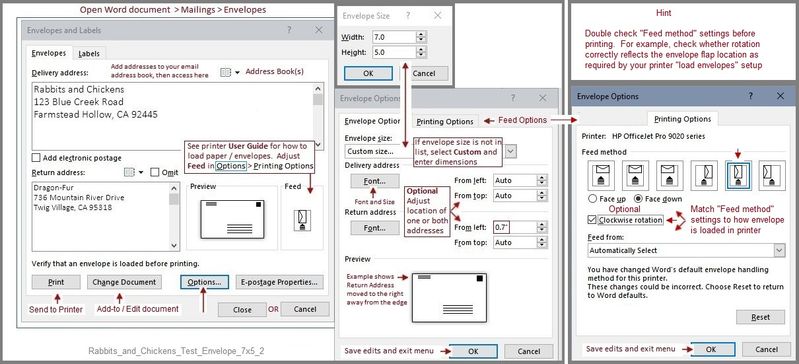
Word > Mailings > Envelopes
Remember to set the envelope size to Custom and then add the dimensions.
Check and adjust the Feed!
Note (in the example) that the test envelope is 7x5 inches, that is, 7 inches wide and 5 inches tall.
Example
Rabbits_and_Chickens_Test_Envelope_7x5_2
NOTE:
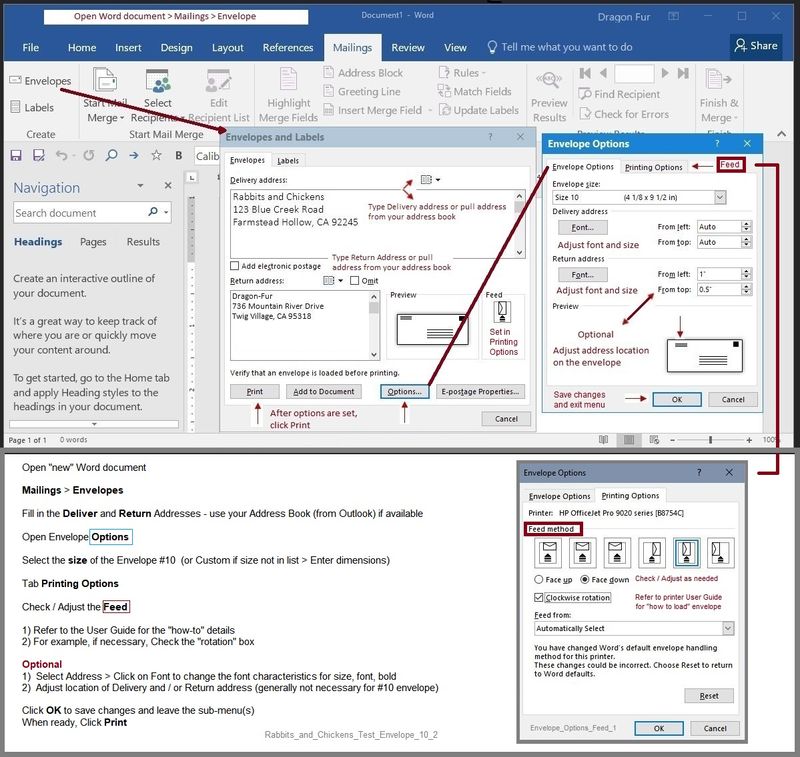
This second example is FYI - it is only intended to add detail for the "Feed" bits
Rabbits_and_Chickens_Test_Envelope_10_2
Printer Home Page - References and Resources – Learn about your Printer - Solve Problems
“Things that are your printer”
NOTE: Content depends on device type and Operating System
Categories: Alerts, Access to the Print and Scan Doctor (Windows), Warranty Check, HP Drivers / Software / Firmware Updates, How-to Videos, Bulletins/Notices, Lots of How-to Documents, Troubleshooting, User Guides / Manuals, Product Information (Specifications), more
When the website support page opens, Select (as available) a Category > Topic > Subtopic
HP ENVY 4520 All-in-One Printer series
Thank you for participating in our HP Community.
We are a volunteer community workforce dedicated to supporting HP technology
Click Thumbs Up to say Thank You for the help.
If the answer helped resolve your issue, Click "Accept as Solution" .