-
×InformationNeed Windows 11 help?Check documents on compatibility, FAQs, upgrade information and available fixes.
Windows 11 Support Center. -

-
×InformationNeed Windows 11 help?Check documents on compatibility, FAQs, upgrade information and available fixes.
Windows 11 Support Center. -
- HP Community
- Printers
- Printer Setup, Software & Drivers
- Problem installing older printer onto Catalina OS

Create an account on the HP Community to personalize your profile and ask a question
10-19-2019 11:59 AM
Downloaded the latest driver for what I assume is Catalina (the driver date was last week) and switch from AirPort Extreme to Ecco Router and now cannot get printer to work! Need step by step instructions, please as I am not that computer literate.
10-21-2019 03:44 PM - edited 10-21-2019 03:44 PM
@mkgrandma, Welcome to HP Support Community!
Now that you have a new router, you may have to reconfigure the wireless settings on the printer. Here is how you can do it-
First, restore network defaults-
a. Turn the product off.
b. Press and hold the wireless button and the cancel button, and then turn the product on.
c. Hold the buttons until all of the lights blink in unison, and then release the buttons.
Now, connect the printer to the network-
If your wireless router supports WPS, use this method to set up the product on a wireless network.
1. Press the Wi-Fi Protected Setup button on your router or access point device.
2. On the product control panel, press the Wireless button.
3. From the Wireless Menu, select the WPS Setup sub-menu, and then follow the control-panel display prompts to complete the wireless network setup.
Once the connection is successful, add the printer on to your computer. Since your printer is Airprint compatible, remove and add the printer using AirPrint drivers. Here is how you can do it-
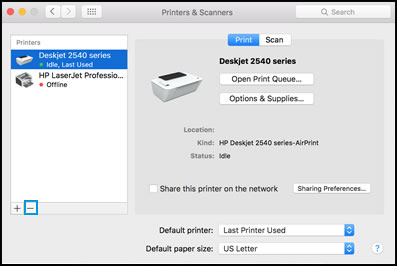
Click the Apple menu, and then select System Preferences.
Depending on your operating system version, click Print & Fax, Print & Scan, or Printers & Scanners.
Click the name of your printer, click the Minus sign
, and then delete the printer.

Click the Plus sign
, and then click Add Printer or Scanner.
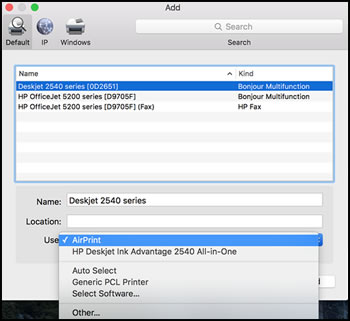
Click the Use or Print Using box, and then select AirPrint

Click Add to add the printer to the list.
Try to print.
Keep me posted for further assistance.
Please click “Accept as Solution” if you feel my post solved your issue, it will help others find the solution. Click the “Kudos/Thumbs Up" on the bottom right to say “Thanks” for helping!
TEJ1602
I am an HP Employee
10-22-2019 03:39 PM
Thanks for replying!
Refer to the document HP LaserJet Pro M1217nfw Printer - Wireless Printer Setup for help.
Let me know if you need any further assistance.
Please click “Accept as Solution” if you feel my post solved your issue, it will help others find the solution. Click the “Kudos/Thumbs Up" on the bottom right to say “Thanks” for helping!
TEJ1602
I am an HP Employee