-
×InformationNeed Windows 11 help?Check documents on compatibility, FAQs, upgrade information and available fixes.
Windows 11 Support Center. -

-
×InformationNeed Windows 11 help?Check documents on compatibility, FAQs, upgrade information and available fixes.
Windows 11 Support Center. -
- HP Community
- Printers
- Scanning, Faxing, and Copying
- Re: Scan Driver for MACOS Tahoe 26.5

Create an account on the HP Community to personalize your profile and ask a question
02-22-2020 08:28 AM
I just tried Easy scan with my new HP 9010 and the document scan worked and I was able to save to my files. Unfortunately my older HP 6970 does not still work. Not sure what recently changed but at least it is working now with one of my HP printers.
03-20-2020 09:38 AM - edited 03-20-2020 09:39 AM
I see @IronBadger has shared some great information in another post. Thank you! So I copy it here. Hope it helps.
No Preview for crop and adjustments, no Send to option, Communication errors, etc.
For those reporting the Gray preview window and the lack of being able to Send to, it seems deleting the preferences resolves these issues for me.
If you downloaded HP Easy Scan from the Mac App store then you need to delete the following folders
~/Users/username/Library/Containers/com.hp.EasyScanMac
~/Users/username/Library/Containers/com.hp.scan.request.handler
If you downloaded HP Easy Scan using HP Smart then you need to delete the following files
~/Users/username/Library/Preferences/com.hp.EasyScanMac.plist
~/Users/username/Library/Preferences/com.hp.scan.HPScanCaptureMgr.plist
Then relaunch HP Easy Scan.
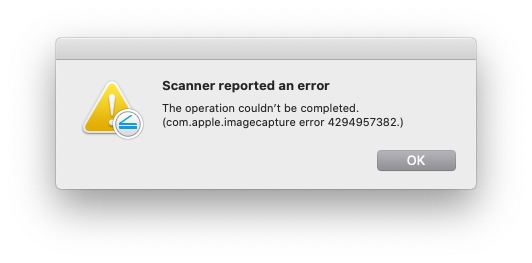
In macOS Catalina I will reliably get the communication error on the first scan.
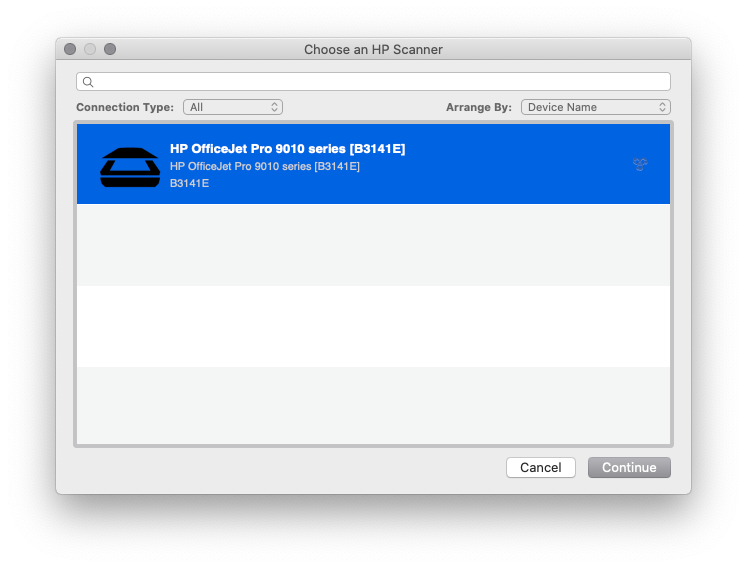
After this occurs click Ok. Then select Browse Scanners and select your scanner. I was then able to successfully scan.
I will periodically get the communication error again if I try and scan consecutive pages quickly. Simply waiting a few seconds allows for a successful scan. I have it under good authority that the next update to a certain OS resolves drastically reduces this timing issue.
For those getting the 704 errors it could be 1 of 2 issues.
1. You do not have the complete HP Essentials Package installed on your macOS. To make sure you have the latest Essentials download and run HP East Start. Some older devices require a device driver that is not installed as part of HP Easy Scan but is installed with the Essentials. Image Capture needs these drivers for older devices as well. These drivers are located in:
~/Library/Image Capture/Devices
There could be any number of HP Scanner devices. Each driver supports different devices and have names like "HP Scanner 4".
2. If you have installed the latest Essentials package and still get the 704 error it may mean your device is not supported in macOS Catalina. Some device drivers were not able to be ported over. This mainly includes several old ScanJet models like the 200 and 300.
And finally, if all this fails I suggest deleting all of the preferences referenced earlier and then deleting HP Easy Scan from the apps folder. Then go to the Mac App store and re-download HP Easy Scan. Then try scanning again.
I am HP Employee
05-28-2026 03:10 PM - edited 05-28-2026 03:34 PM
Doesn't work for me. The app opens but the Printer Settings page is blank! HP Support says the product's serial number is invalid, even though I've typed in EXACTLY what's on the printer, and their AI call screener tells me to call back during business hours even though I'm calling before 5pm Eastern Time!
I finally got to a human support person by going through business sales. They told me that the HP app replaces HP Easy Scan, but the HP Utility is still used to control printer settings such as the "Scan to Computer" setting. That setting needs to be enabled in order for the Scan to Computer feature of the HP 8600 to work so I hope it doesn't become unsupported. The HP phone rep told me that my printer is "really, really old" and tried to get me on a subscription plan where they would replace my printer every 2 years (whether it needs it or not) and send me ink cartridges. Doesn't that seem like trying to boost profit margins at the expense of harming the environment? And who wants another subscription?
HP's not the reliable, responsible company they used to be.
- « Previous
- Next »