
-
×InformationNeed Windows 11 help?Check documents on compatibility, FAQs, upgrade information and available fixes.
Windows 11 Support Center. -
-
×InformationNeed Windows 11 help?Check documents on compatibility, FAQs, upgrade information and available fixes.
Windows 11 Support Center. -
- HP Community
- Printers
- Printer Setup, Software & Drivers
- Smart Tasks in HP App problem..email recipients not receivin...

Create an account on the HP Community to personalize your profile and ask a question
Your account also allows you to connect with HP support faster, access a personal dashboard to manage all of your devices in one place, view warranty information, case status and more.
Check some of the most frequent questions about Instant Ink: HP INSTANT INK, HP+ PLANS: INK AND TONER.
Check out our WINDOWS 11 Support Center info about: OPTIMIZATION, KNOWN ISSUES, FAQs AND MORE.

It has been a while since anyone has replied. Simply ask a new question if you would like to start the discussion again.

05-04-2019
08:39 PM
- last edited on
01-05-2026
08:09 AM
by
 Nal_NR
 HP Recommended
Product: HP App with Smart Tasks
Smart Tasks as a feature of the HP app printer app, will accomplish all tasks, like printing, uploading to the cloud reliably. However when an email or multiple emails are sent out, they do not arrive at the intended recpients. In the alerts section, it shows all tasks were completed successfully including emails sent. I have experimented with the HP app on ios phone, ipad, windows 10 pc, and directly from a smart tasks synced OJP9015. I've tried multiple different email addresses with the same result. Interestingly if I use the scan to email feature emails are sent and arrive fine to recipents with attachments. Again I show no failures in the HP Apps Alert section, and indeed all tasks did perform exactly as planned except the emails...
Solved! Go to Solution.
1 ACCEPTED SOLUTION
Accepted Solutions

11-08-2019 10:36 PM
HP Recommended
Hello Kumar0307 , thank you and sorry for late reply.
I had to recreate the smart task from scratch (with the previously created one i had no luck despite being identical) and now it seems to work both from the pc/app and from the touch panel. Thanks for your support
14 REPLIES 14


05-06-2019 06:56 AM
HP Recommended
Welcome to the HP Support Community.
Try uninstalling and reinstalling the App.
Let me know if this helps.
If the information I've provided was helpful, give us some reinforcement by clicking the Accepted Solution button, that'll help us and others see that we've got the answers!
Thanks!
Have a great day!
I am an HP Employee
05-06-2019 11:02 AM
HP Recommended
Hi,
yes, I had already tried the delete and reinstall method of diagnosing, remember from post I’ve attempted on 4-devices including 9015 synced from my phone. I have 4-different smart tasks set up for diagnosing, With different verified email addresses to use for tests. Smart tasks is a brilliant part of an already great app. Which I use all the time personally and for work reasons. Just got to figure out email issue
05-07-2019 11:16 AM
HP Recommended
Try a firmware update: https://support.hp.com/in-en/document/c02919168
Let me know if this helps.
If the information I've provided was helpful, give us some reinforcement by clicking the Accepted Solution button, that'll help us and others see that we've got the answers!
I am an HP Employee
05-07-2019 01:19 PM
HP Recommended
Yes the 9015, has been udated with latest firmwear, but this is way off the bigger issue. This should work absent of a printer. It is supposed to work with any HP printer as a service/feature of the HP smart app. Smart tasks only available from the touchscreen on the new 9000 series. Yet my tests have been on all said devices. This may need immediate escalation..
05-09-2019
11:25 AM
- last edited on
01-15-2026
07:37 AM
by
Nal_NR
HP Recommended
I understand. Let's try a few steps here:
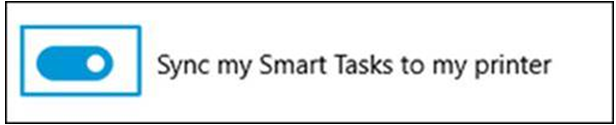
Make sure at least one Smart Task has been created in the HP app. Make sure sync option on HP app Smart Tasks screen is enabled.
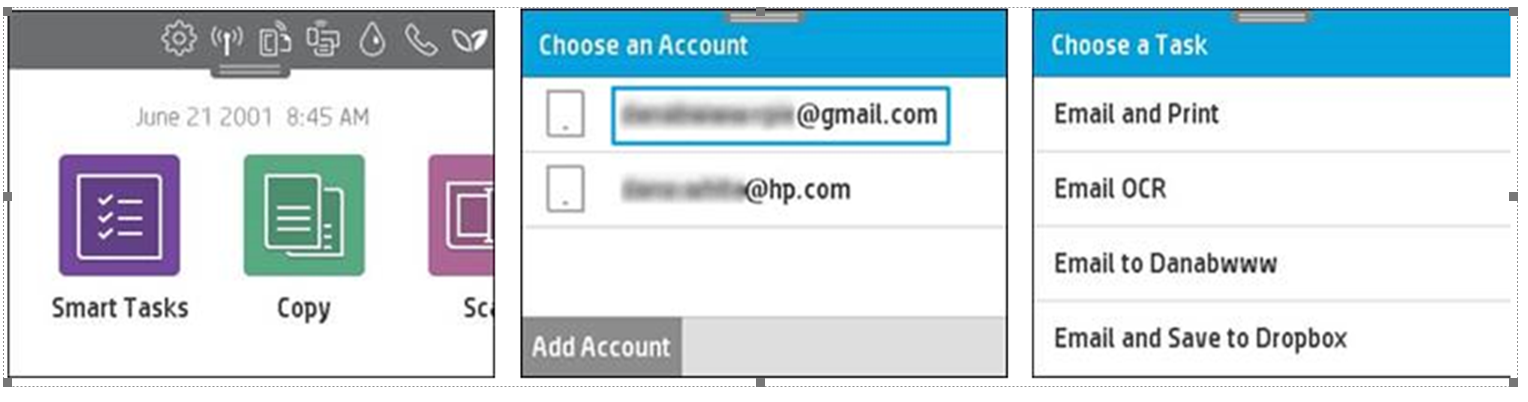
Tap Smart Tasks icon on Officejet 9015 printer control panel and confirm if your HP ID email address appears on Choose an Account screen. Select the account and confirm Smart Tasks appear on the Choose a Task screen.
Also, you may
- Reboot printer, router, and mobile device/computer
- Uninstall and re-install HP app
Let me know if this helps.
If the information I've provided was helpful, give us some reinforcement by clicking the Accepted Solution button, that'll help us and others see that we've got the answers!
I am an HP Employee
05-09-2019 12:41 PM
HP Recommended
Oh I"ve done all that several times...BTW smart tasks do not need a 9015 printer to work. Although I have had a 9015 work properly. My smart tasks sync, I see my account I activate any number of smart tasks I've created. and all of my smart tasks perform as intended. I get my scans in the cloud, if I have chosen it they will print. Again, its just the emails show they were sent, to a variety of emails, including my own but they never show up, not in spam folders, not anywhere...I test daily
05-19-2019 08:19 AM
HP Recommended
Hope you're doing well.
Please help us with some additional information:
- Does this happen 100% of the time?
- What email domains did you try? If you can let us know the Source and Target.
- Did you check the outbox of the source email or sent folders? Was the email there?
Thanks
I am an HP Employee
05-19-2019 10:02 AM - edited 05-19-2019 10:13 AM
HP Recommended
Smart tasks email fails 100%. Although shows successful as a completed task.
Scan to email is successful 100%.
Email domain source of all sent is “@yahoo.com”. Recipient targets are @yahoo.com, @marketsourcerep.net, and @hotmail.com.
Outbox on iOS email appears when an email is not sent, there is no outbox present at this time...
Email client is Apple App iOS 12.3. iPad mini 3. iPhone 6Splus. iPhone 6s.
Windows 10 w/HP Smart. (No email client assigned, so that might be the problem there) but still shows task successful....
MP

Be alert for scammers posting fake support phone numbers and/or email addresses on the community.
If you think you have received a fake HP Support message, please report it to us by clicking on "Flag Post".
† The opinions expressed above are the personal opinions of the authors, not of HP. By using this site, you accept the Terms of Use and Rules of Participation.


Didn't find what you were looking for?
Ask the community
† The opinions expressed above are the personal opinions of the authors, not of HP. By using this site, you accept the <a href="https://www8.hp.com/us/en/terms-of-use.html" class="udrlinesmall">Terms of Use</a> and <a href="/t5/custom/page/page-id/hp.rulespage" class="udrlinesmall"> Rules of Participation</a>.