• ×
    Information
    Need Windows 11 help?
    Check documents on compatibility, FAQs, upgrade information and available fixes.
    Windows 11 Support Center.
  • post a message
  • ×
    Information
    Need Windows 11 help?
    Check documents on compatibility, FAQs, upgrade information and available fixes.
    Windows 11 Support Center.
  • post a message
Guidelines
Seize the moment! nominate yourself or a tech enthusiast you admire & join the HP Community Experts!
Check some of the most frequent questions about Instant Ink: HP INSTANT INK, HP+ PLANS: INK AND TONER.


Check out our WINDOWS 11 Support Center info about: OPTIMIZATION, KNOWN ISSUES, FAQs AND MORE.
HP Recommended
HP LaserJet CP1025nw color
macOS 10.14 Mojave

I updated my new MacBook Pro to OS Mohave 10.14 and found that I cannot print using my HP CP1025nw. Please advice. Thanks 

3 REPLIES 3
HP Recommended

@Navull


A warm welcome to HP Forums! This is a great place to get support, find answers and tips to your technical queries.

As per this document, HP LaserJet Pro CP1025nw printer is AirPrint compatible. Removing the existing printer driver and the setting up the printer with Apple AirPrint may resolve the issue. If the printer is connected to your home network, then use the steps below to remove existing printer driver and setup the printer with Apple AirPrint:

Please ensure that the printer is up to date with its firmware and Mac is up to date with it's software. If you are unsure you may use the links below to update the printer and Mac software:

Update printer firmware

Update software on Mac


1.) Click the Apple menu, click System Preferences, and then click Print & Scan or Printers & Scanners.
2.) Check if your printer name displays in the Printers list, If your printer is listed, click the printer name, click the minus sign to delete the printer.

3.) If you see multiple printer queues for the same printer, remove all extra printers by selecting them one at a time, and then clicking the minus button  at the bottom of the list.

4.) Click the plus sign , click Add Printer or Scanner, click the printer name.
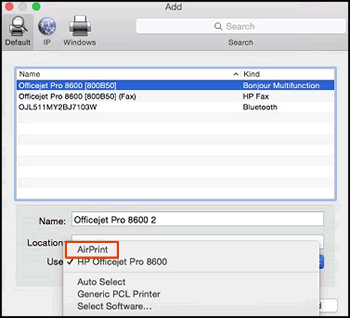

5.) Click the Use or Print Using menu, select AirPrint or Secure AirPrint in the pop-up menu. Then click Add.

Select AirPrint from the Use menu


6.) Try to print and scan.

Let me know how it goes!


If the information I've provided was helpful, give us some reinforcement by clicking the Accepted Solution and Kudos buttons, that'll help us and others see that we've got the answers!
Have a great day!

Senan6806


I am an HP Employee

HP Recommended

Hi There! I need some help here, please. Mu old HP CP1025 simply won't work with mojave. I've tried (I guess) all tentative solutions given in many formums, but so far, none worked for me.


Cheers,

Peter

HP Recommended

@Peter_Feddersen


Thank you for being a part of HP Forums.

As per this document, HP LaserJet Pro CP1025 Printer is not supported with macOS 10.14 Mojave. HP LaserJet Pro CP1025 Printer driver for macOS 10.14 Mojave are not available from the HP website or Apple Software Update. However, Gutenprint (formerly called Gimp-Print) provides open-source basic print drivers for many printers that would otherwise not be supported in Mac OS X. To see if your printer is supported, go to Gutenprint drivers for more information.

NOTE: 

Gutenprint drivers are not supported by HP or Apple.


Senan6806


I am an HP Employee

† The opinions expressed above are the personal opinions of the authors, not of HP. By using this site, you accept the <a href="https://www8.hp.com/us/en/terms-of-use.html" class="udrlinesmall">Terms of Use</a> and <a href="/t5/custom/page/page-id/hp.rulespage" class="udrlinesmall"> Rules of Participation</a>.

