• ×
    Information
    Need Windows 11 help?
    Check documents on compatibility, FAQs, upgrade information and available fixes.
    Windows 11 Support Center.
  • post a message
  • ×
    Information
    Need Windows 11 help?
    Check documents on compatibility, FAQs, upgrade information and available fixes.
    Windows 11 Support Center.
  • post a message
Guidelines
Seize the moment! nominate yourself or a tech enthusiast you admire & join the HP Community Experts!
Check some of the most frequent questions about Instant Ink: HP INSTANT INK, HP+ PLANS: INK AND TONER.


Check out our WINDOWS 11 Support Center info about: OPTIMIZATION, KNOWN ISSUES, FAQs AND MORE.
HP Recommended
all in one inkjet printer 3830

Help!!!! I sold my hp inkjet 3830 printer and the new owner can not register it as it is still registered to me. HOW DO I DELETE A PRINTER FROM MY ACCOUNT!!!!  HELP ME PLEASE!!!!!! I have spent the last 5 hours surfing this HP website to no avail for a solution. 

1 REPLY 1
HP Recommended

@Steve5900 


Welcome to the HP Community.


Find the source of the issue...


====================================================================

If you gave / sold the printer to someone without having correctly cancelled an Instant Ink account, you'll likely need the help of an agent for that since the terminated but not cancelled account has locked the printer access.


Contact >>   HP Instant Ink Support   NOTES:  Select Your Region // Hours are as listed at the site.


Reference

Examples of the Terms of Service Contract for various regions

 Instant Ink - Terms of Service - USA


====================================================================

What else?

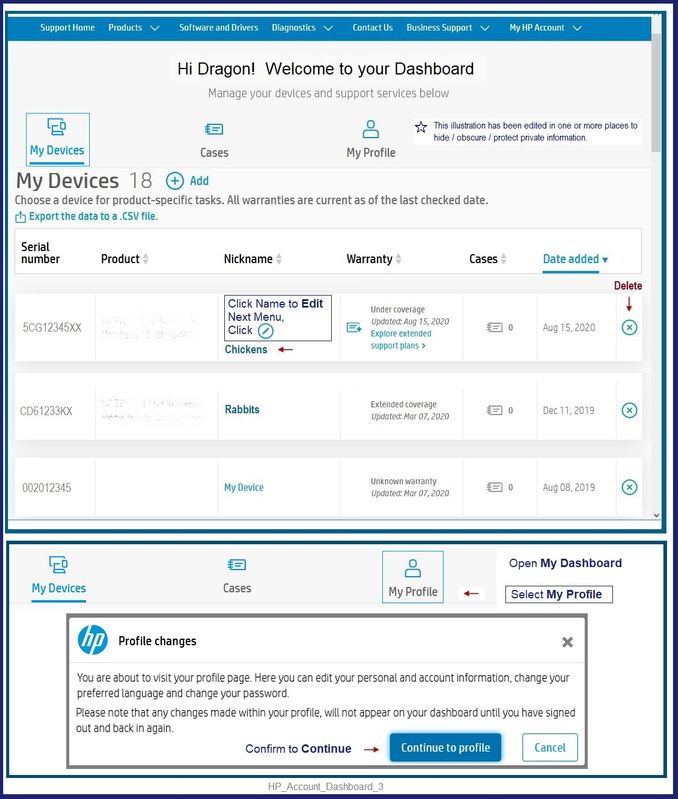
If the printer is simply listed in your HP Support Assistant or your HP Account Dashboard, use one of the following to remove the device.


Open HP Support Assistant.


Depending on the type of HP Support Assistant you have installed,

Try / Consider


HP Support Assistant Application (Version 9.6.x and newer)


Open HP Support Assistant

If you have not done so, Sign into the application

In the upper right corner, Click on your Account name icon

Open View Profile

Peruse the list

Click the in Blue Circle in the last column of the device information


For those reading...

For the "software" version of HPSA that is installed in Programs and Features


Open HP Support Assistant

If you have not done so, Sign into the HP Support Assistant

Click on your Account icon (people icon with your name under the icon)

Peruse the list

Click "Edit this device" > Click "Remove this Device" >> Save


What if?

Could be as simple as uninstalling / reinstalling the HPSA software / application.

Restart the computer after the uninstall step and before you install a fresh copy of HPSA from its website.

OR

Could work to log into your HP Account and remove the stubborn device from the Dashboard.


HP Account - Login / Dashboard

Note:  Log into your HP Account if / when you need central access to your device information, including the ability to update your personal  information.


Open the main HP Account website,

Click and sign into your HP Account,

Click on your account name (upper right)

Switch to your Dashboard

Device(s) listed in rows.

Click the X in Blue Circle in the last column of the device information


HP Account - Login / Dashboard

Note:  Log into your HP Account if / when you need central access to your device information, including the ability to update your personal  information.


HP_Account_Dashboard_3HP_Account_Dashboard_3


====================================================================

Registration


If the product is still listed in your Registered product list and you want to remove it,


Register your product during first setup or soon afterwards

   READ >>     Register HP Product and Registration FAQ

Example >> FAQ Question:  How do I change or delete my product information from My Account?


=========================================================================


Thank you for participating in the HP Community.

The Community is a separate wing of the HP website - We are not an HP business group.

Our Community is comprised of volunteers - people who own and use HP devices.

Click Thumbs Up to say Thank You.

Question / Concern Answered, Click "Accept as Solution"

Dragon-Fur

† The opinions expressed above are the personal opinions of the authors, not of HP. By using this site, you accept the <a href="https://www8.hp.com/us/en/terms-of-use.html" class="udrlinesmall">Terms of Use</a> and <a href="/t5/custom/page/page-id/hp.rulespage" class="udrlinesmall"> Rules of Participation</a>.