-
×InformationNeed Windows 11 help?Check documents on compatibility, FAQs, upgrade information and available fixes.
Windows 11 Support Center. -

-
×InformationNeed Windows 11 help?Check documents on compatibility, FAQs, upgrade information and available fixes.
Windows 11 Support Center. -
- HP Community
- Printers
- Printer Setup, Software & Drivers
- instant ink payment

Create an account on the HP Community to personalize your profile and ask a question
11-07-2020 02:08 PM
Hi,
I have only used 50 pages out of the 300 pages allocated for this month so am trying to downgrade so I am only charged for what I have used but it won't let me so can someone suggest what I can do next please?
thanks caymen
Solved! Go to Solution.
Accepted Solutions
11-08-2020 05:17 AM
Hi @12345665,
I'd like to help!
Follow the below instructions-
-
Sign in to hpinstantink.com/signin.
Your HP Instant Ink account page opens.
-
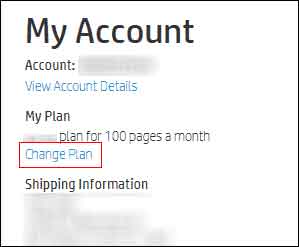
In the My Account section of your HP Instant Ink account page, click Change Plan.

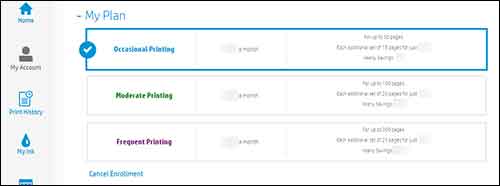
- The My Plan section opens, showing your current plan and the other available plan options and fees. Select a new plan.
-
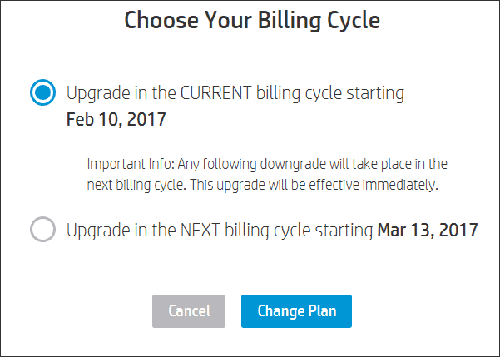
If you are upgrading your plan, select when you want the upgrade to take effect. Plan upgrades take effect immediately or at the start of the next billing cycle, depending on your selection. When you upgrade your account, your monthly rollover maximum also increases.
-
If you are downgrading your plan, your plan automatically changes on the first day of the next billing cycle. When you downgrade your account, your monthly rollover maximum decreases and any rollover pages in excess of your new maximum are forfeited.
NOTE:
Certain plans are only offered to qualifying Instant Ink customers. If you qualify for a plan, you see it in your My Plan choices.

-
-
Click Change Plan.

Hope this helps! Keep me posted.
And, Welcome to the HP Support Community.
Please click “Accept as Solution” if you feel my post solved your issue, it will help others find the solution.
Click the “Kudos, Thumbs Up" on the bottom right to say “Thanks” for helping
11-08-2020 05:17 AM
Hi @12345665,
I'd like to help!
Follow the below instructions-
-
Sign in to hpinstantink.com/signin.
Your HP Instant Ink account page opens.
-
In the My Account section of your HP Instant Ink account page, click Change Plan.

- The My Plan section opens, showing your current plan and the other available plan options and fees. Select a new plan.
-
If you are upgrading your plan, select when you want the upgrade to take effect. Plan upgrades take effect immediately or at the start of the next billing cycle, depending on your selection. When you upgrade your account, your monthly rollover maximum also increases.
-
If you are downgrading your plan, your plan automatically changes on the first day of the next billing cycle. When you downgrade your account, your monthly rollover maximum decreases and any rollover pages in excess of your new maximum are forfeited.
NOTE:
Certain plans are only offered to qualifying Instant Ink customers. If you qualify for a plan, you see it in your My Plan choices.

-
-
Click Change Plan.

Hope this helps! Keep me posted.
And, Welcome to the HP Support Community.
Please click “Accept as Solution” if you feel my post solved your issue, it will help others find the solution.
Click the “Kudos, Thumbs Up" on the bottom right to say “Thanks” for helping